Smartphone vs Computer: Which Is Better for You?
Published: 10 Oct 2026
A smartphone can handle many everyday tasks, but can it really replace a computer? Although both devices let you browse the internet, communicate, and enjoy entertainment, they differ in performance, portability, and capabilities.
In this guide, you’ll learn the key differences between a smartphone and a computer to help you decide which device is best for your daily needs. Without wasting time, let’s dive in!
What Is a Smartphone?
A smartphone is a portable device that combines mobile phone communication with computing capabilities. Modern smartphones can connect to the internet, run apps, capture photos and videos, use GPS, stream media, and do much more than what was previously done on computers.
The main benefit of a smartphone lies in its portability and convenience. It is pocketable and can be used virtually anywhere without the need for an additional keyboard, mouse, or monitor.
However, the smaller design also creates limitations. The screen is smaller, typing can be less comfortable for long documents, and some professional applications are unavailable or more limited than their desktop versions.
What Is a Computer?
A computer is a general-purpose computing device designed to perform a wide range of tasks. Computers include desktops and laptops. Laptops are easier to carry, while desktop computers usually offer more space for hardware upgrades and modifications.
Computers can be used for work, programming, graphic design, video editing, gaming, writing reports, data analysis, and many other tasks that require computing power.
Unlike smartphones, computers typically use a physical keyboard and mouse for input, making tasks such as typing long documents and working with professional applications more convenient
Smartphone vs Computer: 10 Key Differences
Although both computers and smartphones can do similar basic functions, there are many ways that they differ. The following points highlight the differences between computers and smartphones.
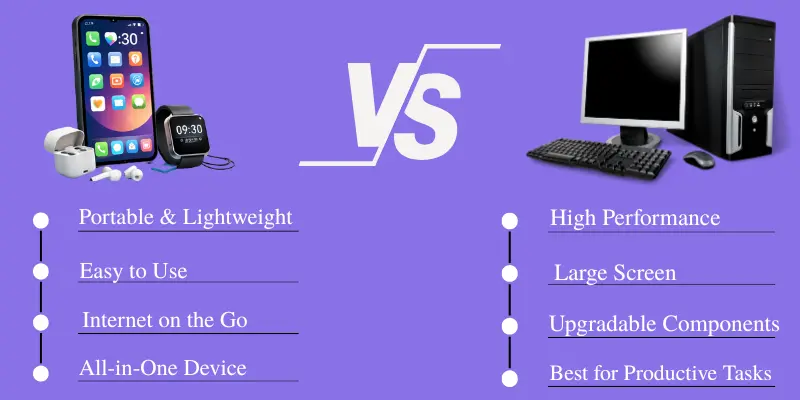
1. Portability
The most notable feature that distinguishes a smartphone from a computer is portability. A smartphone is portable enough to be put in a pocket and can be conveniently carried around during travel, work, study, or movement.
Computers are relatively larger in size and especially the desktop type, whereas even the laptop type needs some space to be carried. In such cases, smartphones offer better convenience to access and communicate with people away from the desk.
From the perspective of daily usage, the compact nature of smartphones serves as an advantage. Computers offer spacious areas to work on, but smartphones are portable and convenient to use anywhere.
2. Performance
Computers usually have more processing capabilities for handling demanding tasks. A modern-day computer is capable of having very powerful processors, huge RAM capacity, graphics hardware and other hardware that are made to cater to heavy-duty applications.
Today’s smartphones are getting very powerful and can do various tasks from browsing to playing games and even editing videos or photographs. But the hardware of smartphones is designed in smaller dimensions.
For basic tasks like sending messages or emails, a smartphone would suffice. For heavier tasks like professional video editing and 3D designing, computers would usually have more capabilities.
3. Screen Size
The screen size makes a huge difference in the level of comfort experienced when using the devices. Smartphones typically come with screens that are just a couple of inches, which means that they are easy to use when performing small tasks, but not ideal for looking at a lot of information.
On the other hand, computers have bigger screens. They are particularly useful when working on documents, spreadsheets, editing software, websites, or multiple windows at the same time.
A smartphone comes in handy for checking something quickly, whereas a computer provides more screen space for work.
4. Input Method
The main input method used by smartphones is the touchscreen. You can tap, swipe, type using the on-screen keyboard, and use gestures to interact with apps and other features.
Computers use physical keyboards and a mouse or trackpad as input devices. Physical keyboards and mice offer greater precision and are often more comfortable for tasks such as typing documents, editing files, coding, and using software in general.
Smartphone touchscreens are great for quick interactions and mobile apps. However, for tasks that require precision and extended typing, a physical keyboard and mouse can offer greater comfort.

5. Storage
Another difference between smartphones and computers is storage capacity. Smartphones usually come with internal storage for apps, photos, videos, documents, and other files. However, their storage capacity may be limited, depending on the device.
On the other hand, computers can offer more storage space, and desktop computers can support multiple storage drives. External drives and network storage can also be used to store additional files.
This makes computers more convenient for people who work with large amounts of data. Smartphones are suitable for everyday activities, but large video collections and professional projects may require more storage space than many phones offer.
6. Multitasking
Both computers and smartphones support multitasking, although computers usually offer more flexibility when running several tasks at once.
On a computer, you can run multiple applications and windows at the same time. This allows you to write, research, organize documents, and communicate with others without having to switch between apps.
Smartphones also support multitasking features such as split-screen and app switching. However, the smaller screen can make it harder to work with multiple apps at once.
7. Battery and Power
Smartphones are designed to run on an internal battery. This makes them convenient to use while traveling or away from a power source during daily activities.
Unlike laptops, desktop computers usually need a constant power supply because they do not have built-in batteries. More powerful computers may also consume more electricity, depending on their hardware and workload.
Battery life depends on the device, screen, processor, apps, and how you use it. Smartphones are easier to carry and use on the go, while desktop computers are more suitable for extended work sessions at a desk.
8. Software and Applications
Smartphones use mobile operating systems and are mainly built around apps downloaded from an app store. These apps are designed specifically for touchscreens and smaller displays.
Computers use desktop operating systems that support a much wider range of professional and specialized software. Programs for programming, advanced design, professional video editing, engineering, data analysis, and other demanding tasks are often designed primarily for computers.
Smartphone apps have become very capable, and many services now offer both mobile and desktop versions. However, the desktop environment generally provides more flexibility for complex software and professional workflows.
9. Connectivity
One important feature of smartphones is that they have the ability to connect to a cellular network. This enables you to be able to make phone calls, send texts, browse the internet, navigate, and perform other online activities without requiring a Wi-Fi connection.
The computer generally uses Wi-Fi or an Ethernet connection to connect to the internet, while some laptops have the ability to have a cellular connection as well.
Another important factor about smartphones is that they have Bluetooth, GPS, NFC, Wi-Fi, and many other forms of wireless connections in one portable gadget. This makes them ideal for use during travel.
10. Cost and Use Cases
The price of a smartphone and a computer will depend heavily on their specifications, brand, and intended purpose. A basic smartphone could be cheaper than an advanced computer, while even premium smartphones can become very costly.
Computers come in a wide range of configurations. For example, a basic laptop can be used for browsing and everyday work, while a desktop computer can have advanced hardware for professional tasks and gaming.
The best option depends on the purpose you want to achieve. Smartphones are suitable for communication and everyday activities, while computers are generally better for demanding tasks that require more processing power or a larger workspace.
Mobile Phone vs Computer: Quick Comparison Table
For quick readers, the table below highlights the main differences between smartphones and computers in simple words.
| Feature | Smartphone | Computer |
|---|---|---|
| Portability | Easy to carry in your pocket. | Desktops stay in one place; laptops are portable. |
| Performance | Handles everyday tasks and mobile apps. | Better for demanding tasks and complex software. |
| Screen Size | Small screen for quick activities. | Larger screen for comfortable viewing and work. |
| Input Method | Uses a touchscreen and on-screen keyboard. | Uses a physical keyboard and mouse or trackpad. |
| Storage | Usually has limited internal storage. | Often offers more storage and upgrade options. |
| Multitasking | Supports switching between apps and split-screen. | Handles multiple windows and programs more easily. |
| Battery and Power | Runs on a built-in rechargeable battery. | Desktops need constant power; laptops use batteries. |
| Software | Mainly uses apps designed for mobile devices. | Supports a wide range of desktop programs. |
| Connectivity | Supports mobile data, Wi-Fi, and other wireless features. | Usually connects through Wi-Fi or Ethernet. |
| Cost | Prices range from budget to premium models. | Prices vary by type, brand, and hardware. |
Which One Should You Choose?
Here are some main reasons why you should choose smartphones or why you should choose computers for your daily life activities.
Choose a Smartphone If:
- You need a device that is easy to carry.
- You mainly browse the web and use social media.
- You make calls and send messages frequently.
- You need GPS and mobile connectivity.
- You take photos and videos regularly.
- You want quick access to apps and online services.
Choose a Computer If:
- You regularly type long documents.
- You need professional software.
- You work with large files.
- You need a larger screen.
- You perform heavy multitasking.
- You edit videos or graphics.
- You play demanding computer games.
- You need more storage and hardware flexibility.
Common Mistakes to Avoid
When comparing a smartphone and a computer, many people focus only on cost or processing speed. However, the best device depends on how you plan to use it and what you need for your daily tasks.
- Assuming a more expensive device is always better.
- Comparing processors without considering the actual use.
- Ignoring screen size and typing comfort.
- Choosing a device without checking storage requirements.
- Assuming a smartphone can run every desktop application.
- Ignoring portability when choosing a device for travel.
- Focusing only on specifications instead of your daily tasks.
Conclusion
So, which is better: a smartphone or a computer? It depends on what you need. Smartphones are ideal for portability, communication, browsing, and everyday tasks, while computers are better suited to demanding work, larger projects, and professional software.
If you need quick access and portability, choose a smartphone. If you need more workspace, power, and flexibility, a computer is usually more suitable.
Choose the device that fits your everyday needs.
Frequently Asked Questions (FAQs)
Here are the answers to some common questions about the smartphone vs computer :
While smartphones are getting more powerful, they’re still limited when it comes to tasks like graphic design, video editing, or programming. However, for basic tasks, smartphones can handle most of your needs.
Yes, you can connect them using a USB cable, Bluetooth, or wireless tools. This allows you to transfer files, back up data, and perform other supported tasks.
A computer is generally better for students who need to write assignments, prepare presentations, and research topics. Its larger screen and physical keyboard make studying and completing projects more comfortable. A smartphone is useful for watching lectures, reading notes, and accessing educational apps. Students should choose a device based on their courses and budget.
Yes, laptops are designed to be portable and can be used anywhere. Desktops are stationary and need a dedicated space. However, desktops generally offer more power and larger screens.
You can play games on both, but computers offer better performance, graphics, and controls. Mobile games are fun for quick entertainment, but PCs handle demanding games better.




- Be Respectful
- Stay Relevant
- Stay Positive
- True Feedback
- Encourage Discussion
- Avoid Spamming
- No Fake News
- Don't Copy-Paste
- No Personal Attacks
- Be Respectful
- Stay Relevant
- Stay Positive
- True Feedback
- Encourage Discussion
- Avoid Spamming
- No Fake News
- Don't Copy-Paste
- No Personal Attacks
