Mobile LCD Display Explained: Working, Types, Parts, Pros and Cons
Published: 16 Aug 2026
Confused about what a mobile LCD display is or whether terms like LCD, TFT, and IPS refer to the same thing? With so many display terms used in smartphone specifications and replacement listings, it can be difficult to understand what they mean and which screen is right for your phone.
This guide explains everything in simple terms. You’ll learn about the main parts and types of mobile LCD displays, their advantages and disadvantages, common screen problems, replacement options, and how LCD compares with other display technologies.
What Does LCD Mean in Mobile Phones?
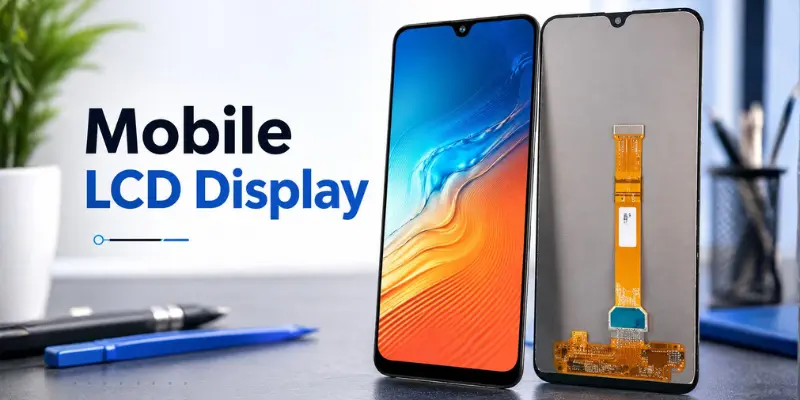
LCD stands for Liquid Crystal Display. It is a screen technology that uses a backlight and a layer of liquid crystals to create the images you see on your phone.
Liquid crystals cannot produce light themselves. Instead, they control how much light from the backlight passes through each part of the display. The controlled light then passes through the color filters to produce the different colors and images on the screen.
According to LG Display, liquid crystals are placed between polarizers to control the direction and intensity of light passing through the display. This controlled light combines to create the final image you see on the screen.
Simple explanation
Think of the LCD backlight as a lamp behind a window. The liquid crystals work like adjustable blinds, controlling how much light passes through. Millions of tiny areas working together create the image you see on your smartphone.
How Does a Mobile LCD Display Work?
A mobile LCD uses several layers and components that work together to create the image on your screen. Here’s how the process works:
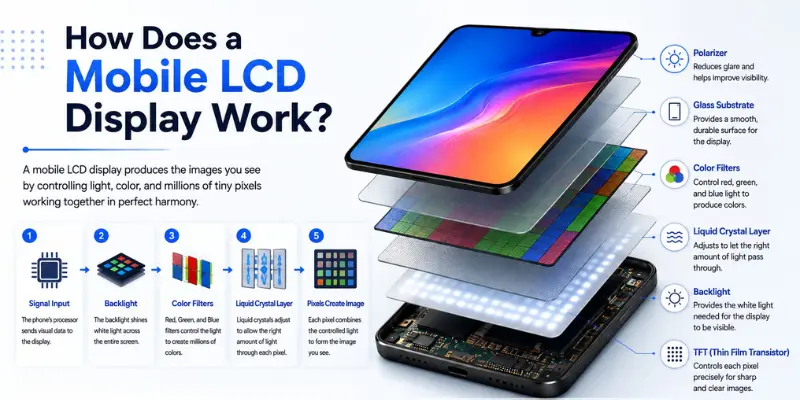
1. Backlight Generates Light
LCD pixels cannot produce light themselves, so they need a light source. Modern smartphone LCDs usually use an LED backlight behind the display panel. It provides the light that passes through the other layers.
2. Polarizers Control the Light
LCDs use polarizing layers to control how light travels through the display. The liquid crystal layer sits between two polarizers and controls how much light passes through the display.
3. Liquid Crystals Control the Light
The liquid crystal layer responds to electrical signals and changes its orientation to control how much backlight passes through each pixel.
4. TFT Controls the Pixels
Most smartphone LCDs use TFT (Thin-Film Transistor) technology. Tiny transistors control individual pixels and regulate the signals sent to the liquid crystals.
5. Color Filters Create Colors
The controlled light passes through red, green, and blue (RGB) filters. By adjusting the brightness of each subpixel, the display creates different colors and forms the final image.
Main Layers of a Mobile LCD Screen
A phone screen is more than just a piece of glass. A mobile LCD contains several layers and components that work together to display images and respond to touch.
1. Cover Glass
The cover glass is the outer surface you touch. It protects the display underneath from scratches, impacts, and everyday wear.
2. Touch Digitizer
The digitizer detects your finger movements and converts them into touch input, such as taps, swipes, scrolling, pinching, and typing.
The LCD displays the image, while the digitizer detects touch. In many modern phones, they are integrated into the same display assembly.
3. Polarizing Layers
Polarizers control how light travels through the LCD. They work with the liquid crystal layer to control the amount of light passing through the display.
4. Liquid Crystal Layer
This is the layer that gives LCD its name. Electrical signals change the orientation of the liquid crystals, controlling how much backlight passes through each pixel.
5. TFT Layer
The TFT (Thin-Film Transistor) layer contains tiny transistors that control individual pixels. This active-matrix system allows precise control of the display.
6. Color Filters
Red, green, and blue (RGB) color filters help produce the colors you see on the screen. Different brightness levels from these subpixels combine to create a wide range of colors.
7. Backlight
The backlight provides the light needed to see the image on an LCD. This is one of the main differences between LCD and OLED, as OLED pixels produce their own light.
Types of LCD Displays Used in Mobile Phones
You may see several different terms when reading smartphone specifications.
The most common are TFT LCD, IPS LCD, and LTPS LCD.
1. TFT LCD
TFT stands for Thin-Film Transistor.
The TFT display makes use of transistors to regulate the pixels on the active-matrix LCD display. According to Samsung, TFT LCD displays are active-matrix LCD displays.
TFT technology helped improve:
- Pixel control
- Image quality
- Resolution
- Display responsiveness
An important point is that TFT and LCD are not completely separate display technologies. TFT is a technology used to control pixels within an LCD.
2. IPS LCD
IPS stands for In-Plane Switching.
IPS is a Liquid Crystal Display Technology designed to enhance the performance of images displayed on a screen and the viewing angles.
According to LG Display, “IPS technology utilizes horizontal liquid crystal arrangement to achieve wide viewing angles and stability in image quality.”
IPS LCD screens are known for:
- Wide viewing angles
- Good color reproduction
- Consistent images when viewed from different directions
3. LTPS LCD
LTPS stands for Low-Temperature Polycrystalline Silicon. It is a backplane technology used to control pixels in some mobile displays. It helps manufacturers create compact, high-resolution screens for smartphones and other devices.
Tianma lists LTPS-LCD among its display technologies for smartphones, tablets, wearables, and other consumer devices. LTPS can also be used as a backplane technology in other types of displays.
Is IPS the Same as TFT LCD?
Not exactly.
This is one of the most confusing parts of mobile display terminology.
- TFT describes an active-matrix transistor system used to control LCD pixels.
- IPS describes how the liquid crystals are arranged and move inside an LCD panel.
So an IPS display can also use TFT technology.
It is therefore more accurate to think of IPS as a type or mode of TFT-LCD technology, rather than treating “TFT” and “IPS” as two completely unrelated display systems. Samsung identifies TFT LCD as active-matrix technology, while LG Display describes IPS as a liquid-crystal arrangement used in LCDs.

➡️You may also like this Post: LTPS LCD vs IPS LCD: 8 Key Secrets Behind Better Displays
Advantages of Mobile LCD Displays
LCD technology still offers several useful benefits, which is why it continues to be used in many smartphones.
1. Good Image Quality
LCD screens nowadays offer great visuals, good resolution, good colors, and a high refresh rate. So, having an LCD display does not necessarily mean poor screen quality.
For example, the Motorola Moto G Power 2026 features a Full HD+ LCD display with a 120Hz refresh rate and up to 1,000 nits of brightness in High Brightness Mode.
2. Good Viewing Angles With IPS
IPS LCD technology can provide wide viewing angles and stable image quality. This means the screen remains easier to view when you are not looking at it perfectly straight.
3. No Typical OLED Burn-In Behavior
LCD works differently from OLED because its pixels do not contain the same self-emitting organic light structure.
This makes LCD useful for screens that regularly display static interface elements.
4. Mature Technology
LCD is a mature and well-established display technology with years of development and manufacturing experience. It is still widely used in smartphones, tablets, monitors, automotive displays, and other devices.
Disadvantages of Mobile LCD Displays
Although LCD displays can offer good image quality and brightness, they also have some limitations compared with OLED and AMOLED screens.
1. Blacks Are Not as Deep
LCD displays use a backlight that remains behind the panel, even when the screen shows black. Because some light can still pass through, LCDs generally cannot produce the same deep blacks and high contrast as OLED displays.
2. Limited Viewing Angles on Some LCDs
Viewing angles can vary depending on the type of LCD panel. IPS LCDs generally provide wide and stable viewing angles, while some other LCD panels may show changes in brightness or color when viewed from the side.
3. Requires a Separate Backlight
Unlike OLED, LCD pixels cannot produce their own light. They need a backlight behind the display, which adds extra layers and components to the screen assembly.
4. Dark Mode Is Less Power-Efficient
Using dark mode on an LCD does not normally turn off individual pixels because the backlight still needs to illuminate the panel. OLED displays can switch off individual black pixels so that dark content can use less power on OLED screens.
Mobile LCD vs OLED Display
The biggest difference is how the two technologies produce light.
| Feature | LCD | OLED |
|---|---|---|
| Full name | Liquid Crystal Display | Organic Light-Emitting Diode |
| Light source | Uses a backlight | Pixels produce their own light |
| True black | More difficult | Individual pixels can turn off |
| Contrast | Generally lower | Generally higher |
| IPS viewing angles | Can be very good | Usually very good |
| Burn-in concern | Different display aging behavior | Possible with prolonged static content |
| Dark-screen power behavior | Backlight still needed | Black pixels can switch off |
| Common variants | TFT, IPS, LTPS LCD | OLED, AMOLED, POLED |
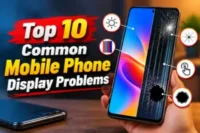
Common Signs of a Damaged Phone LCD
A damaged LCD can cause several visible display problems.
Common signs include:
- Black areas or dark patches on the screen
- Colored vertical or horizontal lines
- Screen flickering
- Distorted or unusual colors
- Part of the image disappearing
- Screen showing distorted images
- Completely blank display even though the phone is still running
Does a Cracked Screen Mean the LCD Is Broken?
Not always. A phone’s outer glass can be cracked, but the LCD underneath continues to display the image normally. If the screen displays a clear image with no lines, black spots, or distortion, the damage may be limited to the outer glass.
However, if you notice black patches, colored lines, missing parts of the image, or severe distortion, the LCD panel may also be damaged.
Are LCD Phones Still Available?
Yes, LCD phones are still available, especially in budget and mid-range smartphones. LCD technology is not limited to older devices; manufacturers still use advanced LCD panels with features like Full HD+ resolution, 120Hz refresh rates, and high brightness.
For example, the Motorola Moto G Power 2026 comes with a 6.8-inch Full HD+ LCD display and a 120Hz refresh rate, proving that LCD screens are still a practical choice in modern smartphones.
Conclusion
So guys, in this article, we’ve covered mobile LCD displays in detail. We explained how LCD works, its main layers and types, along with its advantages, disadvantages, and differences from OLED. In my view, LCD is still a practical choice if you want good image quality and brightness at an affordable price.
If this guide helped you, check out our other mobile phone guides for more useful tips.
Frequently Asked Questions (FAQs)
Here are the answers to some common questions about what is mobile lcd display:
Neither is simply better because each technology has different strengths. LCD can offer good brightness and value, while OLED usually provides deeper blacks, higher contrast, and thinner designs. Your choice depends on your needs and budget.
TFT refers to the transistor system used to control LCD pixels, while IPS describes the way liquid crystals are arranged in the panel. An IPS display can also use TFT technology. Therefore, TFT and IPS are not completely separate display technologies.
LCD screens are generally less susceptible to the permanent image retention commonly associated with OLED displays. However, LCD panels can still experience other types of image retention or display aging. This is one reason some users prefer LCD for screens with frequently displayed static content.
Yes, LCD screens are still used in 2026, especially in budget and mid-range smartphones. Many manufacturers continue using improved LCD panels because they provide good brightness, reliable performance, and an affordable price compared to premium display technologies.
Generally, LCD screens can consume more battery than OLED displays because they require a separate backlight that stays on whenever the screen is active. However, modern LCD panels with better efficiency and features like adaptive refresh rates can still provide good battery performance.



- Be Respectful
- Stay Relevant
- Stay Positive
- True Feedback
- Encourage Discussion
- Avoid Spamming
- No Fake News
- Don't Copy-Paste
- No Personal Attacks
- Be Respectful
- Stay Relevant
- Stay Positive
- True Feedback
- Encourage Discussion
- Avoid Spamming
- No Fake News
- Don't Copy-Paste
- No Personal Attacks
