Adapter vs Charger: Know the Difference Before You Buy
Published: 28 Oct 2026
You are looking for a new charger, but the product listing calls it a “power adapter.” Is it the same thing? The difference between an adapter and a charger can be confusing because these names often overlap, even though supplying power and controlling battery charging are different jobs.
In this guide, we’ll explain how adapters and chargers work, their key differences, whether you can use one in place of the other, and how to choose the right option for your device.
What Is a Power Adapter?
A power adapter is an external power supply that converts electricity into a form your device can use. Most wall adapters change alternating current (AC) from a socket into lower-voltage direct current (DC), which devices such as laptops and monitors need.
An adapter can power a device without charging a battery. For example, a router’s adapter keeps it running while connected to a wall socket.
Not all adapters provide DC power. Some equipment requires low-voltage AC, so check the output label before choosing a replacement.
What Is a Battery Charger?
A battery charger supplies and controls the power needed to recharge a battery. It manages charging voltage and current according to the battery’s requirements.
It can be a separate unit, such as a charging dock for a camera battery, or a circuit built into a phone or laptop. Some separate chargers receive power through an external adapter.
Different battery types need different charging methods. For example, many lithium-ion chargers reduce the charging current as the battery gets closer to full, then stop charging when the charge cycle is complete.
What Is the Difference Between an Adapter and a Charger?
Adapters and chargers both help power electronic devices, but they differ in how they supply electricity and manage battery charging. Here are the key differences between them.
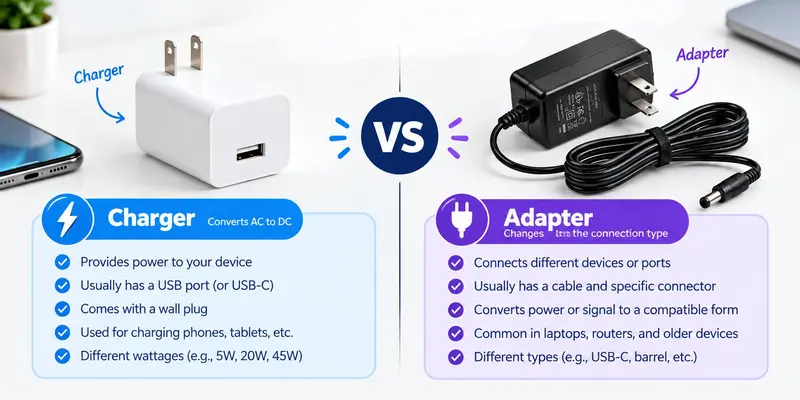
Functionality
A power adapter converts an electrical supply into the power a device needs to operate. It can keep a device running even when no battery is involved.
A battery charger controls the process of recharging a battery. For example, a monitor’s power adapter provides electricity to operate the screen, while a camera-battery charging dock charges a compatible camera battery.

Output Voltage and Current Control
A conventional regulated adapter may supply a fixed voltage, such as 12V DC. USB-C Power Delivery adapters can support several output settings and agree on a compatible setting with the connected device.
The charging circuit controls the voltage and current reaching the battery. Many lithium-ion systems first use a constant-current stage, where current stays steady while battery voltage rises. This is followed by a constant-voltage stage, where voltage stays steady and charging current gradually decreases as the battery approaches full charge.
Compatibility Requirements
A power adapter must supply the voltage your device needs, provide enough current and have the correct connector. Depending on the connection, polarity and the supported charging protocol must also match.
A dedicated battery charger must support the battery type, number of cells and charging limits. For example, a charger made for nickel-metal hydride (NiMH) batteries is not automatically suitable for lithium-ion batteries. Check which battery types the charger supports before using it.
Battery Monitoring and Protection
Power adapters may include protection against overloads, short circuits and excessive heat. These features protect the power supply and connected equipment.
A battery-charging system can also monitor the battery during charging. Depending on its design, it may check the battery’s voltage and temperature or use a timer to control charging. It can then adjust or stop charging when necessary.
Behavior When the Battery Is Full
An adapter can keep powering a device after its battery is fully charged. For example, a laptop can continue running from its external power supply even when the battery is full.
The charging circuit controls when battery charging stops. Many lithium-ion systems end the charging cycle when specific conditions are met and restart later if the battery level drops below a set point. Other battery types may need a different approach to maintaining a full charge.
Physical Appearance: Can You Tell Them Apart?
Adapters and chargers can look similar. Both may come as compact wall plugs or larger desktop units. A separate battery charger may have slots or a dock, while an internal charging circuit is hidden inside the device.
Size, shape and indicator lights are therefore unreliable ways to identify their function. Check the product label, specifications and intended use to understand what the accessory actually does.
Adapter vs Charger: Quick Comparison Table
For readers who want a quick overview, the table below highlights the main differences between a power adapter and a battery charger in simple words.
| Feature | Power adapter | Battery charger |
|---|---|---|
| Main purpose | Supplies suitable power | Controls battery charging |
| Output control | May provide fixed or negotiated output | Regulates charging according to battery requirements |
| Compatibility | Must match the device’s power requirements | Must support the battery type and charging requirements |
| Battery monitoring | Not necessarily included | May include battery monitoring features |
| At full charge | May continue powering the device | Manages charging completion |
| Familiar example | Router power adapter or laptop power brick | Camera-battery dock or internal phone charging circuit |
Is a Power Adapter a Charger?
In everyday language, power adapters for phones and laptops are often called chargers because plugging them in allows the battery to recharge. Technically, however, supplying power and controlling battery charging are separate jobs.
For example, your phone’s wall adapter provides electrical power to the phone. The charging circuit inside the phone then manages the voltage and current reaching the battery and determines when charging should stop.
Some standalone battery chargers, such as camera-battery charging docks, combine power conversion and charging control in one unit. Others need a separate adapter. A power adapter can therefore support battery charging without being a complete battery charger itself.
Can You Use an Adapter and a Charger Interchangeably?
Sometimes, but compatibility depends on the equipment’s requirements—not just whether the plug fits.
A phone or laptop with built-in charging circuitry can use a compatible power adapter to charge its battery. The adapter must provide the correct voltage, enough power and the required connection or charging protocol.
A dedicated battery charger cannot automatically replace a device’s power adapter. Its output is designed for particular batteries and may not suit the device. Use it as a power supply only if the manufacturer supports that function.
Do not connect an ordinary power adapter directly to a bare rechargeable battery. Without suitable charging circuitry, it cannot properly control battery charging and may cause overheating or damage.

Which One Should You Choose?
Choose according to what you need to power or charge:
- For a router, monitor or similar device: Choose a power adapter that matches the device’s electrical and connection requirements.
- For a phone or laptop: Choose a compatible power adapter, often sold as a “charger.” The device’s internal circuitry manages battery charging.
- For a removable rechargeable battery: Choose a dedicated battery charger that supports its battery type, cell count and charging requirements.
Check your device’s manual or the manufacturer’s specifications before buying. The product name alone does not confirm compatibility.
Travel Adapter vs Charger: What Changes?
A basic travel adapter allows your plug to fit a different type of wall socket. It does not convert mains voltage or charge a battery by itself. Your phone or laptop charger still supplies the power your device needs.
Before traveling, check the INPUT label on your charger. If it says 100–240V AC, 50/60Hz, it can accept mains supplies within that range. You may only need a correctly rated travel plug adapter. If the destination’s voltage falls outside the supported range, a plug adapter alone is not enough. You may need a suitable voltage converter, depending on your device.
Some travel adapters also include USB charging ports. These combine plug adaptation with a built-in power supply, so check their USB output specifications as well.
Conclusion
So guys, in this article, we’ve covered adapter vs charger in detail. A power adapter supplies power to a device, while a battery charger manages the charging process. In my opinion, you should always check your device’s requirements before buying a replacement adapter or charger. Make sure the accessory is compatible with your device or battery for safe and reliable use.
If you found this guide helpful, share it with others who may need it.
Frequently Asked Questions (FAQs)
Here are the answers to some common questions about the adapter vs charger :
Yes, you can usually charge your phone with a laptop USB-C charger if both devices support compatible charging standards. A USB-C Power Delivery charger can adjust its output to a power level supported by a compatible phone. However, charging speed depends on your phone, charger and cable.
Choose a phone charger that supports your phone’s required charging standard and power output. Check the voltage, wattage, connector type and compatibility with your phone before buying one. For safety and reliable performance, choose an original charger or a certified product from a reputable manufacturer.
A simple power adapter supplies electricity at the voltage and current required by a device. A basic travel plug adapter allows your plug to fit a different type of wall socket but does not convert voltage or charge your device by itself. Some travel adapters also include USB charging ports, so check their power output and voltage compatibility before using them.
Yes, a phone charger usually refers to the power adapter that plugs into a wall socket. It converts electricity from the socket into power that your phone can use for charging. The phone’s internal charging circuit then controls how the battery charges.
Not always, because a compatible power adapter may already be part of your phone’s charging setup. If your adapter supports your phone’s charging standard, power requirements and connector, you may not need to buy another one. However, you may need a separate USB cable or a different adapter if the existing one is incompatible.
Yes, a higher-wattage adapter is generally safe if it supports your phone’s required voltage and a compatible charging standard. Your phone usually draws only the power it can support, so a higher maximum wattage does not automatically force extra power into the battery. Always choose a reliable adapter and check your phone manufacturer’s recommendations.
A phone charger can become warm during charging because some electrical energy is converted into heat. Poor ventilation, heavy loads or a faulty charger can cause excessive heating. If you notice a burning smell, damaged casing or unusually high temperatures, unplug the charger and stop using it.






- Be Respectful
- Stay Relevant
- Stay Positive
- True Feedback
- Encourage Discussion
- Avoid Spamming
- No Fake News
- Don't Copy-Paste
- No Personal Attacks
- Be Respectful
- Stay Relevant
- Stay Positive
- True Feedback
- Encourage Discussion
- Avoid Spamming
- No Fake News
- Don't Copy-Paste
- No Personal Attacks
