Wi-Fi vs Mobile Data: Which Connection Should You Use?
Published: 15 Jun 2026
Are you confused about whether Wi-Fi or mobile data is better for your phone? You are not alone. Millions of smartphone users switch between Wi-Fi and mobile data every day without knowing which one is better for speed, battery life, cost, security, and daily use.
Wi-Fi is usually better when you are at home, in the office, or in a place with a trusted internet connection. Mobile data is better when you are outside, travelling, or away from a Wi-Fi network.
So, which one should you use? Let’s compare Wi-Fi vs mobile data in detail so you can choose the best option for your phone.
What Is Wi-Fi?
Wi-Fi is a wireless technology that allows your phone to connect to the internet without using cables. It works through a wireless router that is connected to an internet service provider (ISP).
Wi-Fi is usually found at home, at work, in schools, in coffee shops, hotels, airports, and other public places. Because it does not rely on your mobile carrier’s data plan, it is often used for streaming videos, downloading large files, updating apps, and browsing the web.
How good the Wi-Fi is depends on your internet plan, the router, how far away you are, how many devices are linked, and how strong the signal is.
What Is Mobile Data?
Mobile data is the internet connection provided by your mobile carrier. It uses cellular networks such as 4G and 5G to connect your phone to the internet.
It allows you to access the internet when Wi-Fi is unavailable, making it useful while travelling, commuting, or spending time outdoors. As long as your carrier has network coverage, you can stay connected almost anywhere.
Mobile data is very useful, but how well it works relies on your data plan, signal power, carrier range, and how busy the network is. If your data plan has a limited amount of space, using it a lot can quickly use up your monthly limit.
Wi-Fi vs Mobile Data: 10 Key Differences
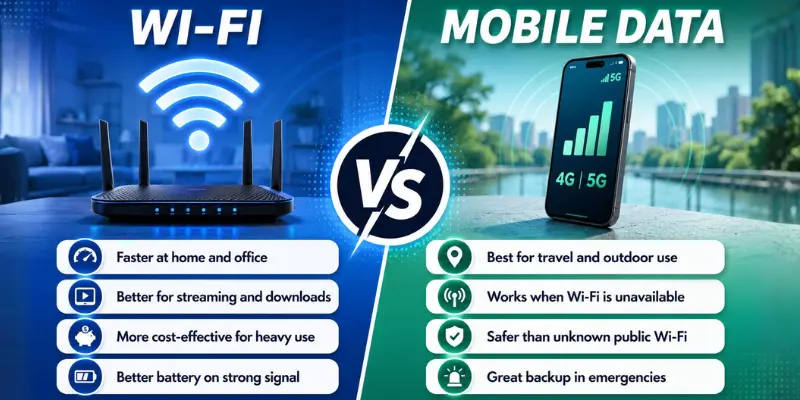
Here are the most important differences between Wi-Fi and mobile data for phone users.
1. Speed
Wi-Fi can provide very fast internet speeds, especially when paired with a high-speed internet plan and a quality router. This makes it ideal for streaming HD videos, downloading apps, updating software, and using cloud-based services.
With 4G and 5G data, mobile connectivity can also be speedy. But speed varies based on where you are, the strength of your signal, carrier coverage and the number of other users using the network in your area.
Best choice: Wi-Fi will often deliver more consistent speed at home and the workplace. When it comes to mobility data, it is a better option when you are away and need to get it fast.
2. Cost
Wi-Fi is usually more cost-effective for people who use a large amount of internet data. Once you have a home or office internet plan, multiple devices can connect to the same network without consuming mobile data.
Mobile data can become costly if you often stream videos, download large files, or use apps that require a lot of data. Users with limited data plans may reach their monthly allowance quickly.
Best choice: Wi-Fi is generally the more affordable option for heavy internet users.
3. Battery Life
Wi-Fi generally uses less battery than mobile data when the Wi-Fi signal is strong. Your phone does not need to work as hard to maintain a stable connection.
Mobile data can drain more battery, especially when the signal is weak. Your phone keeps searching for a stronger network, which can increase battery usage.
Best choice: Wi-Fi is usually better for battery life when the connection is strong and stable.

4. Security
A private Wi-Fi network protected by a password is generally safe for everyday use. Home and office Wi-Fi networks are often more secure than public networks because they are managed by trusted individuals or organizations.
Public Wi-Fi networks in places such as cafés, airports, hotels, and shopping malls can be a security issue if not properly secured. In some situations, hackers may be able to access sensitive information such as passwords, banking details, and personal data.
For activities such as online banking, digital payments, business emails, and accessing private accounts, mobile data is often the safer option when a trusted Wi-Fi network is unavailable.
Best choice: Use trusted Wi-Fi networks at home or work whenever possible. For sensitive tasks, mobile data is generally safer than unfamiliar public Wi-Fi connections.
5. Reliability
Wi-Fi reliability depends on several factors, including your router, internet service provider (ISP), signal strength, and the number of connected devices. If you are far from the router or too many devices are using the network, you may experience slower speeds or connection drops.
Mobile data is generally more reliable when you are on the move. As long as your carrier has network coverage, you can stay connected while travelling, walking, commuting, or spending time outdoors.
Best choice: Wi-Fi is usually more reliable in fixed locations such as your home or office. Mobile data is the better option when you need internet access while on the go.
6. Streaming and Downloads
Wi-Fi is the better option for watching YouTube, Netflix, TikTok, online courses, and other video platforms. It is also better for downloading games, apps, movies, and software updates.
Mobile data can handle streaming, but it may use a large amount of data. Watching HD or 4K videos on mobile data can quickly reduce your data balance.
Best choice: Wi-Fi is better for streaming, large downloads, and app updates.
7. Gaming and Video Calls
Wi-Fi is usually better for gaming and video calls when the connection is strong. It can provide smoother performance and lower interruptions.
Mobile data can also work well for gaming and video calls if you have strong 4G or 5G coverage. However, weak signals can cause lag, dropped calls, or poor video quality.
Best choice: Wi-Fi is better for long gaming sessions and video calls at home. Mobile data is useful when Wi-Fi is unavailable.
8. Coverage and Availability
Wi-Fi only works within a limited range. Once you move away from the router, the signal becomes weak or disconnects completely.
Mobile data works in many places where your carrier has coverage. This makes it more flexible than Wi-Fi because you can use it outside your home, office, or school.
Best choice: Mobile data is better for coverage and outdoor use.
9. Data Limits
You may also find that Wi-Fi plans have higher (or unlimited) data depending on your internet provider. This makes Wi-Fi more convenient for daily and heavy Internet usage.
Mobile data plans are typically capped at a certain amount. Too much data may slow your browsing speed or you may have to purchase an additional package.
Best choice: Wi-Fi is generally the better option if you want fewer data restrictions and more freedom to use the internet.
10. Daily Use Experience
For normal daily use, Wi-Fi is usually more comfortable. It is better for scrolling social media, watching videos, backing up photos, updating apps, and using your phone for longer sessions.
Mobile data gives you freedom. It keeps you connected when you are outside, travelling, shopping, or away from a trusted Wi-Fi network.
Best choice: Wi-Fi is better for home use. Mobile data is better for outdoor use.
Quick Comparison Table: Wi-Fi vs Mobile Data
| Feature | Wi-Fi | Mobile Data |
|---|---|---|
| Speed | Usually faster at home or work | Depends on the signal and the carrier |
| Cost | Better for heavy use | Can be costly with limited plans |
| Battery Life | Usually better with strong signal | May drain battery in weak coverage |
| Security | Safe on trusted private networks | Safer than unknown public Wi-Fi |
| Reliability | Best in fixed places | Best while travelling |
| Streaming | Better for HD videos | Uses more data quickly |
| Downloads | Better for large files | Not ideal for big downloads |
| Gaming | Stable on strong Wi-Fi | Good with strong 4G or 5G |
| Coverage | Limited to router range | Works where carrier coverage exists |
| Best For | Home, office, streaming, downloads | Travel, outdoor use, emergencies |
When Should You Use Wi-Fi?
You should use Wi-Fi when you are connected to a trusted network. This includes your home, office, school, or a secure private network.
Wi-Fi is best for:
- Watching videos
- Downloading apps
- Updating your phone
- Backing up photos
- Online classes
- Long video calls
- Gaming
- Saving mobile data
- Reducing internet costs
If your Wi-Fi is fast, private, and password-protected, it is usually the best option for everyday phone use.
When Should You Use Mobile Data?
You should use mobile data when Wi-Fi is not available or when the available Wi-Fi network is not safe.
Mobile data is best for:
- Travelling
- Outdoor use
- Using maps
- Sending urgent messages
- Checking emails outside
- Online banking in public places
- Avoiding unsafe public Wi-Fi
- Staying connected during power or Wi-Fi outages
Mobile data gives you freedom and flexibility. It is not always cheaper than Wi-Fi, but it is very useful when you need internet anywhere.
Which One Is Better for Phones?
Wi-Fi is better for most people who use their phones every day. For home, business, and school use, it is often cheaper, faster, and more useful.
Mobile internet is better for use outside and as a backup. When you’re moving, not near Wi-Fi, or using private apps in public, this is the best option.
The best thing to do is to use both. For important work, use Wi-Fi. For internet access when you’re not at home or when Wi-Fi isn’t safe, use your phone’s data plan.
Conclusion
So guys, in this article, we’ve covered wifi vs mobile data in detail. Both options have their own strengths, and the right choice depends on your situation. Personally, I recommend using Wi-Fi for daily tasks like streaming, downloads, and browsing, while keeping mobile data as your backup for travel and emergencies. This way, you get better speed, cost savings, and flexibility.
If you found this guide helpful, don’t forget to check our other mobile internet tips to learn more.
Frequently Asked Questions (FAQs)
Here are the answers to some common questions about the difference between wifi and cellular data :
In many cases, Wi-Fi is faster than mobile data, especially at home or work with a strong internet connection. However, a fast 5G network can sometimes be quicker than slow Wi-Fi. The actual speed depends on your network quality and signal strength.
No, Wi-Fi does not use your mobile data allowance. When connected to Wi-Fi, your phone uses the internet provided by the router. This helps save your cellular data plan.
You can turn off mobile data if you want to save battery life or prevent background data usage. However, keeping it enabled provides a backup connection if Wi-Fi disconnects. The best option depends on your needs.
Yes, mobile data is usually better when travelling because it works in many locations without needing a Wi-Fi network. It allows you to use maps, messaging apps, and online services on the go. Coverage depends on your carrier’s network.
In most situations, mobile data uses more battery than a strong Wi-Fi connection. This is especially true when your phone struggles to find a cellular signal. Poor coverage can increase battery consumption.






- Be Respectful
- Stay Relevant
- Stay Positive
- True Feedback
- Encourage Discussion
- Avoid Spamming
- No Fake News
- Don't Copy-Paste
- No Personal Attacks
- Be Respectful
- Stay Relevant
- Stay Positive
- True Feedback
- Encourage Discussion
- Avoid Spamming
- No Fake News
- Don't Copy-Paste
- No Personal Attacks
