Do Not Disturb vs Airplane Mode: Complete Comparison Guide
Published: 6 Oct 2026
Are you confused about whether you should use Do Not Disturb or Airplane Mode when you want some peace from your phone? While both can reduce interruptions, they work in different ways. Do Not Disturb mainly manages calls and notifications, whereas Airplane Mode is designed to disable cellular and other wireless connections.
In this guide, you’ll learn the key differences between Do Not Disturb and Airplane Mode, including calls, notifications, mobile data, Wi-Fi, Bluetooth, battery usage, and when to use each mode. So, let’s dive in!
What Is Do Not Disturb?
Do Not Disturb, commonly called DND, is a feature designed to reduce unwanted interruptions from your phone.
If you activate DND mode on your phone, it can silence incoming calls, messages, notifications, and other interruptions. But in most cases, DND does not disconnect your phone from the cellular network and the internet.
The reason why it is useful to know about DND is that you can still use your phone while it is activated. You can visit web pages, use mobile data or Wi-Fi, and use your apps without turning off your internet connection.
There is one more thing that you should know about DND mode. Many phones let you set your own Do Not Disturb settings.
What Is Airplane Mode?
Airplane Mode is a feature designed to quickly disable wireless communication on your phone. After turning it on, your phone will normally turn off cellular connectivity. Wi-Fi and Bluetooth may also be turned off initially.
This is because the main aim of Airplane Mode is to disable wireless connections. It is for this reason that it is normally activated when flying.
However, turning on Airplane Mode does not mean that all features of your phone stop working.
Do Not Disturb vs Airplane Mode: 10 Key Differences
Do Not Disturb and Airplane Mode may seem similar, but they control different aspects of your phone. Here is a quick overview of the main differences before we look at each one in detail.
| Feature | Do Not Disturb | Airplane Mode |
|---|---|---|
| Main purpose | Reduces interruptions | Disables wireless connections |
| Cellular connection | Usually stays active | Usually turned off |
| Incoming calls | Can be silenced or filtered | Cellular calls cannot normally reach the phone |
| Notifications | Silenced or filtered | May stop when there is no internet connection |
| Mobile data | Usually stays available | Usually turned off |
| Wi-Fi | Usually stays active | Usually turned off initially |
| Bluetooth | Usually stays active | Usually turned off initially |
| Battery usage | Can help save battery | Can help save battery |
| Scheduling | Available on many phones | Usually manually activated |
| Best use | Study, sleep, work, or meetings | Flights, offline use, or disconnecting |
Now, let’s look at each difference in detail to see how both modes work.
1. Connectivity
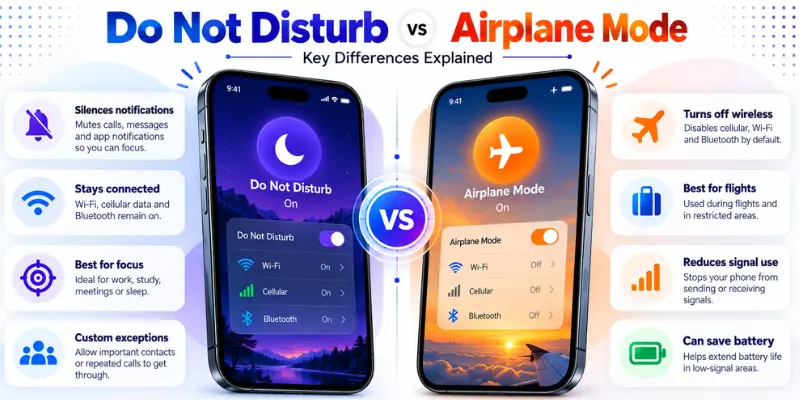
The biggest distinction between these two modes is how each of them treats the device’s connectivity to the network. The Do Not Disturb mode does not block connection to cellular and Wi-Fi networks; instead, it reduces unnecessary disturbances.
The Airplane Mode is opposite to that since its main aim is to block wireless communication. Normally, it blocks the cellular network service.
This means Do Not Disturb is mainly for reducing distractions, while Airplane Mode is mainly for disconnecting wireless connections.
2. Calls and Notifications
“Do Not Disturb” mode mainly manages calls, notifications, and messages without disconnecting your phone from the network. The “Do Not Disturb” mode depends on the settings, and you will be able to block calls and notifications while letting only some selected contacts reach you.
The “Airplane Mode,” on the other hand, does not allow cellular connection. This means that no calls will come into the device through the cellular connection while using “Airplane Mode.”
The main difference is simple: Do Not Disturb manages interruptions, while Airplane Mode disconnects cellular communication.
3. Mobile Data
Do Not Disturb usually lets mobile data remain enabled. You can browse the web, use social media, watch online videos, or use other internet-dependent applications without disabling DND.
Airplane Mode usually blocks cellular connectivity, which also disables mobile data. However, your device can reconnect to the internet by simply enabling Wi-Fi even when Airplane Mode is still on.
So, if you need mobile internet without interruptions, Do Not Disturb is more suitable. If you want to stop cellular data, Airplane Mode is designed for that purpose.
4. Wi-Fi and Bluetooth
“Do Not Disturb” mode generally does not impact Wi-Fi and Bluetooth. Your phone will be able to connect with wireless headphones, smartwatches, Wi-Fi connections, and other Bluetooth devices even while Do Not Disturb is on.
“Airplane Mode” generally switches off Wi-Fi and Bluetooth upon the initial activation. Yet, many new-generation smartphones allow turning on Wi-Fi and Bluetooth manually while having Airplane Mode turned on.
This means you can use Airplane Mode with Wi-Fi or Bluetooth when you want to avoid cellular communication but still need certain wireless features.
5. Battery Usage
Do Not Disturb mainly reduces interruptions rather than wireless activity. It may indirectly save some battery by preventing notifications from constantly waking the screen or activating sounds and vibrations.
Enabling the Airplane Mode may save on battery power by blocking all forms of communication and wireless connectivity. However, this is particularly helpful when you are using your cell phone in places where the signal is weak.

6. Notifications
Do Not Disturb is specifically designed to manage notifications. It can silence or filter alerts from apps and people, while many phones allow you to create exceptions for important contacts, apps, or alarms.
Airplane Mode does not work as a notification filter. Instead, it affects the network connection that many notifications depend on, so online notifications may not arrive while your phone has no internet connection.
Once you reconnect to cellular data or Wi-Fi, pending notifications may start arriving again. This makes Airplane Mode different from simply silencing notifications.
7. Best Use Cases
The Do Not Disturb feature is best used when you want to stay connected to the network but do not want to be disturbed by incoming calls and messages. It can be useful for studying, sleeping, meetings, watching videos, and other activities on your phone without getting unwanted alerts.
The Airplane Mode feature is useful when you want to disconnect from wireless connections. This feature is used mostly during air travel, but may also be useful when you want to use your phone offline or troubleshoot any network issue.
The right choice depends on whether your main goal is fewer interruptions or fewer wireless connections.
8. Scheduling and Control
Do Not Disturb gives you more control over when and how interruptions are managed. With Do Not Disturb, depending on your phone, you can set it to work at particular times and allow selected contacts, apps, alarms, or other important notifications.
Airplane Mode is typically easier to use because its main purpose is to turn wireless connections off and on. You can simply turn it on when you need to disconnect from cellular and other wireless connections.
This makes DND more useful for regular focus periods, while Airplane Mode is more useful when you need a quick wireless disconnect.

9. Use During a Flight
Airplane Mode is most commonly used when people are flying because it is designed to disable cellular communication. Once activated, it normally turns off cellular connectivity and may also turn off Wi-Fi and Bluetooth.
However, if your airline offers Wi-Fi and allows the use of Bluetooth accessories, you can manually turn on Wi-Fi or Bluetooth without turning off Airplane Mode.
Do Not Disturb can also reduce notifications during a flight, but it does not replace Airplane Mode when you need to disable cellular communication.
10. Offline vs Connected Use
Do Not Disturb is better suited to situations where you still want your phone to work online. You can continue using mobile data or Wi-Fi while reducing calls, alerts, and notifications according to your settings.
Airplane Mode is more suitable when you want to use your phone without a wireless connection. You can still use offline games, downloaded videos, music, the camera, and other features that do not require an internet connection.
Can You Use Do Not Disturb and Airplane Mode Together?
Yes, you can use both features together because they control different things. Airplane Mode can disconnect the phone from wireless networks, while Do Not Disturb can manage notifications and other interruptions.
For example, if you are going to sleep and don’t need any network connection, you could use Airplane Mode and DND together.
However, using both is not always necessary. If you simply want to stop notifications while continuing to use the internet, Do Not Disturb alone may be enough.
Common Mistakes to Avoid
Some common mistakes can make it confusing to know when to use Do Not Disturb or Airplane Mode. Understanding these differences can help you use each mode correctly.
1. Thinking Do Not Disturb Turns Off the Network
DND normally does not disconnect your phone from cellular or Wi-Fi networks. Its main purpose is to manage interruptions.
2. Thinking Airplane Mode Turns the Phone Off
Airplane Mode does not switch off the phone. You can still use the camera, downloaded files, offline games, music, and many other features.
3. Assuming Airplane Mode Always Means No Wi-Fi
On many modern devices, you can manually turn Wi-Fi back on while Airplane Mode remains active.
4. Assuming DND Blocks Everything
Do Not Disturb can allow certain contacts, apps, alarms, or other notifications to interrupt you depending on your settings.
5. Assuming Airplane Mode Gives Unlimited Battery Life
Airplane Mode can help save battery by reducing wireless activity, but your phone can still use battery for the display, apps, GPS, and other features.
Conclusion
So, which one should you use: Do Not Disturb or Airplane Mode? The right choice depends on whether you want to avoid interruptions or disconnect your phone from wireless networks.
“Do Not Disturb” comes handy if you need to remain connected but at the same time do not want to receive any calls or notifications. Airplane mode is better for turning off cellular connection and working without your phone being online.
If you need to remain connected, leave “Do Not Disturb” active and adjust exceptions. In case you need to switch off the cellular connection, go for Airplane mode and activate Wi-Fi and Bluetooth only if required.
Stay connected when you need to—and disconnect when you need some peace.
Frequently Asked Questions (FAQs)
Here are answers to some common questions about Do Not Disturb vs Airplane Mode:
Missed calls can still appear in your phone’s call history even when Do Not Disturb is active. DND mainly controls how your phone alerts you about the call rather than removing the call from your device.
You normally cannot receive regular cellular text messages while Airplane Mode disables cellular connectivity. However, messages that use Wi-Fi may work if you turn Wi-Fi back on and have an active internet connection.
Do Not Disturb is usually better if you want to keep your phone connected while reducing nighttime interruptions.
- Choose DND: If you may need calls or internet access.
- Choose Airplane Mode: If you do not need cellular or wireless connections.
- Use both: If you want fewer interruptions and do not need a network connection.
Simply enable Do Not Disturb from your phone’s settings or Quick Settings. Your cellular data or Wi-Fi can usually remain active, so you can continue using the internet while DND manages unwanted alerts.
Yes, Airplane Mode can be useful when your phone has no mobile signal. When your phone keeps searching for a network, it can use extra battery. Turning on Airplane Mode stops the phone from searching for a cellular network, which may help save battery.
You can turn Airplane Mode off when you reach an area with a better signal and need to reconnect to the mobile network.





- Be Respectful
- Stay Relevant
- Stay Positive
- True Feedback
- Encourage Discussion
- Avoid Spamming
- No Fake News
- Don't Copy-Paste
- No Personal Attacks
- Be Respectful
- Stay Relevant
- Stay Positive
- True Feedback
- Encourage Discussion
- Avoid Spamming
- No Fake News
- Don't Copy-Paste
- No Personal Attacks
