Focus Mode vs Do Not Disturb: Complete Comparison Guide
Published: 16 Oct 2026
Whether you’re studying, working, or trying to relax, constant phone notifications can make it difficult to concentrate. Focus Mode and Do Not Disturb both help reduce distractions, but they work differently depending on your device.
On Android, Focus Mode temporarily pauses selected distracting apps and their notifications, while Do Not Disturb silences or filters incoming calls and alerts. On iPhone, however, Do Not Disturb is one of several options within Apple’s broader Focus system.
Understanding these differences can help you choose the right setting, reduce unnecessary interruptions, and stay available for important calls or messages.
What Is Focus Mode?
Focus Mode is a smartphone feature designed to minimise digital distractions and help you concentrate on activities like studying, working, or relaxing. It helps you manage interruptions, although its functionality differs between Android and iPhone.
On Android, Google’s Digital Wellbeing Focus Mode lets you temporarily pause distracting apps, such as Instagram, TikTok, or YouTube, along with their notifications. You can also schedule Focus Mode around your daily routine or take a short break when you need access to a paused app.
On iPhone, Apple offers a broader Focus system with options such as Work, Personal, Sleep, and Do Not Disturb. Instead of blocking app access, it lets you customise which people and apps can send notifications during specific activities.
For example, you can set Work Focus to receive important messages from colleagues while silencing social media alerts. This way, you can stay connected to what matters without unnecessary interruptions.
What Is Do Not Disturb?
Do Not Disturb (DND) is a smartphone feature that silences or filters incoming calls, messages, and app notifications, helping you avoid interruptions without restricting access to your apps.
For example, during an important meeting, you can continue using your calendar, email, and work apps without being distracted by constant notification alerts.
You can also customise Do Not Disturb to allow calls and notifications from important contacts or selected apps. This means you can silence social media alerts while still receiving calls from family members.
Both Android and iPhone support Do Not Disturb, although the available settings and exceptions vary by device. On iPhone, DND is part of Apple’s Focus system, while on Android, it operates separately from Digital Wellbeing Focus Mode.
Essentially, Do Not Disturb helps you control interruptions while keeping your phone fully accessible.
Focus Mode vs Do Not Disturb: Key Differences
Although both features help reduce digital distractions, they work differently depending on your device and the type of interruption you want to control.
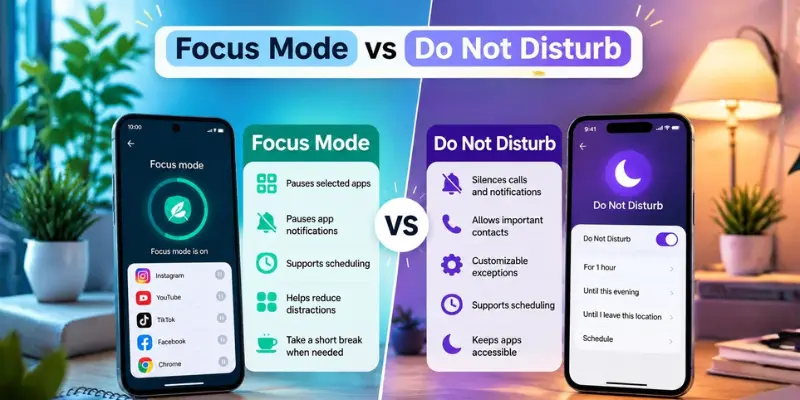
Here’s a quick comparison to help you understand their main differences.
| Feature | Focus Mode | Do Not Disturb |
|---|---|---|
| Main Purpose | Limits app distractions on Android; manages activity-based alerts on iPhone | Silences unwanted interruptions |
| App Access | Pauses selected apps on Android | Keeps apps accessible |
| Notifications | Pauses selected app alerts on Android; controls alerts on iPhone | Silences unwanted alerts |
| Calls & Messages | Doesn’t normally pause regular calls on Android; can silence alerts on iPhone | Silences alerts unless allowed |
| Customisation | App selection or Focus profiles | Allowed contacts and apps |
| Scheduling | Supports automatic activation | Supports automatic activation |
Let’s explore these differences in more detail to understand how each feature works in everyday situations.
1. Main Purpose
The main difference between Focus Mode and Do Not Disturb is the type of distraction they help you manage.
On Android, Focus Mode temporarily pauses selected distracting apps, such as Instagram or YouTube, helping you avoid repeatedly opening them while studying or working.
Do Not Disturb, on the other hand, silences incoming calls and notification alerts without restricting access to your apps. You can still allow important interruptions through customised exceptions.
For example, if you keep checking social media while studying, Android Focus Mode may be more useful. However, if constant calls and notifications interrupt your concentration, Do Not Disturb is a better choice.
On iPhone, both Do Not Disturb and other Focus profiles primarily manage notifications rather than restrict app access.
2. App Access and Restrictions
One key difference between Focus Mode and Do Not Disturb is how they affect app access.
On Android, Digital Wellbeing Focus Mode temporarily pauses selected apps, such as TikTok or Instagram, along with their notifications. These apps remain unavailable until you turn off Focus Mode or take a permitted break.
In contrast, Do Not Disturb doesn’t restrict access to apps. You can still browse social media, watch videos, or use messaging apps, even when their notifications are silenced.
On iPhone, Apple’s Focus system manages distractions through notification settings and customised Home Screens rather than blocking apps. Even if an app is hidden from a particular Home Screen, you can generally access it elsewhere.
For stricter app restrictions, iPhone users can use Screen Time features such as App Limits and Downtime.
3. Notification Management
Both Focus Mode and Do Not Disturb manage notifications, but they work differently depending on your device. On Android, Focus Mode pauses notifications from selected distracting apps, while other apps can generally continue sending alerts. Do Not Disturb offers broader control by silencing unwanted notifications while allowing exceptions for important contacts or selected apps.
For example, you can silence social media alerts while keeping calendar reminders active, provided your Do Not Disturb settings allow them.
On iPhone, Apple’s Focus system lets you choose which people and apps can notify you during specific activities. Do Not Disturb supports similar options because it’s part of the same system.
4. Calls and Messages
Focus Mode and Do Not Disturb handle calls and messages differently, particularly on Android. Digital Wellbeing Focus Mode doesn’t normally silence regular phone calls, but pausing a messaging app like WhatsApp can also pause its notifications, potentially affecting alerts for app-based calls.
Do Not Disturb, meanwhile, lets you control which calls and message alerts can interrupt you. Depending on your device, you can allow calls from important contacts or repeated callers. On iPhone, Do Not Disturb and other Focus profiles offer similar options for managing notifications from selected people and apps.
Importantly, silencing call and message alerts generally doesn’t block communication. It simply changes how your phone notifies you. If you’re expecting an important call, check your contact exceptions before enabling these settings.
5. Customisation and Exceptions
Both features offer customisation, but they give you control over different things. On Android, Focus Mode lets you choose which distracting apps to pause, while Do Not Disturb allows you to silence notifications and set exceptions for important contacts, selected apps, and alarms.
On iPhone, Apple’s Focus system allows you to customise notifications for various activities. For example, Work Focus can allow alerts from colleagues, while Personal Focus can prioritise family members.
Do Not Disturb supports similar notification exceptions, and Focus filters can control certain information displayed in compatible apps.
6. Scheduling and Automation
Both Focus Mode and Do Not Disturb support scheduling, allowing you to manage distractions without manually changing settings throughout the day.
On Android, you can schedule Digital Wellbeing Focus Mode to pause selected apps during study or work hours. Do Not Disturb can also activate automatically at specific times, such as during meetings or bedtime.
On iPhone, Apple’s Focus system supports automatic activation based on time, location, or app usage. For example, you can schedule Work Focus during office hours and Sleep Focus around your bedtime routine.
Although the available options vary by device, both features help you maintain a consistent routine with fewer interruptions.
Can Do Not Disturb Be Considered a Focus Mode?
Yes, on iPhone. Apple’s Do Not Disturb is one of several options within its Focus system, alongside Work, Personal, and Sleep. It allows you to silence unwanted notifications while making exceptions for important people and apps. Each Focus option can be customised for different activities.
On Android, however, the answer is no. Google’s Digital Wellbeing Focus Mode and Do Not Disturb are separate features. Focus Mode temporarily pauses selected distracting apps, while Do Not Disturb silences incoming alerts without restricting app access. Although both help reduce distractions, they serve different purposes.
When Should You Use Focus Mode or Do Not Disturb?
The right choice depends on the distractions you want to avoid and how you use your phone.
Choose Focus Mode If:
- You frequently open distracting apps while studying or working.
- You want to temporarily pause selected apps on Android.
- You need scheduled, distraction-free work or study sessions.
- You want personalised Focus profiles on iPhone.
Choose Do Not Disturb If:
- You want to silence unwanted calls and notifications.
- You need quiet time during meetings or sleep.
- You want to keep using your apps without restrictions.
- You need to allow alerts from important contacts.
- You prefer scheduled quiet hours.
Common Mistakes to Avoid
Although Focus Mode and Do Not Disturb are easy to use, misunderstanding their settings can lead to unwanted interruptions or missed alerts.
- Assuming both features work the same: Android Focus Mode can pause selected apps, while iPhone Focus primarily manages notifications.
- Thinking Do Not Disturb blocks calls: It usually silences call alerts rather than blocking calls completely.
- Forgetting important contacts: Check your notification exceptions to avoid missing calls or messages from family or colleagues.
- Expecting iPhone Focus to block apps: Apple’s Focus system doesn’t normally restrict app access. Use Screen Time for stricter limits.
- Ignoring alarm settings: Do Not Disturb may affect alarms differently depending on your device and settings, so check them before bedtime.
Understanding these limitations helps you manage distractions without missing important notifications.
Conclusion
So, which is better: Focus Mode or Do Not Disturb? The answer depends on your device and the type of distraction you want to avoid.
On Android, Focus Mode helps you concentrate by temporarily pausing distracting apps, such as social media. Do Not Disturb, however, silences incoming calls and notification alerts while keeping your apps accessible.
On iPhone, Do Not Disturb is one of Apple’s Focus modes. You can use it for general quiet time or choose other Focus modes, such as Work or Sleep, to manage notifications according to your activities.
Ultimately, if distracting apps are your main problem, Focus Mode is a better choice. If you simply want to reduce interruptions without restricting app access, Do Not Disturb is more suitable.
Frequently Asked Questions (FAQs)
Here are answers to some common questions about Do Not Disturb vs Focus Mode :
Yes, on Android, you can use Digital Wellbeing Focus Mode to pause distracting apps while Do Not Disturb silences unwanted notifications. Both features can work together to reduce different types of distractions. On iPhone, however, Do Not Disturb is a Focus mode, and only one Focus profile can be active at a time.
On Android, Focus Mode doesn’t normally block regular calls or messages, but it pauses notifications from selected apps. On iPhone, Focus can silence call and message alerts depending on your settings. You can also allow notifications from important contacts to stay reachable.
On iPhone, alarms set using the built-in Clock app still ring when Do Not Disturb is enabled. On Android, alarm behaviour depends on your device and Do Not Disturb settings. Check your alarm exceptions before using DND overnight.
Yes, Focus Mode can help reduce screen time by limiting distractions, particularly on Android, where selected apps are temporarily paused. On iPhone, Focus manages notifications but doesn’t directly restrict app usage. For stricter screen time limits, iPhone users can use Apple’s Screen Time features.
Sleep Focus can be more useful for bedtime because it is designed around your sleep routine and lets you control which people and apps can interrupt you. It can also activate automatically according to your sleep schedule. Do Not Disturb is better when you simply want a general period of fewer interruptions without using a sleep-specific Focus mode.





- Be Respectful
- Stay Relevant
- Stay Positive
- True Feedback
- Encourage Discussion
- Avoid Spamming
- No Fake News
- Don't Copy-Paste
- No Personal Attacks
- Be Respectful
- Stay Relevant
- Stay Positive
- True Feedback
- Encourage Discussion
- Avoid Spamming
- No Fake News
- Don't Copy-Paste
- No Personal Attacks
