Common Mobile Phone Display Problems & How to Fix Them
Published: 26 Sep 2026
Most people use a phone screen dozens of times every day, but we often realize its importance only when something goes wrong. A cracked screen, delayed touch response, flickering display, or sudden black screen can quickly make a phone difficult to use.
Mobile phone display problems can have many causes, including accidental drops, water exposure, software bugs, aging components, and hardware failure. Some issues can be fixed with simple troubleshooting, while others may require professional repair.
Before replacing a screen or spending money on repairs, it is important to understand what is causing the problem. In this guide, we’ll cover the most common mobile phone display problems, their causes, warning signs, and practical solutions.
Understanding Mobile Phone Display Problems
A smartphone display is not just a single piece of glass. It contains multiple layers, including the protective glass, touch-sensitive digitizer, and the actual display panel (LCD or OLED) that produces images.
When any of these parts fail, users may experience different types of screen problems. For example, a cracked outer glass may still allow normal use, while damage to the digitizer can stop touch functionality completely.
Some of the most common mobile phone display problems include:
- Cracked or broken screens
- Touchscreen not responding
- Ghost touch
- Screen flickering
- Black screen
- Vertical or horizontal lines
- Dead pixels and discoloration
- Brightness problems
- Screen burn-in
- Water damage
Identifying the exact symptom is the first step toward finding the right solution.
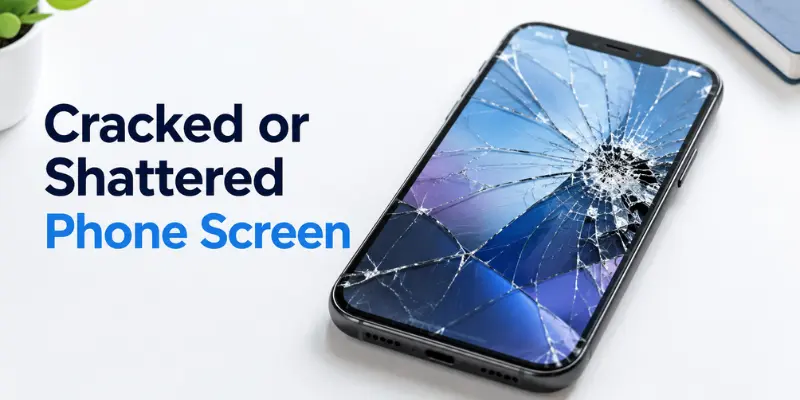
1. Cracked or Shattered Phone Screen
A cracked screen is one of the easiest display problems to recognize. It usually happens when the phone is accidentally dropped, but strong impacts, excessive pressure, or previous damage can also cause the screen to crack.
Most modern smartphones use thin glass screens that are lightweight and responsive. However, this also makes them vulnerable to impacts, pressure, and cracks.
Even a small crack can spread over time and affect the layers underneath the glass. As the damage gets worse, you may notice touch problems, dark spots, or lines on the display.
Why Does a Phone Screen Crack?
Common reasons include:
- Dropping the phone on concrete or hard surfaces
- Sitting on the phone while it is in a pocket
- Excessive pressure on the display
- Poor-quality protective accessories
- Previous damage becoming worse over time
How to Deal With a Cracked Screen
If the phone continues to operate normally, you can protect the damaged portion with a high-quality screen protector temporarily. But make sure not to press on those parts since additional pressure might affect the display internally.
But if there are issues like non-responsive touch, black spots, or colored lines appearing, then the damage might have spread to the LCD/OLED screen. Under such circumstances, it would be better to change the entire display.
2. Touchscreen Not Working or Responding Slowly
One of the most annoying things that can happen to your phone would be the touch screen problem. It would seem that there is nothing wrong with your device, but it would not respond to your touches.
The touch screen uses something known as a digitizer, which is responsible for processing your movements on the screen and executing the commands accordingly.
In some cases, the problem may be limited to a portion of the display, while in others, the entire screen stops functioning.

Common Causes of Touchscreen Problems
A phone touchscreen may stop working because of:
- Physical screen damage
- Faulty digitizer
- Water or moisture exposure
- Software glitches
- Damaged screen protector
- Battery swelling inside the phone
Signs of a Touchscreen Problem
You may notice:
- Certain areas of the screen do not respond
- Touch response feels delayed
- Keyboard keys do not work properly
- The phone ignores finger movements
- Touch works only sometimes
Things You Can Try Before Repair
Start with simple solutions:
- Restart your phone
- Remove the screen protector
- Clean the display surface
- Update your phone software
- Check if recently installed apps are causing problems
3. Ghost Touch Problem on Mobile Screen
One of the peculiar problems with smartphones that many people face is that of ghost touch, which is characterized by the fact that one’s phone will respond as if somebody is touching the screen, when actually no one is using the phone.
For example, the phone may open an app, type letters, or scroll on its own. The causes of this problem can include both software and hardware faults.
What Causes Ghost Touch?
Common reasons include:
- Damaged touch digitizer
- Moisture inside the phone
- Poor-quality replacement screens
- Faulty charging cables or adapters
- Software bugs
A damaged touchscreen layer is one of the most common reasons ghost touch continues even after restarting the phone.
How to Fix Ghost Touch
Try these steps:
Firstly, disconnect the charger to see if the issue is resolved. Poor-quality chargers can sometimes affect touch functionality.
Then, restart the phone, clean its screen, and make sure all software updates have been installed.
Ghost touch that appears after the screen has been replaced or the phone has been physically damaged is most likely a hardware issue.
4. Phone Screen Flickering or Random Dimming
Flickering screen causes discomfort when handling your device and is an indication that there might be either a software glitch or a fault with your phone’s screen itself.
For some users, flickering might be experienced at low brightness settings, while for others it might happen constantly with changes in brightness levels.
Why Does a Phone Screen Flicker?
Possible causes include:
- Adaptive brightness problems
- Software bugs
- Outdated operating system
- Loose display connections
- Damaged LCD/OLED panel
- Backlight failure
How to Fix Screen Flickering
Before visiting a repair shop, try adjusting display settings.
You can:
- Turn off adaptive brightness
- Restart your phone
- Update the operating system
- Remove recently installed apps
- Test the phone in safe mode
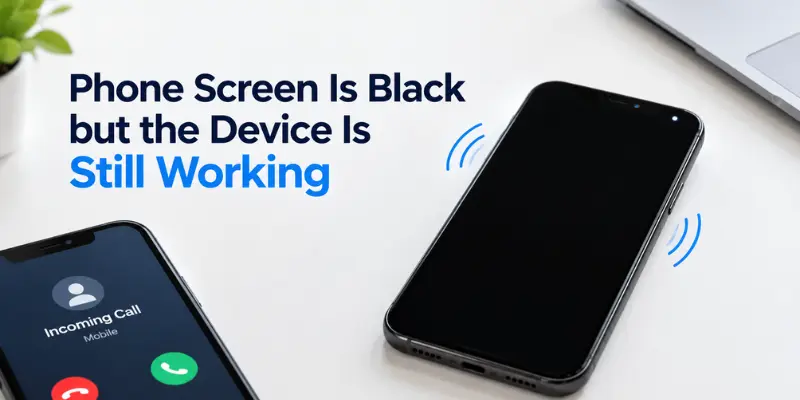
5. Phone Screen Is Black but the Device Is Still Working
One of the most challenging mobile display issues occurs when it seems that the phone is totally dead while in fact it works in the background mode. Thus, you can hear the notifications, receive calls or experience vibrations, but there is no display.
This usually means the problem is not with the entire phone. Instead, something is preventing the display from showing images properly. The issue can range from a temporary software crash to complete display panel failure.
Why Does a Phone Screen Go Black?
A black screen problem can happen because of:
- Damaged LCD or OLED panel
- Loose display connector
- Water damage inside the phone
- Physical impact after a drop
- Software crash
- Battery-related issues
Sometimes the display cable becomes loose after an impact, which stops communication between the phone’s motherboard and the screen.
How Can You Check the Problem?
Before going for repair, try these basic checks:
- Charge the phone for some time
- Perform a force restart
- Call the phone from another device
- Check if vibration or notification sounds are working
If the phone responds but the display remains completely black, the screen hardware is likely damaged and may need professional repair.
6. Vertical or Horizontal Lines Appearing on Phone Screen
One of the most common indicators that there is a problem with your phone’s display is the appearance of lines on your phone screen.
These lines may pop up all at once or gradually start increasing with time. Some people get one green line, and some get multiple white, black, or colorful lines on their phone screens.
What Causes Display Lines?
The most common reasons include:
- Damaged OLED or LCD panel
- Loose display connection
- Internal pressure damage
- Phone being dropped
- Manufacturing defects
OLED screens, especially, can develop permanent lines when individual pixels or internal display circuits become damaged.
Can Display Lines Be Fixed?
If the lines appear because of a temporary software issue, restarting or updating the phone may solve the problem. However, permanent lines that remain visible all the time usually indicate physical display damage.
In most cases, replacing the screen assembly is the most reliable solution.
7. Dead Pixels, Black Spots, and Screen Discoloration
Dead pixels and display color distortion refer to situations when some areas of the screen fail to display colors properly. The problem can appear as small spots but might become increasingly noticeable over time.
A dead pixel may appear as a small black or permanently colored spot, while display color distortion may appear as yellow spots or other color inconsistencies.
Why Do Dead Pixels and Color Problems Happen?
Common causes include:
- Manufacturing defects
- Pressure damage on the screen
- Display aging
- Excessive heat exposure
- Internal panel failure
Sometimes users notice discoloration after dropping the phone or applying pressure to the display.
How Can You Fix Dead Pixels?
Some stuck pixels may be fixed using pixel repair software, but completely dead pixels usually cannot be fixed with software.
If the problem is widespread or distracting when using the screen, it may be necessary to replace the display.
8. Mobile Screen Brightness Problems
Brightness issues may not be as problematic as a cracked screen, but they can make the phone difficult to use. Some people may have phones with screens that are too dim, randomly change brightness, or appear uneven.
There are various reasons why these issues arise.
Common Causes of Brightness Issues
A phone may have brightness problems because of:
- Adaptive brightness errors
- Faulty light sensor
- Software bugs
- Backlight failure
- Aging display panel
How to Fix Brightness Problems
First, check your display settings. Make sure that adaptive brightness is disabled and try adjusting the brightness manually.
Also, you may try restarting your phone and installing available updates. However, if one half of the screen becomes darker than the other, there might be something wrong with the display hardware.
9. Water Damage
Water is one of the most damaging things that can affect your smartphone’s screen. Even if your device seems to be working normally right after being exposed to water, issues may arise as the liquid reaches the internal parts of your smartphone.
There are many ways water can affect your smartphone’s screen and cause various problems.
Signs of a Water-Damaged Display
Common symptoms include:
- Screen flickering
- Touch not responding
- Black display
- Strange colors
- Bright or dark spots
- Random screen behavior
What Should You Do After Water Exposure?
The first thing to do is switch off the phone. Do not charge the phone, since electricity and moisture could cause more damage to the phone internally.
Avoid using any heat sources, such as hair dryers, since excessive heat could damage internal components.
If water gets inside the phone, it is important to take the phone to a professional.
10. Screen Burn-In on Mobile Phone
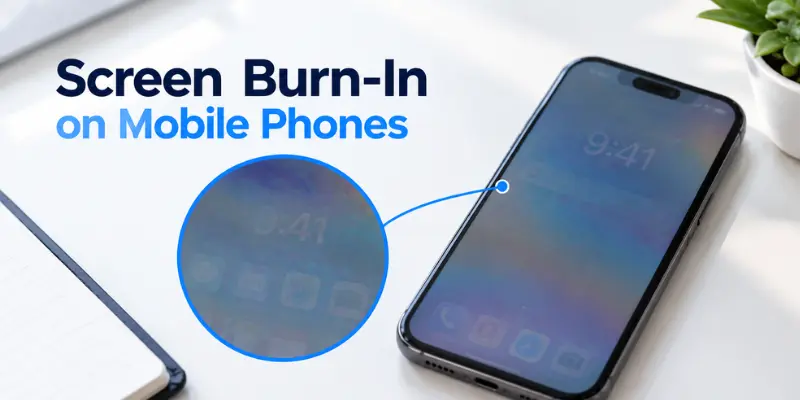
Screen burn-in is a display problem where faint images, icons, or other elements remain visible even when the content on the screen changes. It is more commonly associated with OLED and AMOLED displays.
For example, you may notice the outline of a keyboard, navigation bar, or app icon staying visible in the background. This usually happens when the same static elements remain on the screen for long periods.
What Causes Screen Burn-In?
Common causes include:
- Long-term display of static images
- High screen brightness
- Extended use of the same app or interface
- Aging OLED pixels
- Uneven pixel wear
How to Reduce Screen Burn-In
Permanent burn-in cannot usually be removed with a simple setting or software update. However, you can reduce the risk by:
- Using a lower brightness level
- Using automatic screen timeout
- Avoiding static images for long periods
- Keeping your phone software updated
- Using dark mode where appropriate
If burn-in becomes severe and affects normal use, professional display replacement may be the only practical solution.
Software Problems vs Hardware Display Problems: How to Identify the Difference
Not every mobile display issue means your screen is physically damaged. Many users replace displays unnecessarily because they do not first check whether the problem is software-related.
Software issues usually appear randomly and may disappear after restarting, updating the phone, or changing settings. Hardware problems usually appear after physical events such as drops, pressure, or water exposure.
Software Display Problems Usually:
- Start after updates or app installations
- Improve after restarting the device
- May be fixed through settings changes or software troubleshooting
- Do not usually cause physical screen damage
Hardware Display Problems Usually:
- Start after drops or accidents
- Cause permanent lines or black spots
- Affect touch response
- Require component replacement
Understanding this difference can help you avoid spending money on unnecessary repairs.
How to Prevent Common Mobile Phone Display Problems
The majority of screen issues can be minimized through correct maintenance and protection. Even though you may not be able to prevent some accidents, certain practices will ensure that your phone screen lasts longer.
Simple Ways to Protect Your Phone Screen:
- Use a strong protective case
- Install a quality screen protector
- Keep the phone away from water
- Avoid excessive pressure on the display
- Do not keep the phone under heavy objects
- Avoid exposing the phone to high temperatures
- Use trusted charging accessories
- Clean the screen regularly
When Should You Repair or Replace Your Phone Display?
The decision whether to repair a display or replace the phone depends on the type of damage, the cost of repairing the phone, and its overall condition.
It becomes sensible to repair the screen of your phone if it still functions well and only the display has the issue. Some examples of these include a cracked screen, damaged touch, or a faulty OLED screen.
But it may make more sense to replace the phone if it is already old or if it has some battery problems.
Consider Display Repair When:
- The phone works normally except for the screen
- The damage is limited to the display
- Repair cost is reasonable
- The phone still has good performance
Consider Replacing the Phone When:
- Multiple components are damaged
- Repair cost is close to a new device
- Battery life is poor
- The phone is outdated
Always compare repair costs with the value and expected lifespan of your current phone.
Conclusion
Mobile phone display problems are common, but understanding the symptoms can help you find the right solution faster. Not every screen issue requires immediate replacement; some problems can be solved with simple adjustments or software fixes.
Nevertheless, most issues caused by physical damage, moisture, or faulty display parts should be fixed professionally.
With the right protection, timely attention to warning signs, and a basic understanding of software and hardware problems, you can avoid unnecessary repair costs and keep your phone display working properly for longer.
Frequently Asked Questions (FAQs)
Here are answers to some common questions about mobile phone screen issues.
An LCD screen may turn yellow because of display aging, heat exposure, incorrect color settings, or hardware problems. Check the display settings first, and if the yellow tint remains, the screen may need professional inspection.
A phone screen may flicker because of adaptive brightness, software bugs, an outdated operating system, loose display connections, or a damaged display panel. Try restarting the phone, turning off adaptive brightness, and updating the software to see if the problem improves.
The cost depends on the phone model, display type, extent of damage, and whether the screen or another component needs replacement. OLED and AMOLED displays can be more expensive than some LCD screens.
Consider the repair cost, phone age, battery condition, performance, and whether other components are damaged. If the phone works well apart from the display and the repair cost is reasonable, repairing the screen may be a practical option.
Some display problems can be fixed without replacement, especially when they are caused by software glitches, incorrect settings, or temporary issues. Physical damage to the display usually requires repair or replacement.





- Be Respectful
- Stay Relevant
- Stay Positive
- True Feedback
- Encourage Discussion
- Avoid Spamming
- No Fake News
- Don't Copy-Paste
- No Personal Attacks
- Be Respectful
- Stay Relevant
- Stay Positive
- True Feedback
- Encourage Discussion
- Avoid Spamming
- No Fake News
- Don't Copy-Paste
- No Personal Attacks
