When Should You Actually Replace Your Phone Battery?
Published: 3 Sep 2026
Smartphone batteries do not last forever. Over time, every battery loses its ability to hold the same amount of charge as when it was new.
You may first notice small changes, like needing to charge more often. Later, your phone may drain quickly, shut down unexpectedly, or struggle to last through the day.
However, poor battery life does not always mean you need a replacement. Factors like apps, settings, charging habits, temperature, and network strength can also affect performance.
In this guide, we’ll explain when you should replace your phone battery and the signs that indicate it may be time for a new one.
How Long Does a Phone Battery Usually Last?
Modern smartphones use lithium-ion batteries, which are designed to provide reliable performance for hundreds of charging cycles. Over time, these batteries naturally lose capacity because the chemical materials inside them slowly wear down.
For most users, a phone battery typically lasts:
| Usage Level | Expected Battery Lifespan |
|---|---|
| Heavy users (gaming, streaming, constant use) | Around 1.5–2 years |
| Average smartphone users | Around 2–3 years |
| Light users | Around 3–5 years |
The age of your phone is not the only thing that affects battery life. Two people can use the same phone model for three years, but one may need a battery replacement earlier because they use their phone more heavily, run demanding apps, charge it more often, or expose it to high temperatures.
How Do You Know When Your Phone Battery Needs Replacement?
The best way to know when to replace your phone battery is to pay attention to how your device performs. Here are the most common signs that your battery may need replacement:
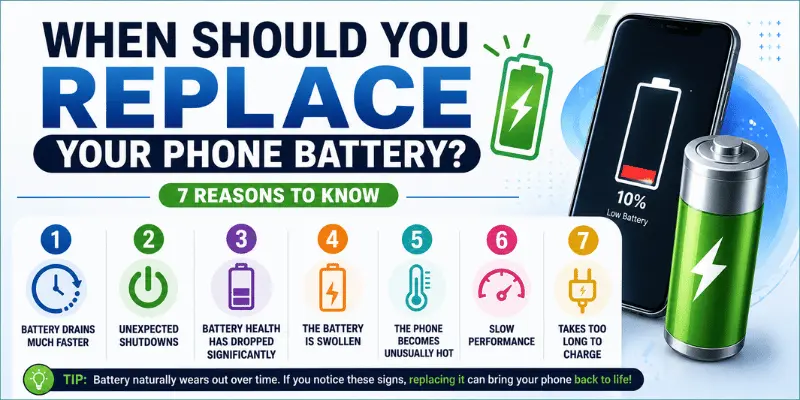
1. Your Phone Battery Drains Much Faster Than Before
One of the most common signs that your phone battery is wearing out is a noticeable decrease in battery life.
For example:
- Your phone used to last all day but now dies before afternoon
- You lose a large percentage of battery while using simple apps
- Your phone loses charge even when you are not actively using it
A healthy battery should provide reliable and predictable performance. If your charging routine has changed because your phone constantly needs power, it may be time to consider a battery replacement.
2. Your Phone Shuts Down Unexpectedly
Does your phone turn off even when the battery percentage shows 20% or 30%?
This usually happens when a battery that is wearing out can no longer provide enough power during demanding situations, such as:
- Opening multiple apps
- Using the camera
- Playing games
- Making calls in cold weather
Unexpected shutdowns are a strong indicator that your battery may no longer be reliable.
3. Your Battery Health Is Below 80%
Battery health percentage is one of the easiest ways to understand your phone battery’s condition.
For iPhone users, Apple provides a Battery Health feature that shows your battery’s maximum capacity compared with when it was new.
A general guideline:
- 100%–90%: Excellent battery condition
- 89%–80%: Normal battery aging, but performance may gradually decrease
- Below 80%: Battery replacement is often worth considering
A battery below 80% does not mean your phone is unusable. However, it usually means your device will not hold as much charge as it did when the battery was new.
Android users can check battery condition through built-in device settings, manufacturer tools, or reliable battery diagnostic apps.
4. Your Phone Takes Longer to Charge
Slow charging does not always mean your battery needs replacement. Charging issues can happen because of several reasons, including:
- Damaged charging cables
- Faulty chargers
- Software problems
- An older battery that has lost some of its capacity
If you have tried a different charger and cable but your phone still charges unusually slowly or cannot hold a full charge, the battery may be the cause.
5. Your Phone Gets Hot During Normal Use
Some warmth during charging or heavy use is normal. However, if your phone frequently becomes hot during simple tasks, it may be a sign of a battery problem.
Pay attention if your phone gets hot while:
- Browsing the internet
- Sending messages
- Making normal calls
- Sitting idle
Excessive heat can shorten your battery’s lifespan over time and may cause it to lose performance faster.
6. Battery Percentage Changes Suddenly
Have you noticed your battery percentage dropping from 40% to 10% within just a few minutes?
This usually happens when an older battery can no longer accurately track how much power it has left.
Common examples include:
- Battery percentage drops quickly without heavy use
- Phone turns off even when it shows remaining charge
- Battery percentage changes unpredictably throughout the day
These problems are common signs that your battery may be losing its ability to hold and deliver power properly.
7. Your Phone Battery Is Swollen
A swollen battery is one of the most serious signs that your phone needs immediate attention.
Common signs include:
- Screen lifting away from the phone body
- Back cover separating
- Unusual bumps or changes in the phone’s shape
A swollen battery can be dangerous and should be replaced as soon as possible. Avoid using a phone with visible battery swelling, as continuing to use it may increase safety risks.
Should You Replace Your Phone Battery or Buy a New Phone?
Many smartphone users assume that battery problems mean it is time for a new device. However, a weak battery does not always mean you need a new smartphone. In many cases, replacing the battery can be a more affordable way to extend the life of your current phone.
Consider replacing the battery if:
- Your phone still performs well
- The camera, screen, and features meet your needs
- The battery is the only major problem
- The repair cost is much lower than buying a new phone
If you are unsure whether a battery replacement is the right choice, a professional inspection can help identify whether the battery is the actual issue. Services offering battery replacement in Antwerp can evaluate your device and recommend the best solution based on its condition.
Consider buying a new phone if:
- Your phone has multiple hardware problems
- It no longer receives important software updates
- The repair cost is close to the phone’s current value
- You need newer features or significantly better performance
For example, an older device with a damaged screen, charging issues, poor battery life, and discontinued software support may not be worth repairing. The right decision depends on your phone’s overall condition, repair cost, and whether it still meets your daily needs.
A simple battery replacement can often give an older smartphone another one to two years of useful life.
A New Battery Will Not Fix Every Power Problem
A new battery can improve your phone’s performance, but it will not solve every power-related issue. This is an important point that many users overlook.
Fast battery drain does not always mean the battery is defective. Problems such as a damaged charging port, liquid damage, hardware faults, software issues, poor-quality accessories, or power-hungry apps can create symptoms that look similar to battery failure.
For example, if your phone is not charging properly, replacing the battery may not help if the real issue is a damaged charging connector.
A proper diagnosis can help prevent unnecessary repairs. An experienced repair shop such as Globe Tech Antwerpen can inspect your device and determine whether the battery or another component is causing the problem.
How Much Does It Cost to Replace a Phone Battery?
The cost of replacing a phone battery depends on:
- Phone model
- Battery quality
- Repair provider
- Whether the battery is original or third-party
Generally, replacing a battery costs much less than purchasing a new smartphone.
Before choosing a repair service:
- Check reviews
- Ask about battery quality
- Confirm warranty options
- Avoid extremely cheap replacements
A low-quality battery may affect your phone’s performance and could create safety concerns.
How to Make Your New Phone Battery Last Longer
After replacing your phone battery, following a few simple habits can help extend its lifespan:
- Avoid extreme heat: High temperatures can damage your battery over time. Avoid leaving your phone in hot cars or direct sunlight.
- Use quality chargers: Cheap, damaged, or uncertified chargers can affect battery performance and charging safety.
- Avoid frequent full discharges: Modern batteries perform better when they are not repeatedly drained completely to 0%.
- Keep your software updated: Software updates often include improvements that help optimize battery usage.
- Reduce unnecessary background activity: Apps running constantly in the background can consume extra power and reduce battery life.
Conclusion
So guys, in this article, we’ve covered when you should replace your phone battery in detail. We discussed the common warning signs, battery health levels, and how to decide whether replacing your battery is better than buying a new phone.
My recommendation is to check your battery condition first instead of upgrading immediately, especially if your phone still works well and the battery is the only issue. A battery replacement can often help you get more value from your device.
Check your battery health today and make the right decision before spending money on a new smartphone.
Frequently Asked Questions (FAQs)
Here are the answers to some common questions about phone battery replacement:
No, 70% battery health is considered low for an iPhone. At this level, you may notice shorter battery life, unexpected shutdowns, or reduced performance. Most users consider replacement when battery health drops below 80%.
Battery replacement is usually worth considering when battery health drops below 80% or when you experience issues like fast draining, shutdowns, or poor performance. The percentage is only a guideline; your daily experience also matters.
iPhone users should consider battery replacement when battery health drops to around 80% or below, or when the phone no longer lasts through normal daily use. Check battery condition from Settings → Battery → Battery Health & Charging.
Android users should consider battery replacement when they experience fast battery drain, frequent charging, overheating, unexpected shutdowns, or reduced performance. The right time depends on the device condition and usage habits.
An 80% battery health level is not necessarily bad, but it means the battery has lost some of its original capacity. Replacement becomes worth considering if shorter battery life starts affecting your daily use.
A worn battery usually affects performance rather than damaging the phone. However, a swollen or damaged battery can create safety risks and should be replaced immediately.
The cost depends on the phone model, battery quality, and repair service. In most cases, replacing an Android battery is much cheaper than buying a new smartphone.






- Be Respectful
- Stay Relevant
- Stay Positive
- True Feedback
- Encourage Discussion
- Avoid Spamming
- No Fake News
- Don't Copy-Paste
- No Personal Attacks
- Be Respectful
- Stay Relevant
- Stay Positive
- True Feedback
- Encourage Discussion
- Avoid Spamming
- No Fake News
- Don't Copy-Paste
- No Personal Attacks
