10 Mobile Display Components That Make Your Smartphone Work
Published: 30 Aug 2026
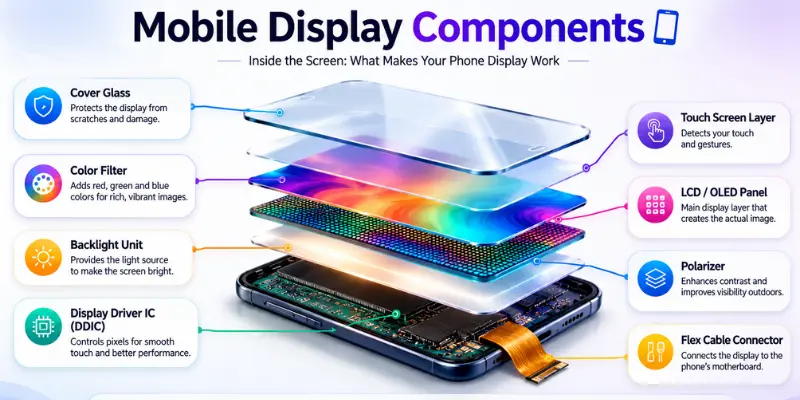
A mobile phone screen may look like one flat piece of glass, but there is much more underneath it. Several small parts work together every time you unlock the phone, watch a video, type a message, or swipe through an app.
The main mobile display components include the cover glass, touchscreen or digitizer, display panel, display driver, touch controller, flex cable, and bonding layers. LCD screens also need a backlight, while OLED screens produce their own light and do not use one.
Some of these parts create the image. Others detect your finger, protect the screen, or carry signals between the display and the phone’s motherboard.
Knowing what each part does can also make screen problems easier to understand.
Main Components of a Mobile Display
Here is a quick look at the main parts found in a modern smartphone screen.
| Mobile Display Component | What It Does |
|---|---|
| Cover glass | Protects the screen from scratches and everyday damage |
| Touchscreen/digitizer | Detects finger touches and gestures |
| Display panel | Produces the image you see |
| Display driver IC | Controls the pixels and sends image information to the panel |
| Touch controller IC | Processes touch signals and their position |
| FPC flex cable | Connects the display assembly to the phone |
| Optical adhesive | Bonds display layers together |
| Backlight | Provides light for an LCD screen |
| TFT backplane | Controls individual pixels |
| Polarizer | Controls light passing through an LCD |
Not every phone uses these parts in exactly the same way. Modern displays often combine several functions into fewer physical layers.
Now, let’s discuss each of these smartphone display components in detail.
1. Cover Glass
The cover glass is the outer surface of a phone screen. It is the surface that your finger touches when using the phone.
Its main job is to protect the more delicate touch and display layers underneath from:
- Scratches
- Small impacts
- Fingerprints
- Dust
- Everyday handling
Many smartphones use chemically strengthened cover glass. Corning, for example, develops Gorilla Glass for mobile devices to improve resistance to scratches, bumps, and drops.
The cover glass should not be confused with the actual display panel. A phone can sometimes have cracked outer glass while the image and touch still work normally. In this situation, the damage may be mostly limited to the protective layer rather than the panel underneath.
Modern phones usually laminate the cover glass closely to the other screen layers, so replacing it is not always as simple as removing one piece of glass.
2. Touchscreen or Digitizer
The touchscreen sensor, commonly called the digitizer, sits beneath or is integrated with the cover glass. It detects where your finger touches the display.
Modern smartphones mostly use capacitive touch technology. Rather than relying on physical pressure, it detects changes in the electrical field when your finger touches or comes close to the sensing area.
This allows phones to recognize actions such as:
- Tapping
- Swiping
- Dragging
- Pinch-to-zoom
- Multi-finger gestures
Capacitive touch became especially useful for smartphones because it supports fast and responsive multi-touch interaction.
The touch sensor is not always a completely separate layer. In modern display designs, touch sensing can be built directly into or onto the display. Samsung Display, for example, has developed Y-OCTA technology that integrates touch functionality into the display itself. Synaptics has also developed in-cell touch solutions that integrate touch sensing with the display.
This helps explain why replacing only the digitizer on a modern phone can be more difficult than it was on older devices.
3. Display Panel
The display panel creates the actual picture.
It contains the pixels that form text, photos, videos, icons, games, and everything else you see on the screen.
Smartphones mainly use two broad display technologies:
- LCD
- OLED
An LCD controls light coming from a separate backlight.
OLED works differently. Its pixels produce their own light, so an OLED display does not need the backlight used in an LCD.
Technologies such as IPS LCD, LTPS LCD, AMOLED and LTPO AMOLED describe different ways these display systems can be built or controlled.
The quality of the display panel has a big effect on:
- resolution,
- brightness,
- colors,
- contrast,
- refresh rate,
- response time,
- and viewing angles.
This is why two phones with the same screen size can still look very different.
4. Display Driver IC
A screen needs instructions before it can show anything. That is where the display driver IC, or display driver integrated circuit, comes in.
The phone’s processor prepares the image, but the display driver helps convert that information into the electrical signals needed to control the screen.
It tells the display which pixels or subpixels need to change and how they should behave. Without the driver system, the panel would have no useful way to turn the image data from the phone into what you see on the screen.
Modern designs may also combine display and touch control functions. Synaptics, for example, offers integrated touch and display IC technology designed to combine these functions into a single solution.
You may see the term TDDI used for this type of integration. It stands for Touch and Display Driver Integration.
5. Touch Controller IC
The digitizer detects a change when you touch the screen, but another component still needs to understand that information.
That part is the touch controller IC.
It reads the signals coming from the touch sensor and determines where the touch happened.
For example, when you tap an app icon:
- The touch sensor detects your finger.
- The touch controller reads the signal.
- It calculates the touch position.
- That information is passed to the phone.
- The operating system responds to the tap.
Touch controllers also need to deal with electrical noise and other conditions that could affect accuracy. Synaptics describes modern touch controllers as providing fast, low-latency touch performance while handling difficult conditions such as charger noise and moisture.
This component also plays a role in how responsive the touchscreen feels.
6. FPC Flex Cable
If you have ever seen a replacement phone screen, you may have noticed a thin ribbon cable coming from the back. This is usually an FPC, or Flexible Printed Circuit, cable.
It provides the electrical connection between the screen assembly and the rest of the phone. Display signals, touch information, and power can travel through this flexible cable.
Its flexible design allows it to bend and fit into the limited space inside a modern smartphone.
A damaged or loose display flex connection can cause problems such as:
- A blank screen
- Flickering
- Display lines
- Intermittent touch
- A screen that cuts out when the phone moves
These symptoms can also have other causes, so a flex cable should not automatically be blamed without checking the phone.
7. Optical Adhesive and Bonding Layers
The screen layers cannot simply sit loosely on top of each other. They need to be bonded.
Modern displays commonly use transparent bonding materials between the cover glass, touch layer and display panel. This helps the screen stay thin while reducing unwanted air gaps between the layers.
Good optical bonding also helps light pass through the screen without unnecessary reflections.
Because these parts are laminated together, screen repair can become more difficult.
A cracked cover glass, for example, may be physically attached to the digitizer and display below it. Specialized repair equipment may be needed to separate and rebond the layers without damaging the panel.
8. Backlight Unit in LCD Screens
The backlight is one of the biggest differences between LCD and OLED displays.
LCD pixels do not create light by themselves.
A light source behind the LCD panel provides the illumination needed for you to see the picture. The liquid crystal layer then controls how that light passes through the pixels.
An LCD backlight system may include parts such as:
- LEDs,
- a light guide,
- diffuser sheets,
- reflector layers,
- and other optical films.
Their job is to spread light across the screen as evenly as possible.
If the backlight develops a problem, the LCD may become extremely dim or appear black even though the panel is still producing an image.
OLED screens do not need this component because their pixels emit their own light.
9. TFT Backplane
Behind the pixels sits another important part called the TFT backplane.
TFT means Thin-Film Transistor.
These tiny transistors work like switches that control individual pixels or subpixels.
Mobile displays can use different backplane technologies. You may have heard names such as:
- amorphous silicon,
- LTPS,
- and LTPO.
The backplane affects how efficiently and quickly the display can control its pixels.
This is also why terms such as LTPS LCD and IPS LCD should not always be treated as direct alternatives. LTPS describes a type of backplane technology, while IPS describes how liquid crystals operate inside an LCD.
10. Polarizers and Optical Layers
Mobile screens also contain optical layers that are difficult to notice from the outside. Polarizers are especially important in LCD displays because they help control the direction of light as it passes through the liquid crystal layer.
An LCD may also contain:
- Color filters
- Diffuser films
- Reflector films
- Other optical layers
These layers work together to manage and control the light produced by the backlight and help produce the final image. Color filters, for example, help create the red, green, and blue colors used to form the image.
These are internal panel layers rather than separate parts that you would normally replace during a phone repair.
LCD vs OLED Display Components
LCD and OLED displays use different technologies, so their internal layers are also different.
LCD Display Structure
A simplified LCD display structure may look like this:
Cover glass → Touch sensor → Polarizer → Color filter → Liquid crystal layer → TFT backplane → Polarizer → Backlight system
OLED Display Structure
A simplified OLED display structure may look like this:
Cover glass → Touch layer → Encapsulation → OLED emitting layers → Electrodes → TFT backplane → Substrate
These structures can vary between display designs, but the main difference is clear: LCD displays need a separate backlight, while OLED displays produce light through their own pixels.
Quick Comparison Table
| Component | LCD | OLED |
|---|---|---|
| Cover glass | Yes | Yes |
| Touch sensor | Yes | Yes |
| Display driver IC | Yes | Yes |
| TFT backplane | Yes | Yes |
| Flex cable | Yes | Yes |
| Backlight | Yes | No |
| Liquid crystal layer | Yes | No |
| Organic light-emitting layers | No | Yes |
| Polarizers | Commonly used | Design-dependent |
| Self-emitting pixels | No | Yes |
How Mobile Display Components Work Together
When you use your phone, several display components work together almost instantly.
Suppose you tap a YouTube video. Your finger touches the cover glass, while the touch sensor detects the interaction. The touch controller determines where you tapped, and the phone processes that input.
The display driver then converts the image data into signals the display panel can use. The TFT backplane controls the pixels, and the display produces the image.
- If it is an LCD, a backlight provides the light.
- If it is OLED, the required pixels light themselves.
All of this happens so quickly that tapping, scrolling, and animations feel like one continuous action.

Which Mobile Display Parts Can Get Damaged?
Different screen problems can point to different parts of the display assembly:
- Cracked outer glass: The phone may still show a normal image and respond to touch. The visible damage may mainly be limited to the cover glass.
- Touch not working: The issue could involve the touch sensor, touch controller, display connection, or another part of the phone.
- Black spots or colored lines: These often appear when the actual display panel has been physically damaged.
- Very dim LCD screen: A backlight problem is one possible cause of a very dim LCD screen.
- Flickering or screen cutting out: The panel, flex cable, display driver, connector, power supply, or software could all be involved.
A single symptom does not always tell you which part is damaged. Proper testing is needed to find the exact cause.
Conclusion
So guys, in this article, we’ve covered parts of a smartphone display in detail. We looked at the cover glass, digitizer, display panel, driver IC, touch controller, flex cable, backlight, TFT backplane, and other important layers.
In my opinion, learning about these parts is useful because it helps you understand how your phone screen works and what may cause common display problems.
If you found this guide helpful, explore our other mobile phone guides for more useful tips and information.
Frequently Asked Questions (FAQs)
Here are answers to some common questions about mobile phone display components.
In most modern smartphones, touch functionality depends on a digitizer or an integrated touch sensor. If the touch-sensing system fails, the display may still show an image while touch input stops working.
Sometimes, yes. If the display panel and touch function are still working, a specialist repair shop may be able to replace only the cover glass. However, modern screens are often tightly laminated, so specialized equipment and repair skills may be required.
A blank screen can result from a damaged display panel, a loose flex connection, a display driver problem, a power issue, or a software fault. Proper testing is needed to determine the exact cause.
No, not all mobile display components are replaced separately. Modern smartphone screens often combine multiple layers and functions into a single display assembly. For example, the cover glass, touch sensor, and display panel may be closely laminated together. Because of this, repair shops often replace the complete display assembly instead of replacing each component individually.
OLED pixels produce their own light when electrically activated. Because the pixels are self-emitting, OLED displays do not require the separate backlight used by LCD screens.



- Be Respectful
- Stay Relevant
- Stay Positive
- True Feedback
- Encourage Discussion
- Avoid Spamming
- No Fake News
- Don't Copy-Paste
- No Personal Attacks
- Be Respectful
- Stay Relevant
- Stay Positive
- True Feedback
- Encourage Discussion
- Avoid Spamming
- No Fake News
- Don't Copy-Paste
- No Personal Attacks
