Types of Fingerprint Sensors in Mobile Phones: Complete Guide
Published: 13 Aug 2026
Have you ever wondered why some phones have fingerprint sensors on the side, while others hide them under the display?
Many users think side-mounted, rear-mounted, and in-display scanners are completely different sensor types. However, these terms mainly describe the sensor’s location. The actual technologies used in mobile phones are capacitive, optical, and ultrasonic.
In this guide, you’ll learn about the different types of fingerprint sensors in mobile phones, how each one works, where it is commonly used, and how they differ in speed, accuracy, and convenience.
What Is a Fingerprint Sensor in a Mobile Phone?
A fingerprint sensor is a biometric security component that scans the unique pattern of ridges and valleys on your fingertip.
Fingerprint recognition can be used to:
- Unlock the mobile phone
- Approve mobile payments
- Open protected applications
- Confirm purchases
- Access saved passwords
- Verify identity in banking applications
- Protect private files and folders
How Many Types of Fingerprint Sensors Are Used in Mobile Phones?
The three main fingerprint sensor technologies used in mobile phones are:
- Capacitive fingerprint sensor
- Optical fingerprint sensor
- Ultrasonic fingerprint sensor
Each type captures your fingerprint differently.
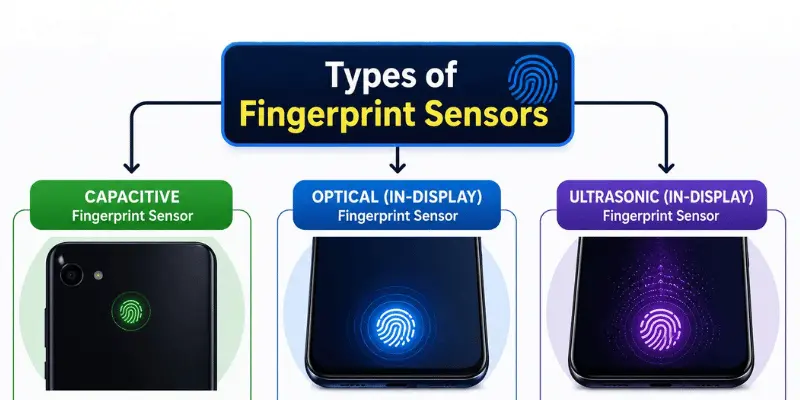
1. Capacitive Fingerprint Sensor
A capacitive fingerprint sensor uses a group of very small electrical components to detect the pattern of your finger. When you place your finger on the sensor, the raised ridges and lower valleys create different electrical signals. The sensor measures these differences and creates a digital representation of your fingerprint.
Capacitive fingerprint sensors became popular in smartphones because they are compact and can provide fast, reliable fingerprint recognition.
Where Are Capacitive Fingerprint Sensors Located?
Capacitive sensors are commonly found:
- On the back of the phone
- Inside the side power button
- Below the display
- Inside a physical home button
- On the front bezel
A side-mounted fingerprint reader is usually a capacitive sensor built into the phone’s power button. Rear-mounted sensors also commonly use capacitive technology.
| Advantages of Capacitive Fingerprint Sensors |
|---|
|
| Disadvantages of Capacitive Fingerprint Sensors |
|---|
|
Is a Capacitive Fingerprint Sensor Good?
A capacitive sensor is a good choice for users who value speed and reliability. It may not look as modern as an in-display scanner, but a well-made capacitive sensor can be faster and easier to use than some low-quality in-display sensors.
2. Optical Fingerprint Sensor
The optical fingerprint scanner works using light to create a picture of your fingertip.
As soon as you press your finger against the fingerprint recognition section, the screen illuminates your finger. A little camera beneath the screen picks up the light bouncing back off the ridges and grooves.
Your phone will compare this picture against the stored fingerprint data template.
According to Samsung Display, optical fingerprint-on-display sensors use light, and ultrasonic sensors use sound.
Where Are Optical Fingerprint Sensors Used?
Optical fingerprint sensors are mainly used under the displays of smartphones.
They are commonly found in:
- Budget phones with AMOLED displays
- Mid-range Android phones
- Some premium Android devices
- Phones designed with an edge-to-edge display
When an optical fingerprint sensor is active, you may notice a bright light under your finger. The light helps the sensor capture a clear fingerprint image.
| Advantages of Optical Fingerprint Sensors |
|---|
|
| Disadvantages of Optical Fingerprint Sensors |
|---|
|
How Can You Identify an Optical Fingerprint Sensor?
Your phone probably has an optical fingerprint sensor when:
- The sensor is under the display.
- A bright light appears under your finger.
- The scanner briefly illuminates part of your fingertip.
- The phone uses an OLED or AMOLED display.
- The manufacturer describes it as an optical in-display sensor.
Not every in-display fingerprint reader is optical. Some premium phones use ultrasonic technology instead.
3. Ultrasonic Fingerprint Sensor
An ultrasonic fingerprint scanner is designed to use ultrasonic waves of high frequency to recognize fingerprint patterns.
An ultrasonic wave is sent from the scanner towards the finger. The ridges and valleys of your fingerprint reflect these waves differently, allowing the sensor to create a detailed representation of the fingerprint.
According to Qualcomm, its 3D Sonic technology works by using ultrasonic pulses to read the ridges and valleys of the finger, not by photographing.
Where Are Ultrasonic Fingerprint Sensors Used?
Ultrasonic fingerprint sensors are usually placed under the phone’s display.
They are more commonly found in:
- Premium smartphones
- Selected flagship Android phones
- Some Samsung Galaxy devices
- Phones using advanced Qualcomm fingerprint technology
| Advantages of Ultrasonic Fingerprint Sensors |
|---|
|
| Disadvantages of Ultrasonic Fingerprint Sensors |
|---|
|
Is an Ultrasonic Fingerprint Sensor Better?
An ultrasonic fingerprint sensor is generally considered the more advanced under-display option because it uses sound waves rather than relying only on a visible image.
However, the real experience depends on the quality of the sensor, its size, the phone’s software, finger condition, display condition and screen protector.
Capacitive vs Optical vs Ultrasonic Fingerprint Sensors
Each fingerprint technology has its own strengths and limitations. Here’s a quick comparison of capacitive, optical, and ultrasonic sensors
| Feature | Capacitive | Optical | Ultrasonic |
|---|---|---|---|
| Scanning method | Electrical charge | Reflected light | Sound waves |
| Common location | Side, rear or front button | Under display | Under display |
| Requires scanner light | No | Yes | No |
| Direct physical sensor | Usually yes | No | No |
| Relative cost | Low to moderate | Moderate | Usually higher |
| Common phone range | Budget to premium | Budget to premium | Mostly premium |
| Works in darkness | Yes | Yes, using its own light | Yes |
| Screen protector concerns | Usually low | Possible | Possible |
| Fingerprint detail | Surface pattern | Two-dimensional image | Detailed depth map |
| Main strength | Speed and reliability | Affordable in-display design | Advanced under-display scanning |
Types of Fingerprint Sensors Based on Their Position
Fingerprint sensors can also be grouped according to where they are placed on a phone.
1. Front-Mounted Fingerprint Sensor
A front-mounted fingerprint sensor is placed on the front of the phone, usually inside a physical home button or front bezel. It was common on older smartphones with large top and bottom bezels.
| Benefits: |
|---|
|
| Limitations |
|---|
|
2. Rear-Mounted Fingerprint Sensor
A rear-mounted sensor is placed on the back of the phone, usually near the camera area. It normally uses capacitive technology.
| Benefits: |
|---|
|
| Limitations |
|---|
|
3. Side-Mounted Fingerprint Sensor
A side-mounted fingerprint sensor is usually built into the phone’s power button. Most side-mounted scanners use capacitive technology.
| Benefits |
|---|
|
| Limitations |
|---|
|
4. In-Display Fingerprint Sensor
An in-display fingerprint sensor is placed underneath the phone’s screen.
It may use:
- Optical technology
- Ultrasonic technology
Most in-display readers are designed to work with OLED or AMOLED screens because these display technologies allow the required light or signal to pass through specific areas.
| Benefits |
|---|
|
| Limitations |
|---|
|
Does a Screen Protector Affect the Fingerprint Sensor?
A screen protector may affect an under-display fingerprint sensor depending on its thickness, material, and fit.
Google and Samsung both warn that some screen protectors can reduce fingerprint recognition performance.
To reduce fingerprint problems:
- Install a screen protector compatible with your device model.
- Check that the screen protector is compatible with your phone’s in-display fingerprint sensor.
- Make sure there are no air bubbles over the fingerprint sensor area.
- Make sure the screen is clean before registering your fingerprint.
- Re-register your fingerprint after installing a screen protector.
- Replace a scratched or damaged screen protector.
Why Does a Fingerprint Sensor Fail to Recognize a Finger?
A fingerprint sensor may fail because of:
- Wet fingers
- Very dry skin
- Oil or dirt on the fingertip
- Dirt on the sensor
- Incorrect finger placement
- A damaged screen protector
- Cuts or scratches on the finger
- A damaged sensor
- Poor fingerprint registration
- Software problems
- A phone case blocking a side sensor
How to Improve Fingerprint Recognition
Follow these practical tips to make your fingerprint sensor work better:
- Register your finger carefully: Move your finger slightly during registration so the phone captures the centre, sides, and tip of your fingerprint.
- Add more than one finger: Register fingers from both hands so you have another option if one finger is wet, dirty, or unavailable.
- Keep the sensor clean: Wipe the physical sensor or fingerprint area with a clean, soft cloth.
- Keep your finger clean and dry: Remove any water, oil, or dirt before scanning to improve recognition.
- Use a compatible screen protector: Choose a protector that is compatible with your phone’s fingerprint sensor.
- Register again after adding a protector: Re-register your fingerprint if recognition becomes less reliable after installing a new protector.
- Install software updates: Manufacturers may improve fingerprint recognition through software updates.
- Place your finger correctly: Cover the sensor fully and keep your finger still until the phone responds.
Common Fingerprint Sensor Myths
There are several common myths about fingerprint sensors. Let’s clear up some of them.
Myth 1: Every In-Display Sensor Is Ultrasonic
This is incorrect. In-display fingerprint sensors can be optical or ultrasonic.
Myth 2: Every Physical Sensor Is Outdated
A physical capacitive sensor may still be faster and more reliable than a low-quality in-display sensor.
Myth 3: Ultrasonic Sensors Always Work Through Every Protector
A thick or incompatible screen protector can also interfere with an ultrasonic sensor.
Myth 4: The Phone Stores a Normal Photo of Your Finger
This is not usually how fingerprint authentication works. Modern fingerprint systems create and compare a fingerprint template rather than storing a normal photo of your finger. The fingerprint data is typically protected by the phone’s security system.
Myth 5: Fingerprint Unlock Replaces the PIN Completely
Fingerprint unlock does not replace your PIN, password, or passcode. Phones may still require a backup security method after a restart, several failed fingerprint attempts, or certain security-sensitive actions.
Conclusion
Capacitive, optical, and ultrasonic fingerprint sensors all help protect mobile phones, but they scan fingerprints in different ways.
Capacitive sensors use electrical signals, optical sensors use light, and ultrasonic sensors use sound waves. The best option depends on your budget, preferred sensor position, and expected performance.
In my opinion, capacitive sensors are still the best choice for users who want speed and reliability, while ultrasonic sensors are better for people who prefer advanced in-display technology.
Always check real user feedback and phone reviews before making your final decision.




- Be Respectful
- Stay Relevant
- Stay Positive
- True Feedback
- Encourage Discussion
- Avoid Spamming
- No Fake News
- Don't Copy-Paste
- No Personal Attacks
- Be Respectful
- Stay Relevant
- Stay Positive
- True Feedback
- Encourage Discussion
- Avoid Spamming
- No Fake News
- Don't Copy-Paste
- No Personal Attacks
