What Is a Gyroscope Sensor? Everything Phone Users Need
Published: 21 Jun 2026
Tilt your phone during a game or move it around while using an AR app, and it responds instantly. Ever wondered how this happens? The answer lies in a small component called a gyroscope.
In this guide, you will learn what a gyroscope sensor in a phone is, how it works, its common uses, benefits, limitations, and how to fix common gyroscope problems. So, let’s dive in
What Is Gyroscope Sensor in Phone?
A phone’s gyroscope sensor is a small motion detector that measures how it rotates, tilts, twists, and turns. In layman’s terms, it allows your phone to perceive its movement in three dimensions.
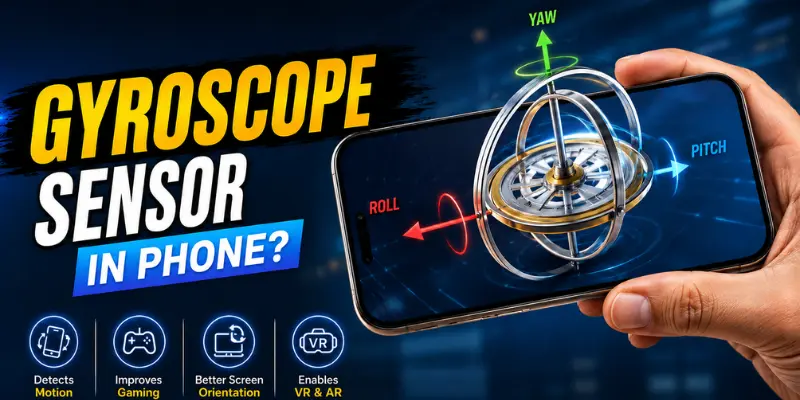
For example, when you rotate your phone left or right in a sports game, the gyroscope assists the game in detecting that movement. When you move your phone while using an augmented reality app, the gyroscope helps the program figure out where you’re aiming.
How Does a Phone Gyroscope Work? Step by Step
A phone gyroscope helps your phone understand how it moves. It checks when your phone tilts, turns, or rotates. Here is how it works step by step:
1. The gyroscope sensor keeps checking your phone’s movement. When you tilt, turn, or rotate your phone, the sensor quickly notices it.
2. The gyroscope not only detects movement. It also measures how fast your phone rotates. It can tell when you move your phone slowly or quickly.
3. The gyroscope checks movement in three main directions:
- X-axis: forward and backward tilt
- Y-axis: left and right tilt
- Z-axis: side-to-side rotation
4. These directions help your phone understand the exact way it is moving. For example, your phone can know if you tilt it forward, move it left, or turn it side to side.
5. These three movements also have simple names:
- Pitch: when your phone tilts forward or backward
- Roll: when your phone tilts left or right
- Yaw: when your phone rotates side to side
6. Modern phones use a very small gyroscope sensor inside a chip. This sensor uses MEMS technology. In simple words, MEMS means tiny moving parts and electronic parts working together.
7. A phone gyroscope does not use a big spinning wheel. Old gyroscopes used spinning parts, but phones use tiny vibrating parts inside the chip. These tiny parts feel the movement when you rotate your phone.
8. After detecting movement, the gyroscope turns it into small electrical signals. Your phone reads these signals very fast and responds quickly during games, AR apps, videos, and camera use.
Gyroscope vs Accelerometer: What’s the Difference?
Many people confuse a gyroscope with an accelerometer because both are motion sensors. But they are not the same.
A gyroscope measures rotation. It detects how the phone twists, tilts, or turns.
An accelerometer measures linear movement. It detects motion in a straight line, such as moving up, down, forward, backward, or shaking.
Here is the simple difference
| Feature | Gyroscope | Accelerometer |
|---|---|---|
| Measures | Rotation and angular velocity | Linear movement and acceleration |
| Detects | Tilt, twist, turn, orientation change | Movement, shaking, direction |
| Best for | Gaming, AR/VR, camera stabilization | Step counting, screen rotation, movement detection |
| Example | Aiming in a shooting game by tilting the phone | Counting steps while walking |
Do You Need a Gyroscope on Your Phone?
Whether you need a gyroscope depends on how you use your phone.
If you only use your phone for calls, messages, browsing, watching videos, and social media, you may not notice the gyroscope much. Your phone can still work without it.
But if you use gaming, AR, VR, camera features, or motion controls, then a gyroscope becomes more important.
| User Type | Need for Gyroscope |
|---|---|
| Basic user | Low |
| Social media user | Low to medium |
| Mobile gamer | High |
| AR/VR user | Very high |
| Camera user | Medium to high |
| Budget phone buyer | Should check before buying |
Common Uses of Gyroscope Sensor in Mobile Phones
The gyroscope sensor is used in many smartphone features, some of which you use every day without even noticing. It helps your phone detect rotation and movement, making games, AR apps, VR experiences, cameras, and motion controls work more accurately.
Here are some of the most common uses of a gyroscope sensor in mobile phones:
- Mobile Gaming: The gyroscope improves motion controls in mobile games by detecting how you move your phone. For example, in racing games, you can tilt your phone left or right to steer instead of relying only on on-screen controls. This creates a more realistic and immersive gaming experience.
- AR Apps: AR means augmented reality. With these apps, digital objects are placed in the real world using your camera. The gyroscope maintains the stability of objects when the phone moves.
- VR and 360-Degree Videos: The gyroscope tracks your phone’s movement and adjusts the view accordingly, making VR and 360-degree videos feel more immersive.
- Camera Stabilization: The gyroscope helps reduce small shakes while recording videos. This makes videos look smoother and clearer.
- Motion Gestures: Some smartphones use the gyroscope to support motion-based gestures and shortcuts. For example, you may be able to flip your phone to mute incoming calls, rotate it to activate certain features, or use gesture controls in supported apps and games.
Pros and Cons of Gyroscope Sensor in Phone
The gyroscope sensor is useful, but like every phone feature, it has both advantages and limitations.
| Pros of Gyroscope Sensor: |
|---|
|
| Cons of Gyroscope Sensor: |
|---|
|
Overall, the benefits are more important than the downsides, especially for gaming, camera, AR, and VR users.
Common Gyroscope Problems and How to Fix Them
Gyroscope sensors are very useful in smartphones, but sometimes they may not work properly. This can affect gaming, AR apps, VR experiences, camera movement, and motion controls. Here are some common problems and their easy fixes:
1. Gyroscope Not Working in Games
If motion controls are not responding in games:
- Check if the gyroscope is enabled in the game settings.
- Restart the game or your phone.
- Update the game to the latest version.
2. AR Apps Not Tracking Properly
If AR objects look unstable or move incorrectly:
- Keep your phone steady during setup.
- Update the AR app.
- Make sure the gyroscope sensor is working correctly.
3. VR View Not Moving Smoothly
If VR apps do not respond to movement:
- Restart the VR app.
- Update your phone software.
- Test the gyroscope using a sensor test app.
4. Delayed or Slow Motion Response
If phone movement feels laggy or delayed:
- Turn off battery saver mode.
- Close background apps.
- Recalibrate the gyroscope if your phone supports it.
5. Camera Stabilization Not Working
If videos look shaky:
- Update your camera app.
- Restart your phone.
- Avoid using unstable third-party camera apps.
If the problem still continues, the gyroscope may be damaged and will require professional repair.
Conclusion
So guys, in this article, we’ve covered what a gyroscope sensor in a phone is in detail. We discussed how it works, its common uses, benefits, limitations, and ways to fix common gyroscope issues.
My recommendation is to choose a phone with a gyroscope sensor if you enjoy mobile gaming, AR apps, VR experiences, or advanced camera features, as it can significantly improve your overall experience.
If you found this guide helpful, feel free to explore our other smartphone guides and tips to make smarter buying decisions.
Frequently Asked Questions (FAQs)
Here are the answers to some common questions about what is a gyroscope sensor :
A gyroscope helps your phone figure out when you move. It checks to see if your phone tilts, turns, flips, or spins. It makes games, augmented reality (AR) apps, virtual reality (VR) apps, camera movies, and motion controls easier to use.
A gyroscope is not essential for basic tasks like calling, texting, browsing, and using social media. However, it becomes important if you play motion-based games, use AR or VR apps, or want better camera stabilization. If you plan to use these features regularly, choosing a phone with a gyroscope sensor is a good idea.
You can check whether your phone has a gyroscope by looking at its specifications on the manufacturer’s website or using a sensor testing app. Many modern smartphones, especially mid-range and flagship models, include a built-in gyroscope. Some budget phones may not have this sensor, so it is always worth checking before buying.
Gyroscope sensors are very common on most iPhones, gaming phones, flagship phones, and most mid-range phones. Some budget-priced Android phones can’t have one. Look at the specs of the mobile phone before purchasing.





- Be Respectful
- Stay Relevant
- Stay Positive
- True Feedback
- Encourage Discussion
- Avoid Spamming
- No Fake News
- Don't Copy-Paste
- No Personal Attacks
- Be Respectful
- Stay Relevant
- Stay Positive
- True Feedback
- Encourage Discussion
- Avoid Spamming
- No Fake News
- Don't Copy-Paste
- No Personal Attacks
