NFC in Mobile Phones Explained: Advantages, Disadvantages & Uses
Published: 9 Sep 2026
Near Field Communication, commonly known as NFC, has become a useful feature in modern smartphones. It allows compatible devices to communicate over a very short distance, making tasks such as contactless payments, sharing information, and connecting devices quick and convenient.
You may already be using NFC without realizing it. For example, when you tap your phone on a contactless payment terminal, NFC helps establish the connection needed to process the transaction. However, NFC is not useful in every situation and comes with certain limitations.
Understanding the advantages and disadvantages of NFC in mobile phones can help you know what this technology can do, where it may not be suitable, and whether it is worth using on your smartphone.
What Is NFC in Mobile Phones?
NFC is a wireless communication system that enables two compatible devices to communicate when they are kept very near to each other.
The range of operation of NFC is just a few centimeters.
For example, an NFC-enabled smartphone can communicate with:
- Contactless payment terminals
- NFC tags
- Other NFC-enabled smartphones
- Smart locks
- Public transport systems
- Access cards
- Compatible electronic devices
Unlike Bluetooth, NFC usually does not require users to manually pair two devices before establishing a connection.
This makes it useful for quick interactions where convenience and speed are important.
How Does NFC Work in a Smartphone?
NFC uses short-range wireless communication to allow compatible devices to exchange information or perform an action while they are very near each other. When NFC is enabled on your smartphone, placing it near an NFC reader or tag can establish communication within seconds.
For example, a contactless mobile payment using NFC usually works like this:
- Unlock your smartphone if required.
- Bring your phone close to the contactless payment terminal.
- The phone and terminal communicate through NFC.
- The payment system processes the transaction.
- Authentication or verification is completed if required.
This whole process takes only a few seconds.
Advantages and Disadvantages of NFC in Mobile Phones
Like any smartphone feature, NFC has strengths that can make certain tasks easier, along with limitations that may affect how and where it can be used.
The table below gives a quick overview of its main advantages and disadvantages.
| Pros |
|---|
|
| Cons |
|---|
|
Now, let’s discuss each of these points in detail.
Advantages of NFC
NFC can make several everyday smartphone tasks faster and more convenient. From contactless payments to quick connections and digital access, its benefits can be useful in different situations.
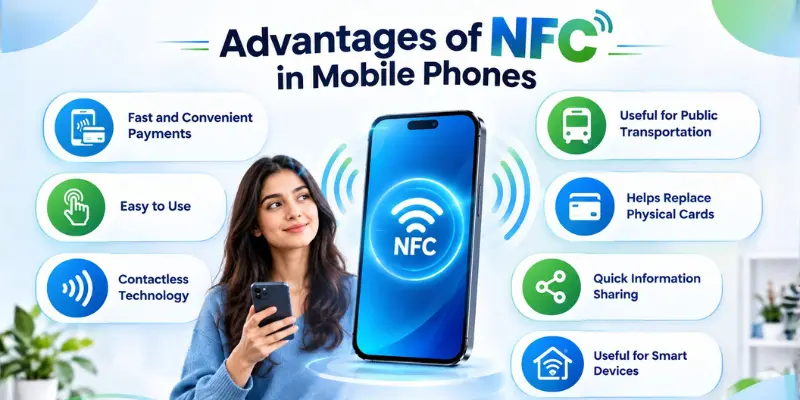
1. Fast and Convenient Payments
One of the main strengths of NFC technology in cell phones is contactless payment. Instead of carrying cash or swiping a credit card, you can pay by tapping your phone near a payment terminal.
NFC technology can be used by mobile wallets to offer a fast payment experience. This is very helpful for fast transactions, like going shopping, travelling or buying food.
2. Easy to Use
NFC is relatively simple and easy to use. Unlike some wireless technologies, it usually does not require complicated pairing or setup.
In many cases, users simply need to bring their phone close to an NFC reader or tag to start an interaction. Depending on the NFC tag or service, this could open a webpage, display information, connect to a service, or trigger a predefined action on the smartphone.
3. Contactless Technology
Another important benefit of NFC is that communication can happen without physically connecting devices. Users do not have to plug cables into their phones or insert cards into machines.
Contactless interaction can be especially useful in places such as:
- Shops
- Airports
- Hotels
- Offices
- Hospitals
- Public transportation systems
This makes NFC suitable for situations where quick interactions are required.
4. Useful for Public Transportation
Many transportation systems use contactless technologies to make passenger entry faster.
If NFC is available, NFC-enabled cell phones could be used by passengers to pay using digital tickets or mobile payment services. Rather than looking for their paper tickets or cards, passengers will only need to wave their phone in front of the reader.
This could make transport more convenient for commuters.
5. Helps Replace Physical Cards
NFC technology may reduce the need to carry certain physical cards.
Depending on the services available in a particular country or organization, NFC-enabled smartphones may be used for:
- Payment cards
- Digital access credentials
- Hotel room access
- Event tickets
- Loyalty programs
Keeping supported credentials digitally on a smartphone can make them easier to manage.
6. Quick Information Sharing
NFC technology is also suitable for transferring or initiating the flow of tiny bits of information.
For instance, organizations can make use of NFC-enabled tags on posters, merchandise, menus, business cards, or any other tangible item.
Upon tapping the tag with their phones, users could be redirected to:
- A website
- Product information
- Contact details
- An application
- A digital menu
- A promotional page
This creates a quick connection between physical objects and digital information.
7. Useful for Smart Devices
NFC can simplify interactions with some smart devices. Instead of manually configuring a device, NFC may be used to initiate a connection or provide setup information.
Depending on device compatibility, this technology can be useful with speakers, headphones, smart home products, locks, and other electronic devices.
Disadvantages of NFC in Mobile Phones
NFC can make some smartphone tasks easier, but it also has a few limitations that users should know about.
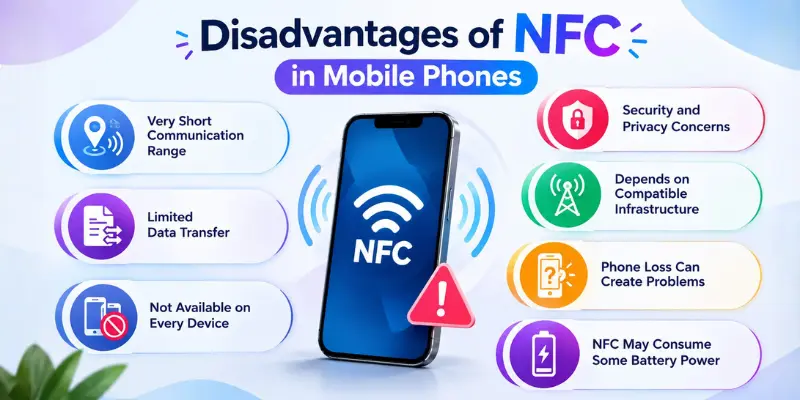
1. Very Short Communication Range
One of the main disadvantages of NFC is its limited operating distance. The devices generally need to be only a few centimeters apart to communicate.
This makes NFC unsuitable for situations that require wireless communication over longer distances. Technologies such as Bluetooth and Wi-Fi are more appropriate when devices need to communicate from farther away.
2. Limited Data Transfer
NFC is mainly designed for quick exchanges of relatively small amounts of information.
It is not normally the best option for transferring large files such as:
- High-resolution videos
- Large photo collections
- Applications
- Large documents
Other technologies such as Wi-Fi, cloud services, or Bluetooth may provide better options for larger transfers.
3. Not Available on Every Device
Although NFC is common in many modern smartphones, it is not supported on every phone, accessory, payment terminal, or service.
A cheaper or older smartphone might not have NFC functionality. Even if a phone supports NFC, the required service may not be available in the user’s area.
Therefore, users cannot always rely on NFC being available everywhere.
4. Security and Privacy Concerns
NFC may involve sensitive information, especially when it is used for payments, access control, or identification. Although NFC services use different security measures, users should still be cautious.
Potential concerns can include:
- Unauthorized transactions
- Malicious NFC tags
- Data interception attempts
- Social engineering
- Lost or stolen smartphones
Users should use device security features and avoid interacting with unknown or suspicious NFC tags.
5. Depends on Compatible Infrastructure
Having NFC support on your phone does not necessarily mean you can use it everywhere. The service you want to use must also have the necessary NFC infrastructure, such as compatible readers or access systems.
For example, a phone may support NFC payments, but a store may not have a compatible payment terminal. In those situations, you can’t use the NFC feature on your phone for that service.
6. Phone Loss Can Create Problems
A smartphone may contain payment credentials, digital tickets, access information, and other services connected to NFC. If the device is lost or stolen, these services could become a concern.
Strong device authentication can help reduce this risk. Users should protect their smartphones using features such as:
- PIN codes
- Strong passwords
- Fingerprint authentication
- Facial recognition
- Remote device locking or wiping
These protections can help prevent unauthorized access.
7. NFC May Consume Some Battery Power
NFC needs hardware and software on the device to function. Having NFC turned on may consume some battery power, although the impact is usually smaller than features such as GPS or mobile data.
Individuals who do not often use NFC may prefer to turn it off to help save battery.
Common Uses of NFC in Mobile Phones
NFC has applications in several areas of everyday life.
NFC for Mobile Payments
Contactless payments are among the most familiar uses of NFC. Users can store supported payment methods in compatible mobile wallets and make purchases by placing their smartphones near contactless payment terminals.
Authentication methods such as fingerprints, face recognition, passwords, or PINs may also be required depending on the device and service.
NFC in Public Transportation
Some public transportation networks allow passengers to use NFC-enabled phones for fares and ticket verification. This can reduce dependence on physical tickets and transportation cards.
Availability varies depending on the transportation provider and location.
NFC Tags
An NFC tag is a small chip that can contain or trigger digital information. Businesses and individuals can use NFC tags for different purposes.
For example, tapping an NFC tag may:
- Open a webpage
- Show contact information
- Display a digital menu
- Launch an application
- Provide product information
- Trigger a compatible smartphone action
NFC for Access Control
Some organizations use NFC-based systems for access management. Compatible smartphones or credentials may be used to enter offices, hotel rooms, buildings, or restricted spaces.
Organizations should use appropriate security controls because access credentials can be sensitive.
NFC in Marketing
Businesses can place NFC tags on advertisements, packaging, posters, or displays. Customers can tap the tag to access additional digital content.
For example, a product package could include an NFC tag directing customers to instructions, warranty information, promotional offers, or product details.
Is NFC Safe to Use on Mobile Phones?
NFC can be reasonably safe when supported by strong security measures and used responsibly.
Its short operating range provides some protection because devices generally need to be very close before communication can occur. However, no wireless technology should be considered completely risk-free.
Users can improve NFC security by:
- Keeping the smartphone operating system updated
- Using a strong screen lock
- Enabling biometric authentication when appropriate
- Avoiding suspicious NFC tags
- Using trusted payment applications
- Reviewing payment notifications
- Reporting lost or stolen devices quickly
- Using remote locking features where available
The security of an NFC transaction also depends on the application, device, payment provider, and system being used.
NFC vs Bluetooth
NFC and Bluetooth are both wireless technologies, but they are designed for different purposes.
| NFC | Bluetooth |
|---|---|
| Works over a very short distance | Works over a longer distance |
| Usually requires minimal setup | May require device pairing |
| Suitable for quick interactions | Suitable for continuous connections |
| Commonly used for contactless payments | Commonly used for audio and accessories |
| Handles relatively small exchanges | Can transfer larger amounts of data |
Neither technology is necessarily better in every situation.
NFC is useful when users need a quick, close-range interaction, while Bluetooth is more suitable for ongoing wireless communication between devices.
Conclusion
So guys, in this article, we’ve covered the pros and cons of NFC in mobile phones in detail. NFC can be a convenient feature for payments, transportation, access control, NFC tags, and compatible smart devices, but you should always use it carefully.
My advice is to use NFC when you need it, rely on trusted apps and services, and keep your phone protected with a strong screen lock.
If this guide helped you understand NFC better, share it with someone who may find it useful and explore more smartphone tips on our website.
Frequently Asked Questions (FAQs)
Here are the answers to some common questions about the benefits and drawbacks of NFC :
You can usually check your phone’s Settings menu by searching for “NFC” or looking under Connections, Connected Devices, or a similar section. You can also check your phone model’s official specifications to confirm whether it supports NFC.
Yes, NFC can work without Wi-Fi because it uses short-range wireless communication rather than a Wi-Fi connection. However, some NFC-based services, such as mobile payments or apps that require online verification, may still need an internet connection.
Yes, NFC can be a useful feature if you regularly use contactless payments, digital access, NFC tags, or other compatible services. It isn’t essential for everyone, but NFC gives you more options for quick wireless interactions.
If you frequently use contactless payments or other NFC features, leaving it on can be more convenient. If you rarely use NFC, you can turn it off and enable it when needed. The choice mainly depends on how often you use NFC.
If NFC is not working on your phone, there could be several reasons. NFC may be turned off, your phone may not support the required NFC feature, or the NFC reader or tag may have a problem.
First, make sure NFC is enabled and try moving your phone closer to the reader or tag. If it still does not work, try another compatible reader or tag to check whether the problem is with your phone or the NFC device.


- Be Respectful
- Stay Relevant
- Stay Positive
- True Feedback
- Encourage Discussion
- Avoid Spamming
- No Fake News
- Don't Copy-Paste
- No Personal Attacks
- Be Respectful
- Stay Relevant
- Stay Positive
- True Feedback
- Encourage Discussion
- Avoid Spamming
- No Fake News
- Don't Copy-Paste
- No Personal Attacks
