Is MagSafe Worth It? Pros, Cons and Key Facts Explained
Published: 21 Sep 2026
MagSafe is a magnetic technology that allows compatible iPhones to attach to chargers and other accessories. It supports wireless charging and works with a variety of accessories, including phone stands, wallets, car mounts, and battery packs.
The magnetic connection makes it easier to attach a charger or accessory to the back of your iPhone. Instead of carefully positioning your phone on a traditional wireless charging pad, the magnets help align the charger with the phone’s charging coils.
However, MagSafe also has some disadvantages. MagSafe accessories can be more expensive than traditional charging options, wireless charging may generate heat, and wired charging can still be faster. So, what are the advantages and disadvantages of MagSafe? Let’s explore both sides in detail.
Advantages and Disadvantages of MagSafe
Before looking at each point in detail, here’s a quick comparison of the key advantages and disadvantages of MagSafe.
| Pros: |
|---|
|
| Cons: |
|---|
|
Advantages of MagSafe
MagSafe offers several useful benefits for compatible iPhones. From easier wireless charging to convenient accessories, it can make everyday phone use more comfortable. Here are some of the main advantages:
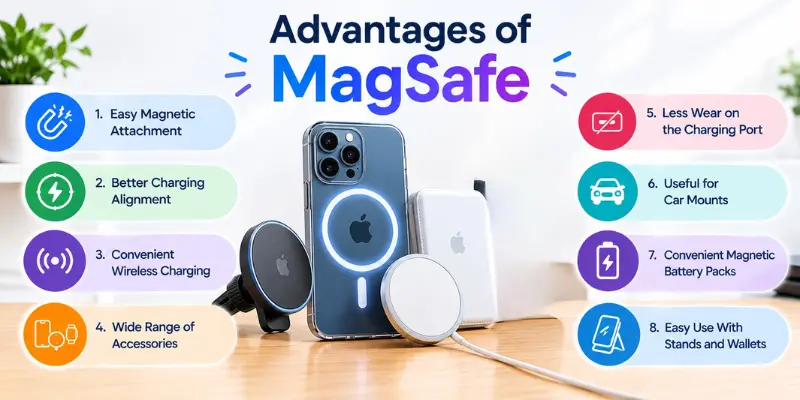
1. Easy Magnetic Attachment
One of the most important benefits of MagSafe technology is its easy magnetic connection. All you need to do is place a compatible charger or accessory near the back of your iPhone, and the magnets will attract it and hold it in place. Therefore, you don’t need to waste time positioning the charger manually.
For example, if you want to charge your iPhone before sleeping, simply place the MagSafe charger near the back of your iPhone, and the magnets will align it automatically. This makes charging more convenient than constantly readjusting a phone on a charging pad.
2. Better Charging Alignment
Proper alignment is important when using wireless charging technology. If a phone is improperly positioned on a conventional wireless charging pad, the charging coils may not align correctly, which can affect charging. The use of magnets in MagSafe helps ensure that the charger is properly aligned with the phone’s charging coils.
Wireless charging becomes more convenient through the use of this system. This is because there is no need for one to ensure that the phone is properly positioned before charging begins.
3. Convenient Wireless Charging
The MagSafe feature enables users to charge compatible iPhones without plugging a cable into the phone. The charger connects to the back of the phone, and charging occurs wirelessly. For users who do not like to connect and disconnect cables each time they charge their phone, this may be an attractive solution.
This way of charging can be quite handy at places such as desks and bedside tables. When needed, you can simply pick up your phone and place it back on the charger without connecting any cables.
4. Wide Range of Accessories
The reason MagSafe is practical is that it works not only with chargers but with a variety of accessories such as wallets, car mounts, stands, and battery packs. This allows the phone owner to have multiple options for using his phone.
For example, a student may choose a magnetic stand to watch an educational video, while someone who travels by car may prefer using a car mount. A magnetic wallet can also be attached when going out and removed when it is no longer needed.
5. Less Wear on the Charging Port
MagSafe wireless charging does not require you to connect a charging cable to your phone every time you need to charge it. If you usually charge your phone multiple times a day, this may reduce the number of times you plug a cable into the charging port.
Using a MagSafe charger can therefore be convenient for people who charge their phones frequently. It does not mean that the charging port will never be used; you can still use a cable whenever needed, but MagSafe gives you another way to charge your device.
6. Useful for Car Mounts
MagSafe makes it easier to use your phone inside a vehicle when paired with a compatible magnetic mount. Instead of placing your phone in a standard mount and adjusting its arms, you can attach it directly to the magnetic mount.
This can be useful for people who drive frequently. The phone can be attached or removed quickly, and some magnetic mounts can even charge it. However, the mount must be compatible with your phone and suitable for safe use while driving.
7. Convenient Magnetic Battery Packs
Batteries that are compatible with MagSafe can easily attach themselves to the back of an iPhone. This way, the user will have a very convenient option for carrying extra power without having to use the battery pack separately.
The battery pack can come in handy when you are going out for long distances or traveling for hours without getting access to electricity. However, the added bulkiness of the battery may not feel comfortable to everyone.
8. Easy Use With Stands and Wallets
MagSafe makes it easier to attach and remove everyday accessories. You can attach a magnetic wallet to the back of a MagSafe-compatible iPhone when you need to carry cards. Similarly, you can attach a stand whenever you want to keep your phone upright on a desk.
This makes it easy to switch between different accessories based on your needs, adding convenience to everyday phone use.
Disadvantages of MagSafe
While MagSafe offers several convenient features, it also has some drawbacks. From slower charging to higher accessory costs, here are some of the main disadvantages to consider:
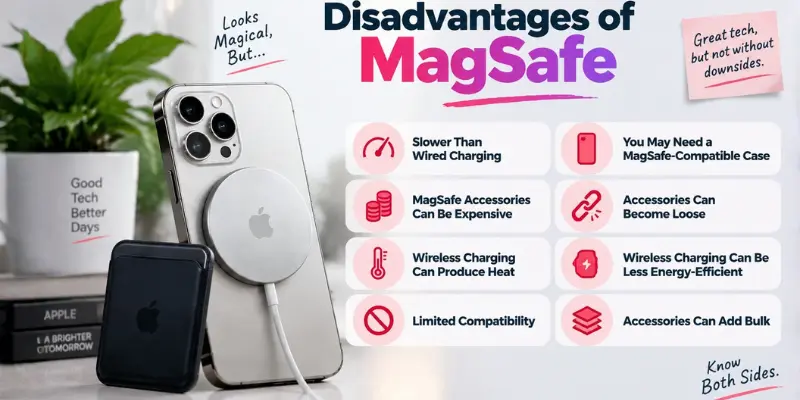
1. Slower Than Wired Charging
One of the main drawbacks of MagSafe charging is that wired charging can be faster. The wired method charges your phone directly from the wire, whereas the wireless method charges the phone through the charging coils. Therefore, it is reasonable to opt for the wired method in situations where time matters.
For example, if you have a few minutes to charge your almost drained battery before leaving the house, you will go for the wired charger. It could be more efficient to use MagSafe in cases where the phone takes a longer time to be charged.
2. MagSafe Accessories Can Be Expensive
Another disadvantage is the additional cost of building a MagSafe setup. A user may want a MagSafe charger, compatible case, wallet, stand, car mount, or battery pack. Buying several accessories can make the total cost much higher than simply using a normal charging cable.
Traditional cables and standard wireless chargers can be available at lower prices. Therefore, someone who only needs basic charging may not want to spend extra money on a complete magnetic accessory system. The cost of MagSafe accessories is one factor that should be considered before making a purchase.
3. Wireless Charging Can Produce Heat
Power transmission through wireless technology could result in the heating of the device when charging the phone. The device can be heated while being charged especially when the charge duration is higher or when the environmental temperatures are also high.
However, this does not mean that using MagSafe would automatically lead to battery problems. Nonetheless, heat is one thing that users need to be careful about while charging their devices. One way to improve the charging environment is to keep the phone away from excessive heat.
4. Limited Compatibility
MagSafe is designed around compatible Apple devices and accessories, so not every smartphone can use the complete MagSafe system. Even among accessories, compatibility can vary depending on the device, case, charger, or mount being used.
This means you should check compatibility before buying a MagSafe accessory. If you change to a different phone later, some of your existing accessories may not provide the same experience. The magnetic ecosystem is therefore more limited than basic USB charging, which is available across many different devices.
5. You May Need a MagSafe-Compatible Case
A phone case can affect how well MagSafe accessories attach to the device. A thick case or one without the required magnetic design may weaken the connection or make it difficult for an accessory to stay attached.
A MagSafe-compatible case is designed to work with the magnetic system and can provide a more reliable connection. However, if you already have a good case, buying another one just to use MagSafe accessories means spending additional money.
6. Accessories Can Become Loose
MagSafe accessories use magnets to attach to the back of the phone, making them easy to attach and remove. However, they may become loose or move out of position if the magnetic connection is not strong enough or the phone is exposed to sudden movement.
For example, a magnetic car mount may move or lose its grip while driving on a rough road. Therefore, it is important to choose a MagSafe accessory with a strong magnetic connection, especially for use in a moving vehicle.
7. Wireless Charging Can Be Less Energy-Efficient
There is energy loss when transferring the power wirelessly. Charging by wires creates a physical link between the charging device and the phone, whereas wireless charging relies on transferring energy without wires using the charging coils.
For many users, this difference may be less important than the convenience of wireless charging. However, people who want the most direct and efficient charging method may prefer using a cable. This is one reason wired charging remains useful even when a phone supports MagSafe.
8. Accessories Can Add Bulk
MagSafe accessories can make the phone thicker or heavier when they are attached. A wallet adds another layer to the back of the phone, while a magnetic battery pack can add noticeably more weight.
This may not be a problem for someone who uses these accessories regularly. However, if you prefer carrying your phone without anything attached to it, constantly adding and removing accessories may become inconvenient. It is worth considering which MagSafe accessories you actually need.
How Does MagSafe Work?
MagSafe technology uses magnets and wireless charging technology to allow compatible accessories to easily connect to a phone. Magnets help align the charger or an accessory to the correct position on the back of the phone.
Once the charger is attached, the aligned charging coils transfer power to the phone wirelessly. This makes MagSafe a bit different from normal wireless charging, which requires the user to manually place the phone on the charging pad.
The use of magnets does not limit MagSafe to charging accessories. Accessories such as wallets, stands, car mounts, and battery packs can also use this magnetic technology.
Is MagSafe Better Than Wired Charging?
MagSafe and wired charging have different benefits. MagSafe focuses on wireless convenience, magnetic attachment, and easy use with accessories, while wired charging can provide faster and more direct power transfer.
If you usually charge your phone at a desk or beside your bed, MagSafe can be convenient because you can attach the charger without plugging a cable into the phone. It is also useful if you already use magnetic stands, wallets, or other accessories.
On the other hand, wired charging may be more suitable when you need to charge your phone quickly. It can also be useful when charging efficiency is more important to you than the convenience of a wireless connection.
Conclusion
So guys, in this article, we’ve covered the pros and cons of MagSafe in detail. MagSafe offers easy wireless charging and convenient magnetic accessories, but higher costs, heat, compatibility limits, and slower charging compared with wired options are worth considering.
My recommendation is to choose MagSafe if you value wireless convenience and regularly use magnetic accessories, while wired charging may suit you better if you prioritize charging speed and efficiency. Before buying MagSafe accessories, consider your daily charging needs and budget.
For more helpful smartphone tips, guides, and solutions, keep exploring Mobile Phone Guide.
Frequently Asked Questions (FAQs)
Here are answers to some common questions about the benefits and drawbacks of MagSafe.
MagSafe does not work with every iPhone model. Apple introduced MagSafe with the iPhone 12 series, and newer compatible iPhone models support the magnetic system. Older iPhones may still work with some wireless chargers, but they do not have the built-in MagSafe magnetic alignment feature.
MagSafe can be faster than traditional Qi wireless chargers because the magnets help align the charging coils correctly. However, it is generally still slower than wired charging, especially when you need to quickly recharge your phone.
Some MagSafe accessories can work with Android phones when used with compatible magnetic cases or Qi2-supported devices. However, most MagSafe features are optimized for iPhones, so compatibility may vary. Check your device support before purchasing accessories.
A MagSafe charger may be worth buying if you value cable-free charging, use magnetic accessories, or want a cleaner desk or bedside setup. If your main goal is simply charging your phone as quickly and cheaply as possible, a wired charger may be a better option.
MagSafe is Apple’s magnetic technology that allows compatible iPhones to connect with chargers and accessories using built-in magnets. It helps align wireless chargers correctly and supports accessories like wallets, stands, mounts, and battery packs. It makes wireless charging and accessory use faster and more convenient.





- Be Respectful
- Stay Relevant
- Stay Positive
- True Feedback
- Encourage Discussion
- Avoid Spamming
- No Fake News
- Don't Copy-Paste
- No Personal Attacks
- Be Respectful
- Stay Relevant
- Stay Positive
- True Feedback
- Encourage Discussion
- Avoid Spamming
- No Fake News
- Don't Copy-Paste
- No Personal Attacks
