What Is Refresh Rate on Phone? Complete Beginner’s Guide
Published: 25 May 2026
Ever notice one phone feels super smooth while scrolling, while another feels slower, even though both open the same apps? This smooth feeling usually comes from a display feature called refresh rate. Many people see terms like 60Hz, 90Hz, 120Hz, or adaptive refresh rate in phone settings, but they do not clearly understand what they mean.
In this guide, you will know what refresh rate on a phone means, why higher Hz can make your screen feel smoother, how it affects gaming, scrolling, FPS, and battery life, and how to check or change it on your phone. So, let’s dive in.
What Is Refresh Rate on Phone?
Refresh rate on a phone is the number of times your mobile screen updates its image every second. It is measured in Hertz, also written as Hz.
For example, a 60Hz phone screen refreshes 60 times per second. A 120Hz phone screen refreshes 120 times per second. This means a 120Hz display updates the image more often than a 60Hz display.
It is mainly used to make screen movement look smoother. When you scroll through social media, open apps, switch between screens, or play supported games, a higher refresh rate can make the phone feel more fluid and responsive.
Common Refresh Rates in Mobile Phones
Most mobile phones come with different refresh rate options depending on their price, display quality and performance level.
Common refresh rates include:
| Refresh Rate | Common Use |
|---|---|
| 60Hz | Basic and budget phones |
| 90Hz | Mid-range phones |
| 120Hz | Premium and flagship phones |
| 144Hz+ | Gaming phones |
| 240Hz | Rare and mostly gaming-focused phones |
So, if you are a basic user, 60Hz is enough. If you want a smoother display experience, 90Hz or 120Hz is better.
Common Uses of High Refresh Rate in Smartphones
High refresh rate improves smartphone usability in several ways:
- Smoother Scrolling: Makes social media feeds, websites, and menus move more smoothly.
- Better App Animations: Opening, closing, and switching between apps feels cleaner and smoother.
- Enhanced Gaming: Supported games can feel more responsive and smoother during gameplay.
- Lower Motion Blur: Some content running at high speeds could appear clearer than at a lower refresh rate.
- Premium Feel: Makes the phone feel faster, smoother, and more modern in everyday use.
- Better Reading While Scrolling: Text can look easier to follow when you scroll slowly or quickly.
Even though refresh rate is a small display feature, it can change how smooth and comfortable your phone feels in everyday use.
Types of Refresh Rates Used in Mobile Phones
Mobile phones use different types of refresh rate systems. Each type is designed for different phone models, battery needs, and user experience.
Standard Refresh Rate
Standard refresh rate usually means 60Hz. This is common in budget phones and older smartphones.
It works well for basic use such as calls, messages, reading, browsing, and watching videos. It also uses less battery compared with higher refresh rates.
High Refresh Rate
High refresh rate usually means 90Hz, 120Hz, 144Hz, or higher. These displays refresh the screen more times every second, which makes scrolling, animations, and movement look smoother and more responsive.
High refresh rate is useful for people who scroll a lot, play games, or want a premium phone experience. But it can use more battery if it stays active all the time.
Adaptive Refresh Rate
Adaptive refresh rate automatically changes the screen refresh rate based on what you are doing.
For example, when you are reading a static page, the phone may lower the refresh rate to save battery. When you start scrolling or playing a supported game, it may increase the refresh rate for smoother movement.
Adaptive refresh rate is useful because it balances smoothness and battery life.
Pros and Cons of High Refresh Rate on Phone
A high refresh rate can make your phone feel smoother and more premium, but it also has some downsides. Before using 90Hz, 120Hz, or higher refresh rates, you should know both advantages and disadvantages.
| Pros of High Refresh Rate: |
|---|
|
| Cons of High Refresh Rate: |
|---|
|
60Hz vs 90Hz vs 120Hz: Which Is Better?
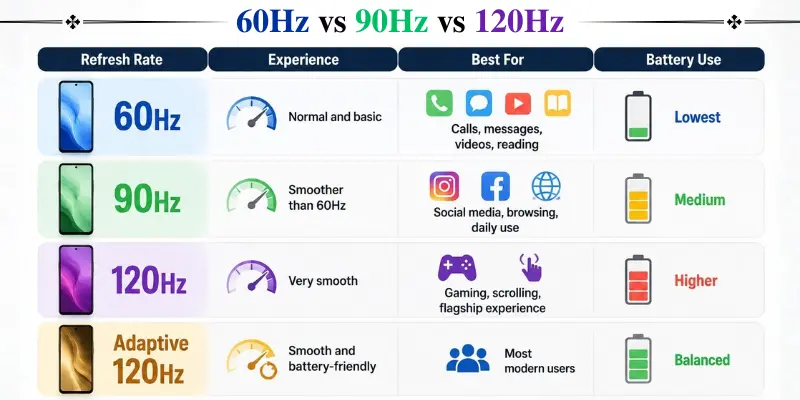
60Hz, 90Hz and 120Hz are the most common refresh rates found in smartphones. Each one has a different experience and battery impact.
| Refresh Rate | Experience | Best For | Battery Use |
|---|---|---|---|
| 60Hz | Normal and basic | Calls, messages, videos, reading | Lowest |
| 90Hz | Smoother than 60Hz | Social media, browsing, daily use | Medium |
| 120Hz | Very smooth | Gaming, scrolling, flagship experience | Higher |
| Adaptive 120Hz | Smooth and battery-friendly | Most modern users | Balanced |
Common Refresh Rate Problems in Mobile Phones
Refresh rate usually works automatically, but sometimes users may face issues.
Some common refresh rate problems include:
- Phone feels less smooth than before.
- 120Hz option is missing.
- Battery drains faster after enabling high refresh rate.
- Game does not feel smoother even on 120Hz.
- Refresh rate keeps changing automatically.
- Screen feels laggy while scrolling.
- Videos do not look smoother on 120Hz.
- High refresh rate turns off in battery saver mode.
These problems do not always mean the display is damaged. Sometimes the issue is related to settings, app support, battery saver, heating or software optimization.
How to Fix Refresh Rate Problems
If your phone’s refresh rate is not working properly, you can try some simple fixes.
- If the phone seems “locked” at 60 Hz, open the display settings and choose either High, Smooth, or Adaptive refresh rate.
- If the 120Hz option is missing, check whether your smartphone actually supports 120Hz.
- To reduce battery drain, try turning on the Adaptive refresh rate or set it to 60Hz for longer battery life.
- If a game does not feel smoother on 120Hz, check whether the game supports high FPS or high refresh rate mode.
- If the refresh rate suddenly drops, turn off battery saver mode and let the phone cool down before using it again.
- If the screen feels laggy, restart the phone and update the software.
- If the option disappeared after an update, check display settings again or wait for a software fix from the phone brand.
- If nothing works, the issue may be related to software limitations, hardware support, or display performance.
Conclusion
So guys, in this article, we’ve covered what the refresh rate on a phone is in detail. From understanding how refresh rate works to learning the difference between 60Hz, 90Hz, and 120Hz, you now know why higher refresh rates can make a phone feel smoother and more responsive.
My personal recommendation is to use adaptive refresh rate if your phone supports it, because it gives smooth scrolling and better animations while also helping save battery when a high refresh rate is not needed.
If you found this guide helpful, feel free to explore more smartphone tips and tutorials on our website.
Frequently Asked Questions (FAQs)
Here are the answers to some common questions about the refresh rate on a phone :
Use 120Hz if you want smoother scrolling, better animations and an improved gaming experience. Use 60Hz if you want better battery life. If your phone supports adaptive refresh rate, that is usually the best option.
60Hz is good for basic use, 90Hz is better for smooth daily use, and 120Hz is best for users who want smoother scrolling, better animations and a premium phone experience.
No, refresh rate and FPS are not the same. Refresh rate is how many times the screen updates per second. FPS is how many frames an app, video, or game produces per second.
Adaptive refresh rate is a feature that automatically changes the screen refresh rate depending on what you are doing. It can lower the refresh rate to save battery and increase it for smoother scrolling or gaming.
Refresh rate does not directly improve video quality. Most videos play at 24fps, 30fps or 60fps. High refresh rate is more noticeable in scrolling, animations and supported games.






- Be Respectful
- Stay Relevant
- Stay Positive
- True Feedback
- Encourage Discussion
- Avoid Spamming
- No Fake News
- Don't Copy-Paste
- No Personal Attacks
- Be Respectful
- Stay Relevant
- Stay Positive
- True Feedback
- Encourage Discussion
- Avoid Spamming
- No Fake News
- Don't Copy-Paste
- No Personal Attacks
