Parts of a Tablet: Main Components You Should Know
Published: 21 Aug 2026
A tablet looks simple from the outside, but many different parts work together every time you open an app, watch a video, join a call, play a game, or write with a stylus.
The main parts of a tablet include the display, touchscreen, cameras, speakers, microphones, buttons, charging port, processor, GPU, RAM, storage, battery, motherboard, wireless hardware, and sensors.
Some parts are visible and used directly, while others are hidden inside the device. Understanding them can help you compare tablets, understand specifications, and identify which component may be causing a problem.
This guide explains the main external and internal parts of a tablet and what each one actually does.
What Are the Main Parts of a Tablet?
Tablet parts can be divided into two main groups:
External Parts
These are the parts you can see, touch, or use directly.
The main external parts are:
- Display screen
- Touchscreen
- Front and rear cameras
- Speakers
- Microphones
- Power and volume buttons
- Charging and USB port
- SIM or memory card slot
Internal Parts
These are the components installed inside the tablet.
The main internal parts are:
- Processor or SoC
- GPU
- RAM
- Internal storage
- Battery
- Motherboard
- Wireless connectivity hardware
- Sensors
Now, let’s look at each tablet part in detail and understand what it does.
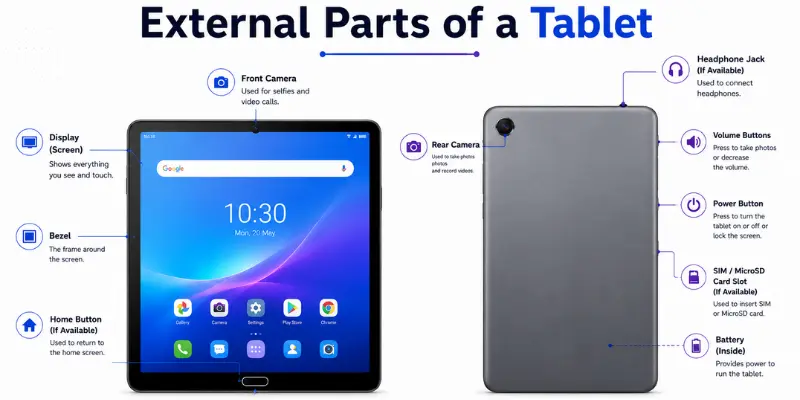
External Parts of a Tablet
External parts are the components you can see, touch, or use directly to interact with the tablet or connect other devices.
1. Display Screen
The display is one of the most important parts of a tablet because it shows everything you see and interact with, including apps, websites, photos, videos, games, and documents.
Tablet display quality depends on factors such as display technology (LCD or OLED), resolution, brightness, refresh rate, and color accuracy.
For example, a standard display may be enough for reading and watching videos, while a brighter and sharper display can be more useful for gaming, drawing, and photo editing.
Why it matters: Display quality affects how clear, comfortable, and enjoyable the tablet feels during everyday use.
2. Touchscreen
The touchscreen detects touches from your finger or stylus and lets you interact with the tablet. You can use it to:
- Tap apps
- Swipe through pages
- Type
- Zoom in and out
- Scroll
- Draw
- Write notes
The touchscreen and display work together, but they have different jobs. The display shows images and content, while the touchscreen detects your input.
For example, you can still hear sounds or receive notifications if the touchscreen stops responding, even though you may not be able to control the tablet normally.
Why it matters: A responsive touchscreen makes the tablet easier and more comfortable to use.
3. Front and Rear Cameras
Most tablets include both front and rear cameras.
The front camera is mainly useful for:
- Video calls
- Online classes
- Meetings
- Selfies
- Face recognition
The rear camera is useful for:
- Taking photos
- Recording videos
- Scanning documents
- Reading QR codes
- Capturing notes
Tablet cameras may not match the quality of a good smartphone camera, but they are useful for students, professionals, and everyday tasks.
Why it matters: Camera quality is important if you regularly use your tablet for video calls, online classes, meetings, or scanning documents.
4. Speakers
Speakers produce the sound you hear from the tablet. They are used for:
- Watching movies
- Playing games
- Listening to music
- Making video calls
- Hearing notifications
Some tablets come with two speakers, while some premium tablets have four speakers for better stereo sound quality.
However, the positioning of the speakers is also important. The right positioning of the speakers will make watching movies and playing games more exciting.
Why it matters: Good speakers provide clear and immersive sound and can reduce the need to use headphones.
5. Microphones
Microphones capture your voice and surrounding sounds. They are used for:
- Video calls
- Voice messages
- Meetings
- Voice recording
- Speech-to-text
- Voice assistants
Most tablets have one or more small microphones built into the top, bottom, or side edges of the device.
A good microphone is especially important when using a tablet for Zoom meetings, Google Meet, online classes, or content creation.
Why it matters: A good microphone helps others hear your voice clearly during calls, meetings, and recordings.
6. Power and Volume Buttons
Physical buttons provide quick control without opening settings.
The power button normally lets you:
- Turn the tablet on
- Wake the screen
- Lock the tablet
- Restart it
- Turn it off
Tablets sometimes have a fingerprint scanner in the power button.
The volume buttons help you manage sound while watching videos, listening to music, playing games, or making calls.
Why it matters: These buttons provide quick and convenient control over basic tablet functions.
7. Charging and USB Port
The charging port supplies power to the battery, but modern tablet ports can do much more.
Many tablets now use USB-C, which may support:
- Charging
- File transfer
- USB drives
- Keyboards
- Mice
- Headphones
- External monitors
- USB hubs
However, USB-C ports can have different capabilities. Some tablets support external displays and faster data transfers, while others may only support charging and basic file transfers.
Why it matters: A versatile USB-C port makes it easier to charge your tablet, transfer files, and connect external accessories.
8. SIM and Memory Card Slot
Some tablets include a SIM card slot, a memory card slot, or both.
A SIM card or eSIM allows compatible tablets to connect to 4G or 5G mobile networks without relying on Wi-Fi.
A microSD card slot lets you add extra storage for:
- Photos
- Videos
- Movies
- Documents
- Downloads
Not all tablets include these features. Some rely only on internal storage, while others also offer a microSD card slot. Cellular models may use a physical SIM, eSIM, or both.
Why it matters: Cellular connectivity is useful when you need internet access away from Wi-Fi, while a microSD card can provide extra storage for your files.
Internal Parts of a Tablet
Internal parts are hidden inside the tablet. You may never see them during normal use, but they control speed, multitasking, graphics, battery life, storage, and connectivity.
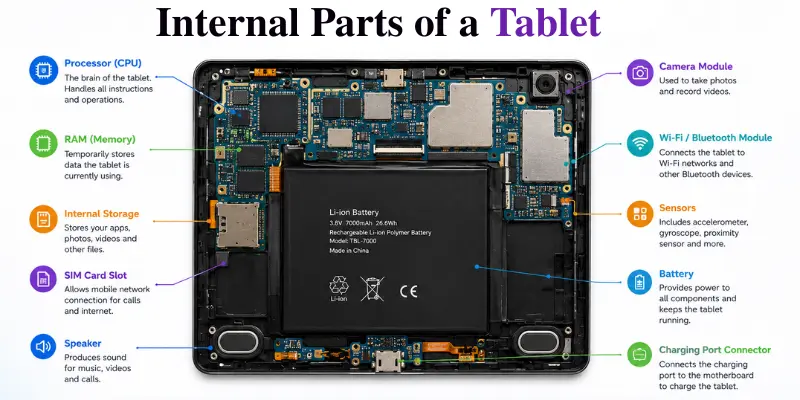
1. Processor or System-on-a-Chip
The processor handles most of the instructions needed to run the tablet.
It helps when you:
- Open apps
- Browse websites
- Watch videos
- Edit photos
- Play games
- Multitask
Today’s tablets usually have a System on a Chip, also called SoC, where multiple processing units are consolidated onto one chip.
A powerful processor is more important in such tasks as gaming, video editing, professional applications, and sustained usage.
Why it matters: The processor affects the speed and responsiveness of your tablet.
2. GPU
The GPU (Graphics Processing Unit) handles graphics-related tasks on a tablet. It helps process:
- Games
- Videos
- Screen animations
- 3D graphics
- Drawing apps
- Photo effects
- Video editing
In most modern tablets, the GPU is integrated into the SoC rather than using a separate graphics card like many desktop computers.
For everyday tasks such as browsing the web and reading documents, a basic GPU is usually enough. However, a more capable GPU becomes important for gaming, 3D apps, drawing, and video editing.
Why it matters: A capable GPU helps provide smoother graphics, animations, and gaming performance.
3. RAM
RAM is used for the temporary storage of data that is currently being worked on by the apps and operating system.
For example, if you have YouTube, Chrome, a PDF, and a notes app open at the same time, RAM helps keep them ready for quick access.
More RAM can be useful for:
- Multitasking
- Gaming
- Heavy apps
- Multiple browser tabs
- Photo and video editing
However, RAM alone does not determine tablet speed. The processor and software also matter.
Why it matters: Enough RAM reduces app reloading and helps multitasking feel smoother.
4. Internal Storage
Internal storage keeps your data even after the tablet is turned off.
It stores:
- Apps
- Games
- Photos
- Videos
- Documents
- Downloads
- Operating system files
The tablet that claims to have 128GB of storage space will not give you 128GB of storage space for your data, since a portion of the storage space will be used by the OS.
If you download movies, install large games, or store many photos and videos, you may need more storage.
Why it matters: Limited storage can make it difficult to install new apps or save additional files.
5. Battery
The battery provides power to the different components of the tablet. It powers:
- Display
- Processor
- Cameras
- Speakers
- Wi-Fi
- Bluetooth
- Sensors
Battery capacity matters, but it does not determine battery life on its own. A tablet with an energy-efficient processor and display may last longer than a tablet with a larger battery.
Gaming, high screen brightness, mobile data, and watching videos can also increase power consumption and reduce battery life.
Why it matters: Battery life determines how long you can use your tablet before needing to charge it.
6. Motherboard or Main Board
The motherboard is the main circuit board inside the tablet.
It connects important components such as:
- Processor
- RAM
- Storage
- Cameras
- Battery
- Charging system
- Wireless hardware
You can think of the motherboard as the central platform through which different tablet components communicate.
If the motherboard develops a serious problem, several tablet features may stop working together.
Why it matters: The motherboard keeps the tablet’s major electronic components connected and working together.
7. Wireless Connectivity Hardware
Wireless components allow the tablet to communicate without cables.
They may support:
- Wi-Fi: Connects the tablet to Wi-Fi networks and the internet.
- Bluetooth: Connects accessories such as headphones, keyboards, mice, speakers, and game controllers.
- Cellular: Allows supported tablets to connect to 4G or 5G mobile networks.
- GPS: Helps with navigation and location-based apps.
The tablet also contains antennas that help send and receive these wireless signals.
Why it matters: Strong connectivity affects internet speed, accessory support, calls, streaming, and navigation.
8. Sensors
Sensors are small internal components that help the tablet understand movement, position, light, and other conditions.
Common tablet sensors include:
- Accelerometer: Detects movement and helps rotate the screen automatically.
- Gyroscope: Measures rotation and helps with games and motion-based apps.
- Ambient Light Sensor: Detects surrounding light and can automatically adjust display brightness.
- Fingerprint Sensor: Allows supported tablets to recognize a registered fingerprint.
Some tablets may include additional sensors depending on their features.
Why it matters: Sensors make many automatic and smart tablet features possible without requiring manual control.
How Do All Tablet Parts Work Together?
The easiest way to understand tablet hardware is to see what happens during a normal task.
Imagine you open YouTube and start watching a video. Several parts begin working together:
- The touchscreen detects your tap.
- The processor helps run the app.
- RAM keeps the app and its data ready for quick access.
- The wireless hardware receives the video data from the internet.
- The GPU helps process the visuals.
- The display shows the video.
- The speakers play the sound.
- The battery powers these components.
This is why a tablet cannot be judged by one specification alone. The best experience comes when the processor, RAM, display, storage, battery, and software work well together.
Conclusion
So guys, in this article, we’ve covered parts of a tablet in detail. We looked at the main external and internal components and explained what each one does.
I recommend focusing on the parts that match your needs instead of choosing a tablet based only on its brand or screen size. Check the key specifications and choose the tablet that best fits your everyday use.
Frequently Asked Questions (FAQs)
Here are the answers to some common questions about the components of a tablet :
No, not every tablet has a SIM card or microSD card slot. Some tablets rely only on Wi-Fi and internal storage, while compatible models may support cellular connectivity or expandable storage.
USB-C can be used for charging and transferring data. Depending on the tablet, it may also support accessories such as USB drives, keyboards, hubs, headphones, or external displays.
There is no single most important part because different components work together. The processor, display, RAM, storage, and battery all have a major impact on the overall experience.
The processor handles instructions and helps run apps, games, and other tasks. A more capable processor can provide better performance for demanding activities.
A mobile phone is smaller and easier to carry, while a tablet has a larger screen and is better suited for reading, gaming, drawing, and productivity. Most phones support cellular calling, while only some tablets offer cellular connectivity. In simple terms, a phone is better for portability, while a tablet provides more screen space for comfortable viewing and work.






- Be Respectful
- Stay Relevant
- Stay Positive
- True Feedback
- Encourage Discussion
- Avoid Spamming
- No Fake News
- Don't Copy-Paste
- No Personal Attacks
- Be Respectful
- Stay Relevant
- Stay Positive
- True Feedback
- Encourage Discussion
- Avoid Spamming
- No Fake News
- Don't Copy-Paste
- No Personal Attacks
