iPad vs Laptop: Complete Comparison for Work, Study & Daily Use
Published: 13 Oct 2026
An iPad and a laptop can both handle everyday tasks like browsing the web, watching videos, writing documents, and attending online classes. However, they offer different features and work experiences
So, should you buy an iPad or a laptop? An iPad offers a lightweight, touch-focused experience with excellent portability, while a laptop provides a traditional desktop-style setup with a built-in keyboard and broader software flexibility.
In this guide, we will compare iPad vs laptop across 10 key differences, including performance, software, typing, multitasking, portability, battery life, and accessories, to help you choose the right device for your needs. Without wasting time, let’s dive in!
What Is an iPad?
An iPad is a tablet computer made by Apple that runs iPadOS. It has a touchscreen and a lightweight design, making it useful for browsing the web, watching videos, reading, taking notes, drawing, attending video calls, and completing everyday tasks.
Modern iPads also support multitasking, allowing users to work with multiple apps and windows on supported models. Some models offer features like Stage Manager, which helps users organize and switch between app windows.
You can also connect an external keyboard to an iPad for easier typing. An Apple Pencil or compatible stylus lets you write notes, draw, and mark up documents directly on the screen.
What Is a Laptop?
A laptop is a portable computer designed around a traditional computer interface. It usually has an integrated keyboard, touchpad, bigger screen, desktop-like operating system, and greater number of ports and software options.
Laptops can be used for writing, researching, coding, using professional software, organizing files, performing business tasks, gaming, and other jobs that need a conventional computer setting.
Unlike an iPad, a laptop comes with a built-in keyboard, so you don’t need to buy an external one for typing.
10 Key Differences Between iPad and Laptop
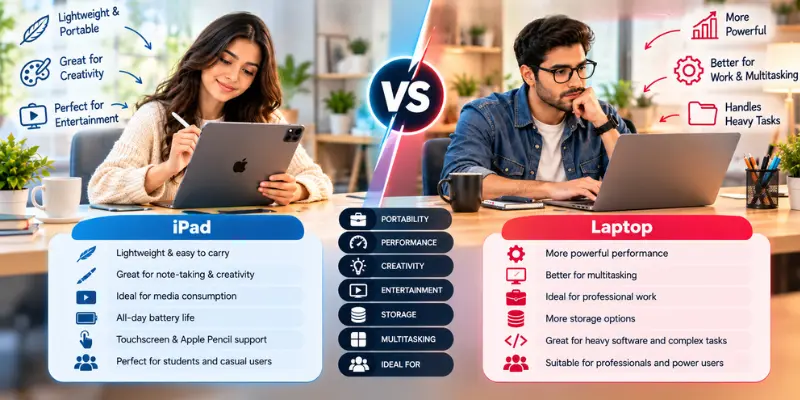
An iPad and a laptop can perform many of the same everyday tasks, but they differ in several important ways. The table below provides a quick overview of their key differences.
| Feature | iPad | Laptop |
|---|---|---|
| Design | Thin and lightweight tablet | Portable computer with a built-in keyboard |
| Operating System | iPadOS | Windows, macOS, ChromeOS, etc. |
| Keyboard | Usually optional | Built-in |
| Touchscreen | Standard feature | Depends on model |
| Portability | Excellent | Good to excellent |
| Multitasking | Supports multiple apps and windows on compatible models | Generally offers flexible desktop multitasking |
| Software | Large selection of tablet apps | Broad desktop software support |
| Note-Taking | Excellent with stylus | Usually less convenient |
| File Management | Good, but more mobile-focused | More traditional and flexible |
| Gaming | Good for supported games | Wider range, especially on Windows |
| Accessories | Keyboard, stylus, hubs, cases | Mouse, external monitor, docks, etc. |
| Best For | Portability, notes, media, light work | Work, study, software, multitasking |
Now, let’s explore each of these 10 key differences in detail.
1. Operating System
An iPad runs iPadOS, an operating system designed for touchscreen use. It also supports external keyboards and trackpads, along with multitasking features that let you work with multiple apps and windows on supported models.
A laptop can run Windows, macOS, or ChromeOS, depending on the model. These operating systems offer access to a wide range of desktop applications and support various external devices, making laptops suitable for many types of work.
2. Keyboard and Typing
One of the biggest differences is the keyboard. A laptop comes with a built-in physical keyboard, so you can start typing immediately without buying another accessory.
An iPad uses an on-screen keyboard for typing, but you can also connect an external keyboard. Using a physical keyboard makes an iPad more suitable for typing emails, writing documents, and completing other tasks that require a lot of typing.
3. Multitasking
Laptops are designed for desktop multitasking, allowing users to open multiple apps and windows simultaneously. This makes it easier to switch between tasks and work with several programs at once.
iPad multitasking has also improved significantly. Depending on the model and iPadOS version, users can work with multiple apps, resize and move windows, and organize their workspace.
However, the overall multitasking experience is still different from Windows and macOS, especially for users who regularly work with multiple desktop applications.
4. Software and Apps
An iPad supports a wide range of apps for productivity, education, creativity, and entertainment. However, these apps are designed for iPadOS and often focus on touch-based controls and a tablet-friendly experience.
Laptops offer access to desktop software that may provide more advanced features and tools. For example, some programming tools, professional editing programs, and business applications offer fuller desktop versions that may not be available on the iPad. This makes laptops a better choice for certain professional tasks, while iPads are convenient for everyday tasks and apps designed for touchscreens.
5. Portability
An iPad is generally lighter and more compact than a laptop, making it easy to carry around. You can hold it in your hands, use it while standing, or comfortably browse the web and read without needing a desk.
Laptops are also portable, but their larger size and attached keyboard can make them less convenient to hold for long periods or use while standing.
If portability is your priority, an iPad may be a better choice because it is lightweight and easy to use in different places.
6. Touchscreen and Stylus Support
A touchscreen is one of the key features that makes an iPad different from a traditional laptop. You can tap, swipe, draw, take notes, and interact directly with items on the screen using your fingers.
Compatible iPad models also support the Apple Pencil, which makes it easier to write notes, create drawings, and sketch diagrams. Some laptops also offer touchscreen and stylus support, but this feature depends on the model. Traditional laptops without a touchscreen rely mainly on a keyboard, trackpad, or mouse for input.
7. Battery and Everyday Mobility
Both iPads and laptops can have a long battery life, depending on the model, display brightness, settings, and tasks you complete.
An iPad is convenient for everyday activities such as browsing the web, reading, watching videos, and taking notes without needing to stay near a power outlet. Laptops can also provide long battery life, especially when performing light tasks, but demanding work can drain their batteries more quickly.
When considering which device has a better battery life, you should consider how you are going to use it outside a charging area.
8. Storage and File Management
File management on laptops is generally more flexible. Users can easily organize files into folders, move them between drives, and manage files across different applications. This can be helpful for people who work with many files daily.
The iPad has a built-in Files app that lets users organize files, access cloud storage services, and work with compatible external storage devices. However, some users may prefer a laptop for file management because desktop operating systems offer more flexibility for handling files and folders.
The better choice depends on your storage needs and the type of work you do.
9. Accessories and Total Setup
An iPad can become more useful for productivity with accessories such as a keyboard, trackpad, stylus, protective cover, docking station, or external display. Compatible iPad models also support external displays, giving users more screen space for work.
A laptop already includes essential hardware, such as a built-in keyboard and trackpad, so you can start working without buying additional accessories. You can still connect a mouse, external display, or docking station to improve your setup.
If you choose an iPad for regular typing or desk-based work, you may need to spend extra on accessories. A laptop can be more convenient if you want a complete computer setup from the start
10. Best Use Cases
An iPad is a convenient choice for users who prioritize portability and use their device mainly for reading, taking notes, sketching, browsing the web, entertainment, video calls, and everyday productivity tasks.
A laptop is generally better suited for tasks that require extensive typing, programming, professional software, advanced multitasking, and managing large numbers of files.
Before choosing a device, consider your daily tasks and make sure it supports the apps and features you need for work or study.
Can an iPad Replace a Laptop?
Yes, an iPad can replace a laptop for some users, but it depends heavily on the tasks involved.
For browsing, communications, note-taking, documents, multimedia content, and many other cloud-based processes, an iPad can help you perform a wide range of tasks that you may otherwise do on your computer. Window management on the current iPadOS is much more robust than its previous versions.
However, switching to an iPad for your work gets increasingly difficult in situations where you have to use a certain desktop program, manage a large number of files, type continuously, or have a complicated workflow process.

iPad vs Laptop for Students
For students, the right choice depends on their course requirements and study style.
An iPad can be useful for reading PDFs, attending online lectures, taking handwritten notes, researching online, annotating documents, and carrying study materials in a lightweight device.
However, a laptop may be more suitable for programming, running specialized software, writing lengthy essays, working with spreadsheets, and conducting research that requires multiple windows or desktop applications.
Before buying an iPad for college or university, check whether your courses require specific Windows or macOS software that may not be available on iPadOS.
iPad vs Laptop for Work
Both devices can be useful for work, depending on the tasks you need to perform and the software you use.
An iPad is suitable for checking emails, editing documents, attending video meetings, researching online, and handling other everyday work tasks. Connecting an external keyboard can also make typing more comfortable.
A laptop is generally a better choice for work that requires desktop software, advanced spreadsheet tasks, programming, managing large numbers of files, or extensive multitasking.
Common Mistakes to Avoid
Choosing between an iPad and a laptop can be confusing if you focus on the wrong features. Keep these common mistakes in mind before making your decision.
1. Choosing Based Only on Portability
An iPad is highly portable, but portability should not be your only consideration. Think about how much typing, multitasking, and software use you do every day.
2. Forgetting the Cost of Accessories
An iPad may require a separate keyboard, stylus, case, or other accessories, depending on how you plan to use it. Include these costs when comparing the total setup cost.
3. Ignoring Software Requirements
Before choosing an iPad for school or work, check whether the applications you need are available on iPadOS and offer the features required for your tasks.
4. Assuming More Power Means a Laptop Replacement
An iPad may have powerful hardware, but hardware performance is not the only factor that matters. The operating system, available software, and compatibility with your workflow are also important.
5. Buying Based on Someone Else’s Needs
A device that works well for a student taking handwritten notes may not suit someone who does programming or professional desktop work. Choose the device that best fits your own tasks and requirements.
Which One Should You Choose?
Here are some main reasons when you should choose an iPad or when you should choose a laptop for your daily life activities.
Choose an iPad if:
- You want excellent portability.
- You read PDFs, books, and online content frequently.
- You prefer touchscreen controls.
- You take handwritten notes.
- You draw or use a stylus.
- You mainly perform light productivity and everyday tasks.
- You want a flexible tablet that can also work with a keyboard.
Choose a laptop if:
- You type for several hours regularly.
- You need desktop applications.
- You work with complex files and folders.
- You do programming or technical work.
- You need extensive multitasking.
- You use specialized professional software.
- You want a traditional computer setup without buying a separate keyboard.
Conclusion
So guys, which is better, an iPad or a laptop? It depends on what you need. An iPad is ideal for portability, touchscreen use, note-taking, entertainment, and everyday tasks, while a laptop is better suited to traditional productivity, desktop software, and demanding workflows.
If you want a lightweight and flexible device for everyday use, an iPad can be a strong option. If you need a complete computer for work, study, software, and long typing sessions, a laptop is usually more suitable.
Choose the device that fits your actual daily workflow.
Frequently Asked Questions (FAQs)
Here are the answers to some common questions about the iPad vs Laptop :
Yes, you can use Microsoft Word and Excel on an iPad through their dedicated apps. These apps let you create documents, edit spreadsheets, and share files. However, some advanced features may work differently or may only be available in the desktop versions.
A laptop is generally better for PC gaming, while an iPad works well for supported mobile games. Laptops offer access to many PC games and support keyboard-and-mouse controls. Your gaming experience depends on the device’s performance and the games you want to play.
An iPad can be cheaper than some laptops, but the price depends on the model and its features. You should also consider the cost of accessories like a keyboard, stylus, and protective case. Compare the total cost of both devices before making a decision.
Yes, you can print documents from an iPad using a compatible printer. Many printers support Apple AirPrint, which lets you print wirelessly over Wi-Fi. If your printer does not support AirPrint, you can check whether the manufacturer’s app offers another printing option.
You should consider buying a keyboard for your iPad if you regularly write emails, assignments, or documents. A physical keyboard can make typing more comfortable than using the on-screen keyboard. Before buying one, check its compatibility, portability, and total cost.






- Be Respectful
- Stay Relevant
- Stay Positive
- True Feedback
- Encourage Discussion
- Avoid Spamming
- No Fake News
- Don't Copy-Paste
- No Personal Attacks
- Be Respectful
- Stay Relevant
- Stay Positive
- True Feedback
- Encourage Discussion
- Avoid Spamming
- No Fake News
- Don't Copy-Paste
- No Personal Attacks
