Pros and Cons of Wireless Charging: You Should Know Before Using
Published: 8 Jul 2026
Wireless charging has become a popular feature in smartphones, wireless earbuds, smartwatches, and many other modern devices. Instead of plugging a charging cable into your device every time, you simply place it on a wireless charging pad or stand, and it starts charging automatically.
While wireless charging offers excellent convenience and helps reduce cable clutter, it is not the perfect solution for everyone. Compared to wired charging, it can be slower, generate more heat, and require proper device alignment to work efficiently.
In this article, we’ll explain the main pros and cons of wireless charging, how it works, when it is useful, and when wired charging may still be the better option. So, let’s dive in.
What Is Wireless Charging?
Wireless charging is a technology that allows you to charge an electronic device without plugging a charging cable into it. Instead, you simply place the device on a wireless charging pad, stand, or dock, and it starts charging automatically.
Modern-day wireless chargers work on the principle known as Qi wireless charging. There are numerous mobile phones, headphones, and watches today that can be charged using the Qi technology or another kind of wireless charging technology.
Wireless charging works using electromagnetic induction. The charger contains a charging coil, and the device has a receiving coil. When the two coils are properly aligned, energy is transferred wirelessly from the charger to the device, which charges the battery.
Pros of Wireless Charging
Wireless charging offers several benefits that make charging easier, cleaner, and more convenient. From reducing cable clutter to protecting charging ports, this technology can improve the everyday charging experience for many users.
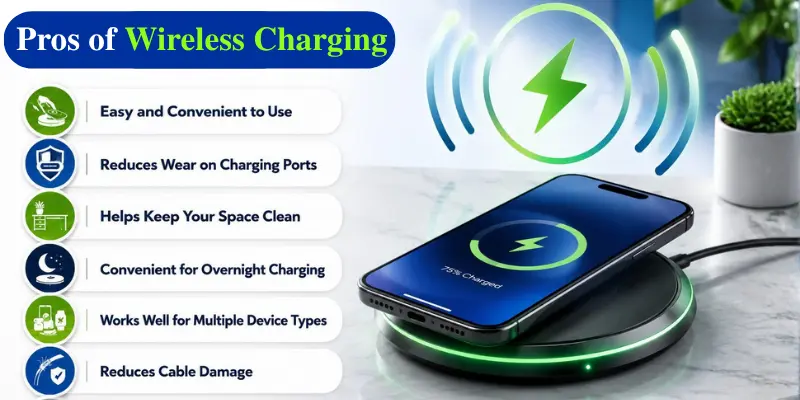
Here are some of the main advantages of wireless charging:
- Easy and convenient to use
- Reduces wear on charging ports
- Helps keep your space clean
- Convenient for overnight charging
- Works well for multiple device types
- Reduces cable damage
- Can be safer for shared spaces
Now, let’s discuss each benefit of wireless charging in detail.
1. Wireless Charging Is Convenient
The most prominent benefit of using wireless charging is that it makes your life easier. There is no need to locate the cable, insert it into your phone, and then remove it again. You only need to place your phone on the charger, and the charging process begins automatically. It is especially useful at night, on your office desk, and in situations where you frequently pick up and put your phone down.
For example, while working at your desk, you can place your phone on a wireless charger and keep it charged throughout the day.
2. Reduces Wear on Charging Ports
Another important benefit of wireless charging is that it helps reduce wear and tear on your device’s charging port. With regular wired charging, repeated plugging and unplugging can make the port loose or damaged over time.
This issue can affect smartphones, tablets, earbuds, and other frequently charged devices. Dust and improper handling can also harm the charging port.
3. Helps Keep Your Space Clean
Wireless charging helps reduce cable clutter and keeps your desk or bedside area more organized. Instead of managing multiple charging wires for different devices, you can use a single wireless charging station for compatible gadgets.
Some wireless chargers can charge multiple devices, such as smartphones, smartwatches, and wireless earbuds, making your charging setup cleaner and more organized.

4. Convenient for Overnight Charging
Wireless charging is especially convenient for overnight charging. At night, searching for a cable and plugging it into your phone can be inconvenient, especially in the dark. With a wireless charger, you simply place your phone on the charging pad before going to sleep.
Many people keep a wireless charging stand beside their bed because it is easy to use and keeps their phone ready for the next day. Since wireless charging is usually slower than wired charging, it works well when you are not in a hurry.
5. Works Well for Multiple Device Types
Wireless charging is not limited to smartphones. Many modern devices, including wireless earbuds, smartwatches, and other accessories, also support wireless charging.
Some charging stations allow you to charge multiple devices at the same time, such as your phone, earbuds, and smartwatch. This makes wireless charging a useful option for people who own several smart devices.
6. Reduces Cable Damage
Charging cables can wear out over time due to frequent bending, twisting, and daily use. Many people have to replace their charging cables after they become damaged or stop working.
Because wireless charging reduces the need to use your charging cable, it is less likely to wear out or become damaged. Although a wireless charger still requires a power cable, it usually stays connected in one place and is handled much less often.
7. Can Be Safer for Shared Spaces
Wireless charging may be helpful in communal areas such as office environments, hotels, lounges, coffee shops, and even automobiles. This allows users to charge their phones by simply placing them on the charging mat and without having to share charging cables.
This will minimize the number of cables needed, such as the USB-C cable, Lightning cable, and other charging connectors.
This will also prevent the use of faulty or unrecognized charging cables.
Cons of Wireless Charging
While wireless charging is convenient, it also has a few limitations. Understanding these drawbacks can help you decide whether it is the right charging option for your needs.
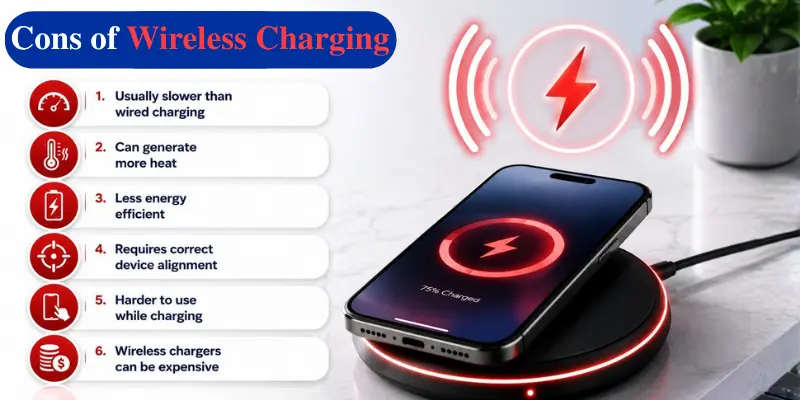
Here are some of the main disadvantages of wireless charging:
- Usually slower than wired charging
- Can generate more heat
- Less energy efficient
- Requires correct device alignment
- Harder to use while charging
- Wireless chargers can be expensive
- Not all devices support wireless charging
Now, let’s discuss each drawback of wireless charging in detail.
1. Wireless Charging Is Usually Slower
One of the biggest disadvantages of wireless charging is speed. In most cases, wireless charging is slower than wired charging.
A wired charger directly transfers power through a cable, which is usually more efficient. Wireless charging transfers energy through coils, and some energy is lost during the process.
This means your phone may take longer to charge on a wireless charger compared to a fast wired charger.
For example, if you need to quickly charge your phone before leaving home, wired fast charging is usually the better option. Wireless charging is more suitable when you are not in a hurry.
2. Can Generate More Heat
Wireless charging usually generates more heat than wired charging. This happens because some energy is lost as heat during the wireless power transfer process.
Poor alignment between the charger and the device, thick phone cases, metal objects, or low-quality chargers can increase heat even further.
Too much heat can affect battery health over time. However, most modern smartphones include temperature management systems to help prevent overheating, making wireless charging safe for everyday use.
3. Less Energy Efficient
Wireless charging is generally less energy efficient than wired charging. During wireless power transfer, some energy is lost as heat, which means more electricity is needed to charge the device.
For a single smartphone, this difference may be small. However, when many devices are charged regularly, the wasted energy can become more noticeable.
Wireless charging may not be the best choice for users who prioritize maximum energy efficiency.
4. Requires Correct Device Alignment
Wireless charging requires proper alignment between the charger and your device. If the phone is not placed correctly, it may charge slowly or not charge at all.
This can be frustrating, especially with flat charging pads where the phone can easily move slightly away from the correct position. Wireless charging stands and magnetic chargers help solve this problem by keeping the device properly aligned.
5. Harder to Use While Charging
With wired charging, you can continue using your phone while it is connected to the charger. However, wireless charging requires your phone to stay on the charging pad or stand.
This makes it difficult to use your phone freely during charging because removing it from the charger stops the process. A wireless charging stand can make this easier by allowing you to view notifications or make video calls while keeping your phone in place.
6. Wireless Chargers Can Be Expensive
Wireless chargers are often more expensive than basic charging cables. High-quality charging pads, stands, and multi-device chargers usually cost more, especially if they support faster charging or magnetic alignment.
Cheaper wireless chargers may not always be reliable. They may charge slowly, generate more heat, or lack proper safety features. Therefore, users may need to invest more to get a reliable wireless charger.
7. Not All Devices Support Wireless Charging
Not all smartphones, earbuds, smartwatches, and other gadgets support wireless charging. Many budget devices and older models do not have built-in wireless charging, which means they cannot be charged wirelessly.
Even when a device supports wireless charging, the charging speed can vary between different models. Some devices offer fast wireless charging, while others charge more slowly. Additionally, some gadgets, such as certain smartwatches, may require their own specific charging stations.

When Should You Use Wireless Charging?
Wireless charging is a convenient option, but it is not always the best choice for every situation. It works well when you want easy charging without needing to plug in a cable.
You should consider using wireless charging:
- During overnight charging
- On your office desk or workspace
- When you frequently pick up and put down your phone
- When charging multiple compatible devices
- When you want to reduce cable clutter
- When you do not need fast charging
You should consider using wired charging:
- When you need to charge your phone quickly
- When your battery is very low
- When you need maximum charging efficiency
- When you want to use your phone freely while charging
- When your device does not support wireless charging
Is Wireless Charging Bad for Battery Health?
Wireless charging does not usually damage your battery. Modern smartphones are designed to support it safely, but heat is the main concern.
Since wireless charging can generate more heat than wired charging, poor-quality chargers and improper charging habits may affect battery health over time.
To protect your battery, use a reliable charger, avoid extreme heat, remove thick cases if they cause overheating, and keep metal objects away from the charging pad.
Overall, wireless charging is safe for everyday use when used properly. However, wired charging may still be a better option when you want to reduce heat and maximize charging efficiency.
Wireless Charging vs Wired Charging
Both wireless charging and wired charging have their own advantages. Wireless charging offers greater convenience for everyday use, while wired charging is the better choice when you need faster charging and higher efficiency.
The table below compares the key differences between wireless charging and wired charging.
| Feature | Wireless Charging | Wired Charging |
|---|---|---|
| Convenience | Very convenient | Requires plugging cable |
| Speed | Usually slower | Usually faster |
| Efficiency | Less efficient | More efficient |
| Heat | Can generate more heat | Usually less heat |
| Port wear | Reduces port use | Uses charging port daily |
| Phone use while charging | Less flexible | More flexible |
| Best for | Overnight and desk charging | Fast charging and heavy use |
You may also like these posts
➡️ Fast Charging vs Normal Charging: Complete Guide
Conclusion
So guys, in this article, we’ve covered the pros and cons of wireless charging in detail. Wireless charging is a convenient option for everyday use, but it also has some limitations, such as slower charging speeds and lower efficiency. If convenience is your priority, it is a great choice. However, if you need the fastest charging, wired charging is still the better option.
We hope this guide helped you make the right decision. If you found it useful, feel free to share it with others who are considering wireless charging.
Frequently Asked Questions (FAQs)
Here are the answers to some common questions about the advantages and disadvantages of wireless charging :
Yes, wireless charging is usually slower than wired charging. This is because some energy is lost during the wireless power transfer process. If you need to charge your phone quickly, wired charging is generally the better choice.
No, not all smartphones support wireless charging. Many budget and older models do not have this feature. Check your phone’s specifications to see if it supports wireless charging.
Yes, some phone cases can affect wireless charging. Thick cases or cases with metal parts may reduce charging performance or prevent charging altogether. Most thin plastic or silicone cases work without any issues.
Wireless charging is worth it if you value convenience and charge your phone regularly at home or at work. It makes charging simple and helps reduce cable clutter. However, wired charging is still better if speed is your priority.





- Be Respectful
- Stay Relevant
- Stay Positive
- True Feedback
- Encourage Discussion
- Avoid Spamming
- No Fake News
- Don't Copy-Paste
- No Personal Attacks
- Be Respectful
- Stay Relevant
- Stay Positive
- True Feedback
- Encourage Discussion
- Avoid Spamming
- No Fake News
- Don't Copy-Paste
- No Personal Attacks
