Mobile Motherboard Guide: Components, Issues & Tips
Published: 6 Apr 2026
Ever wondered what makes your smartphone run smoothly behind the scenes? It’s the mobile phone motherboard. Also called the phone mainboard or PCB, it connects all parts, like the CPU, RAM, cameras, sensors, and antennas. Without it, your phone can’t function.
The smartphone motherboard is very important, but it is also delicate. Issues like crashes, restarts, overheating, or a phone that does not turn on often show a motherboard problem. Repairing the motherboard can be expensive and may cost almost as much as buying a new phone.
In this blog post, we will explain the basics of a motherboard, its key components, signs of failure, and repair tips. So, let’s dive in
What is a Mobile Phone Motherboard?
A mobile phone motherboard, also called the logic board or mainboard, is the main circuit board of your smartphone. It acts as the central hub of your phone, linking the CPU, GPU, memory, storage, sensors, and cameras so everything works together smoothly.
Mobile boards are space-efficient and compact. All the wires have been laid with extreme care to ensure that your device is slim and lightweight.
Components of a Mobile Phone Motherboard
The mobile phone motherboard is a small but powerful hub connecting all parts of your smartphone. Each component plays a key role in keeping your device running smoothly.
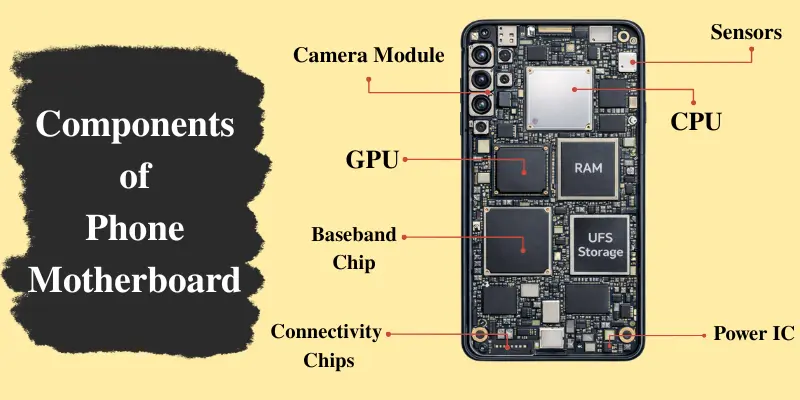
Table for Key Components and Their Functions
| Component | Function & Role |
|---|---|
| CPU | Acts as the brain; executes all instructions and manages other components. |
| GPU | Handles all graphical tasks, animations, and display rendering. |
| RAM & Storage (UFS/eMMC) | RAM enables fast app access; Storage keeps OS, apps, and files. |
| Baseband & Antenna Chips | Manage cellular communication and signal reception. |
| Sensors & Camera Module | Detect motion, light, orientation, and capture images/videos. |
| Connectivity Chips | Enable Wi-Fi, NFC, Bluetooth, GPS, and device pairing. |
| Power Distribution Circuits | Distribute battery power safely to all components. |
Let’s take a closer look at each component and understand how it keeps your smartphone performing at its best:
- CPU (Central Processing Unit): Acts as the brain of the phone, executing instructions and managing other components. It controls speed, multitasking, and overall performance.
- GPU (Graphics Processing Unit): Handles graphics, animations, and gaming visuals. It works with the CPU to keep visuals smooth and efficient.
- RAM & Storage (eMMC/UFS): RAM stores temporary data for running apps, while storage holds your operating system, apps, and files. They ensure fast app switching and smooth operation.
- Baseband & Antenna Chips: Manage calls, messages, and mobile internet by controlling network connectivity.
- Sensors & Camera Module: Sensors detect motion, light, and orientation. The camera module captures images and videos and works with the CPU/GPU for processing.
- Connectivity Chips: Enable Wi-Fi, Bluetooth, GPS, and NFC for wireless connections.
- Power Distribution Circuits: Deliver battery power efficiently, prevent overheating, and protect sensitive components.
Types of Motherboards in Mobile Phones
Not all mobile phone motherboards are the same. Here are the main types:
1. Single-Layer Motherboard: Has a simple design with only one circuit layer. Usually found in budget phones. Easy to repair, but supports fewer features.
2. Multi-Layer Motherboard: Contains several stacked circuit layers. Common in mid-range and high-end phones. Handles advanced components like cameras and sensors.
3. Modular Motherboard: Some parts, like the CPU or camera, can be replaced separately. Makes repairs easier. Less common in modern phones.
4. Compact/Integrated Motherboard: Found in most modern smartphones. All components are tightly packed for thin, lightweight designs. Harder to repair, but maximizes space.
How Does a Motherboard Affect Your Phone?
The motherboard controls how well your phone works every day. It helps different parts of the device communicate with each other, so your apps open properly, the network stays connected, and features like the camera, sensors, and charging work without trouble. If the motherboard starts having problems, your phone may become slow, unstable, or stop working normally.
Why It Matters
- Performance: It supports smooth communication between key parts like the processor, memory, and storage, which helps apps run better.
- System Stability: It keeps the phone’s hardware and software working together, reducing the chances of crashes, freezing, or random restarts.
- Power Management: It helps send power to different components in the right way, which supports safe charging and stable battery use.
Common Symptoms of Motherboard Failure
A damaged motherboard can cause different problems in your phone. Some issues appear slowly, while others stop the phone from working properly. The table below shows common symptoms and their possible causes.
| Symptom | Possible Cause |
|---|---|
| Phone won’t turn on | Problem in the CPU or power circuit |
| Frequent restarts | Faulty RAM connection or software-hardware conflict |
| Screen/display issues | Short-circuit in the power distribution or thermal management failure |
| Overheating | Short-circuit in power distribution or thermal management failure |
| Hardware malfunctions (camera, battery, sensors) | Component integration failure on the motherboard |
Motherboard Repair and Maintenance Tips
If your mobile phone motherboard shows signs of damage, choosing the right repair option and following proper care can help prevent further issues.
1. Professional Repair: Visit an authorized service center or a skilled technician. They can diagnose the problem and repair damaged components safely.
2. Motherboard Replacement: If the damage is severe, replacing the motherboard may be required. This can be costly and sometimes close to the price of a new phone.
3. Preventive Care Tips:
- Avoid drops and water exposure, as physical damage and moisture can harm the motherboard circuits.
- Keep your phone cool, because overheating can damage internal components, especially during heavy use or charging.
- Use certified chargers, since low-quality chargers can cause power issues and damage sensitive circuits.
- Update your software regularly, as updates fix bugs and improve system stability.
Taking care of your motherboard can extend your phone’s life and prevent costly repairs.
Conclusion
So guys, in this article, we’ve covered the motherboard of a mobile phone in detail. We explored its components, functions, common issues, and repair options to help you understand how important it is for your phone’s performance. From my personal experience, taking care of your phone with proper charging habits and avoiding overheating can save you from costly repairs.
If you found this article helpful, don’t forget to share it with others and explore more of our mobile tips to keep your device running smoothly.
Frequently Asked Questions (FAQs)
Here are the most common questions people ask about motherboard functions in mobile phones.
A broken phone motherboard can cause problems such as the phone restarting on its own, overheating, screen issues, or not turning on at all. It can also affect other phone features and make the device inconsistent.
Repairing a mobile motherboard usually costs $30 to $80 for small issues. If you need to replace the entire motherboard, the cost can range from $100 to $250 or more, depending on the phone model and features.
Replacing a phone’s motherboard can be worth it if the damage is serious and the repair cannot fix the phone properly. In some cases, replacement gives a better long-term result.
You can spot a faulty motherboard by looking for signs like periodic crashes, random restarts, overheating, camera or sensor problems, and connectivity issues. These problems often indicate that the motherboard is not functioning properly.
A mobile motherboard includes components such as the CPU, GPU, RAM, storage, baseband or antenna chips, sensors, a camera module, and connectivity chips. These parts help the phone work smoothly and handle important functions.






- Be Respectful
- Stay Relevant
- Stay Positive
- True Feedback
- Encourage Discussion
- Avoid Spamming
- No Fake News
- Don't Copy-Paste
- No Personal Attacks
- Be Respectful
- Stay Relevant
- Stay Positive
- True Feedback
- Encourage Discussion
- Avoid Spamming
- No Fake News
- Don't Copy-Paste
- No Personal Attacks
