Optical vs Ultrasonic Fingerprint Sensors: A Full Comparison
Published: 15 Nov 2026
Unlocking a smartphone with your fingerprint is quick and convenient. However, different smartphones use different fingerprint technologies. The two common types of under-display sensors are optical and ultrasonic.
Optical sensors capture fingerprints using light, while ultrasonic sensors use sound waves to read fingerprint details.
So, which technology offers better speed, accuracy, and security?
In this guide, we will explain the difference between optical and ultrasonic fingerprint sensors, how each one works, and how they perform in everyday situations. We will also look at their advantages, disadvantages, and screen protector compatibility to help you understand which option suits your needs.
What Is an Optical Fingerprint Sensor?
An optical fingerprint sensor uses light to capture an image of your fingerprint. It works much like a small camera that takes a picture of the lines and patterns on your finger.
Many Android smartphones use this technology in their under-display fingerprint readers. When you place your finger on the marked area, the screen lights up and helps the sensor capture your fingerprint.
A small optical sensor below the display reads the light reflected from your finger. Your fingerprint contains raised lines called ridges and small spaces called valleys. The difference in reflected light helps the sensor identify these patterns and create a fingerprint image.
The phone then compares the captured image with your saved fingerprint. If both match, your phone unlocks.
Advantages and Disadvantages of Optical Fingerprint Sensors
Optical fingerprint sensors offer several benefits, especially in affordable and mid-range smartphones.
| Advantages: |
|---|
|
| Disadvantages: |
|---|
|
However, modern optical sensors can still offer good security. Their performance depends on the sensor design and the phone’s security system.
What Is an Ultrasonic Fingerprint Sensor?
An ultrasonic fingerprint sensor uses high-frequency sound waves to read your fingerprint. Unlike an optical sensor, it does not need light or a camera to capture your fingerprint.
When you place your finger on the marked area, the sensor sends high-frequency sound waves toward it. These waves bounce back differently from the raised lines, spaces, and other details of your fingerprint.
The sensor reads the returning signals and uses them to create a detailed 3D map of your fingerprint. Your phone then compares this scan with your saved fingerprint. If the details match, your phone unlocks.
Ultrasonic sensors can also detect tiny fingerprint features, such as pores, which helps them collect more detailed information than a basic 2D fingerprint image.
Many people associate ultrasonic fingerprint technology with premium Samsung Galaxy smartphones. However, other smartphone manufacturers also use this technology.
Advantages and Disadvantages of Ultrasonic Fingerprint Sensors
Ultrasonic sensors offer some useful benefits, especially in premium smartphones.
| Advantages: |
|---|
|
| Disadvantages: |
|---|
|
Ultrasonic technology offers advanced features, but it does not guarantee perfect fingerprint recognition in every situation.
Key Differences Between Optical and Ultrasonic Fingerprint Sensors
The main difference between optical and ultrasonic fingerprint sensors is how they collect fingerprint information.
Here is a quick comparison of both technologies.
| Feature | Optical Fingerprint Sensor | Ultrasonic Fingerprint Sensor |
|---|---|---|
| Working method | Uses light | Uses sound waves |
| Fingerprint capture | Captures an optical image | Creates a detailed fingerprint map |
| Fingerprint details | Mainly 2D image information | Can capture 3D details |
| Scanning speed | Depends on the phone | Depends on the phone |
| Accuracy | Depends on sensor quality | Depends on sensor quality |
| Security | Depends on security features | Can offer advanced anti-spoofing |
| Wet fingers | Moisture may affect scanning | Some models handle slight moisture better |
| Low-light use | May produce a bright flash | Does not need visible light |
| Screen protector | Compatibility varies | Compatibility varies |
| Cost | Generally more affordable | Generally more expensive |
| Availability | Common in many price ranges | Common in selected premium phones |
Now, let’s discuss each point in detail.
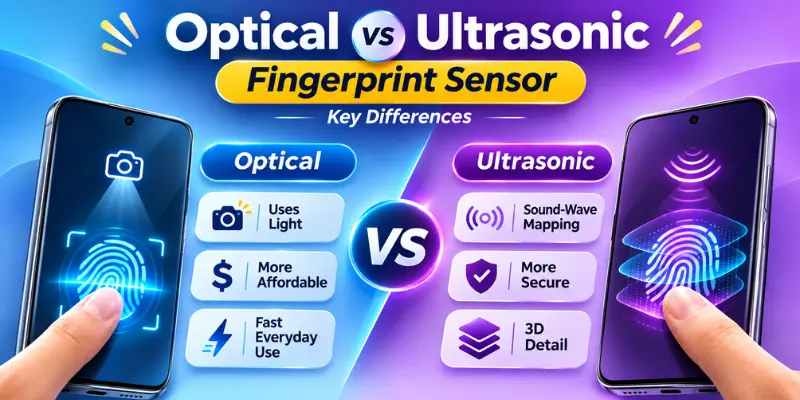
1. Scanning Technology
Optical sensors use light to capture an image of your fingerprint. When you place your finger on the screen, the scanning area lights up and helps the sensor read your fingerprint.
Ultrasonic sensors use high-frequency sound waves instead of light. They send sound waves toward your finger and read the signals that bounce back.
This difference affects how each sensor works under the display.
2. Fingerprint Details
Optical fingerprint sensors mainly capture a two-dimensional image of your fingerprint. They read the patterns formed by the raised lines and spaces on your finger.
Ultrasonic fingerprint sensors can capture three-dimensional fingerprint details. They use sound waves to collect information about the ridges and other surface features of your finger.
This gives ultrasonic sensors more detailed fingerprint information than a basic optical image.
However, capturing more details does not automatically mean better performance in every smartphone.
3. Scanning Speed
Both optical and ultrasonic fingerprint sensors can unlock a smartphone quickly. However, their speed depends on the sensor technology and phone design.
Some optical sensors respond almost instantly, while some ultrasonic sensors also offer very fast recognition.
4. Accuracy
Both optical and ultrasonic fingerprint sensors can recognize fingerprints accurately.
Optical sensors capture a fingerprint image using reflected light, while ultrasonic sensors use sound waves to collect fingerprint details.
Ultrasonic sensors can capture more detailed fingerprint information, but this does not automatically make them more accurate in every smartphone.
The actual accuracy depends on sensor quality, fingerprint registration, software, and how you place your finger on the scanning area.
5. Security
Both optical and ultrasonic fingerprint sensors can provide security for your smartphone.
Optical sensors use fingerprint images to recognize your finger. However, basic optical designs may have more limitations when detecting fake fingerprints.
Advanced ultrasonic sensors can capture detailed fingerprint information and support strong anti-spoofing features. These features can make it harder for someone to unlock your phone using a fake fingerprint.
Still, the complete security system matters more than the sensor type alone.
6. Performance With Wet Fingers
Water or sweat can affect how well a fingerprint sensor recognizes your finger.
Optical sensors may struggle when your finger is wet because moisture can change the way light reflects from your fingerprint.
Some ultrasonic sensors can recognize fingerprints more easily when your finger has slight moisture. However, very wet, oily, or dirty fingers can affect both technologies.
7. Screen Protector Compatibility
Both optical and ultrasonic fingerprint sensors can face problems with certain screen protectors.
Thick glass, poor installation, and air gaps can affect fingerprint recognition. However, ultrasonic sensors may need special screen protectors that work with their scanning technology.
Always check your phone manufacturer’s recommendations before buying a screen protector.
8. Low-Light Performance
Both optical and ultrasonic fingerprint sensors can work in dark environments. However, they use different methods to scan your fingerprint.
Optical sensors use light to capture a fingerprint image. When you place your finger on the screen, the scanning area may produce a bright flash, especially in a dark room.
Ultrasonic sensors use sound waves instead of visible light. Therefore, they can scan your fingerprint without producing a bright scanning flash.
This makes ultrasonic sensors more comfortable to use in dark environments.
9. Cost
Optical fingerprint sensors are generally more affordable, which is why many budget and mid-range smartphones use this technology.
Ultrasonic fingerprint sensors generally cost more to develop and integrate into a smartphone. This is one reason manufacturers use them in selected mid-range and premium devices.
The price difference can vary depending on the sensor design and smartphone model.
Optical vs Ultrasonic Fingerprint Sensor: Which Is Faster?
Speed is one of the most common reasons people compare these two fingerprint technologies.
However, neither technology wins every speed test.
A modern optical fingerprint sensor can unlock a phone very quickly. Similarly, a good ultrasonic sensor can recognize your finger within a short time.
Several factors affect fingerprint unlocking speed:
- Sensor quality: Better hardware can improve fingerprint recognition.
- Sensor size: A larger scanning area can make it easier to place your finger correctly.
- Software: The phone’s fingerprint recognition system affects how quickly it checks your finger.
- Fingerprint registration: Registering your fingerprint properly can improve recognition speed and reliability.
- Finger condition: Moisture, dirt, cuts, or very dry skin can affect the scanning process.
For this reason, you should compare actual smartphone models instead of assuming that every ultrasonic sensor is faster than every optical sensor.
Which Fingerprint Sensor Is More Secure and Accurate?
Security and accuracy matter because your fingerprint protects access to your phone, apps, and personal information.
Both optical and ultrasonic sensors can provide reliable fingerprint recognition, but their scanning methods have some differences.
Optical Fingerprint Sensor Security and Accuracy
Optical sensors capture a two-dimensional image of your fingerprint and compare it with your saved data.
A good optical sensor can recognize your finger accurately. However, basic optical designs may have more limitations in detecting fake fingerprints, especially without strong anti-spoofing features.
Modern phones can improve security through better fingerprint matching and additional protection systems.
Ultrasonic Fingerprint Sensor Security and Accuracy
Ultrasonic sensors use sound waves to capture detailed fingerprint information, including three-dimensional features such as ridges and pores.
These details can help make certain spoofing attempts more difficult. Some ultrasonic systems also include advanced anti-spoofing features.
However, an ultrasonic sensor does not automatically make every phone more secure. The phone’s overall hardware, software, and biometric security system also matter.
Which one should you trust?
Both technologies can provide good protection. Advanced ultrasonic sensors have some advantages in fingerprint detail and anti-spoofing, but you should also check the phone’s overall security features
Which Fingerprint Sensor Is Better for Everyday Smartphone Users?
Your best choice depends on what you expect from your smartphone.
Both optical and ultrasonic sensors can offer a good unlocking experience. However, each technology suits different needs.
When Should You Choose an Optical Sensor?
An optical fingerprint sensor may suit you if:
- You want an affordable smartphone.
- You need a simple fingerprint unlocking system.
- You mainly use your phone in normal daily conditions.
- You do not need advanced fingerprint scanning features.
- You want a phone with reliable everyday performance.
A good optical sensor can handle everyday unlocking without any major problems.
When Should You Choose an Ultrasonic Sensor?
An ultrasonic fingerprint sensor may suit you if:
- You prefer advanced fingerprint scanning technology.
- You want detailed fingerprint recognition.
- You often unlock your phone with slightly damp fingers.
- You prefer a sensor that does not produce a bright scanning flash.
- You are buying a premium smartphone with advanced biometric features.
Ultrasonic sensors can offer extra benefits, but you should still check the phone’s actual performance.
How to Check Which Fingerprint Sensor Your Phone Uses?
You do not need special equipment to find out which fingerprint sensor your smartphone uses.
Follow these simple steps:
- Open your phone manufacturer’s official website.
- Search for your exact smartphone model.
- Open its specifications or technical details page.
- Look for fingerprint sensor information.
- Check whether the phone uses optical, ultrasonic, or capacitive technology.
You can also check the phone’s user manual or contact the manufacturer’s support team.
Remember that an under-display fingerprint sensor does not always mean the phone uses ultrasonic technology. Many smartphones use optical sensors under the display.
Always check the exact model before making a decision.
Conclusion
So guys, we have covered optical vs ultrasonic fingerprint sensors in detail. Both offer convenient unlocking, but each has its own advantages.
Optical sensors are generally more affordable and provide reliable everyday performance. Ultrasonic sensors offer more detailed fingerprint scanning and advanced anti-spoofing features.
If you want an affordable smartphone, an optical sensor can be a good choice. However, if you prefer advanced fingerprint technology, an ultrasonic sensor may suit you better.
Ultimately, the best choice depends on your budget, preferences, and the smartphone model. Always compare the actual performance and features before choosing a phone.
Frequently Asked Questions (FAQs)
Here are answers to some of the most common questions about optical vs ultrasonic fingerprint sensors:
Yes, Samsung uses ultrasonic fingerprint sensors in several of its flagship Galaxy smartphones. These sensors are placed under the display and use sound waves to read fingerprint details. However, not every Samsung phone has an ultrasonic sensor, as some models use optical or other fingerprint technologies.
The best fingerprint sensor depends on your needs and the smartphone you choose. Some flagship Samsung Galaxy phones offer advanced ultrasonic fingerprint technology, while other brands provide fast and reliable optical sensors. Compare unlocking speed, accuracy, security, and real-world performance before choosing a phone.
Ultrasonic fingerprint sensors have a few disadvantages:
- They can cost more than basic optical sensors.
- Some screen protectors can affect fingerprint recognition.
- They appear in fewer smartphone models.
- Their performance can vary between different devices.
- Some models require careful finger placement.
Despite these limitations, ultrasonic sensors offer useful features such as detailed fingerprint scanning and advanced anti-spoofing support.
There is no single smartphone that is always the fastest at fingerprint unlocking. Speed depends on the sensor quality, software optimization, and overall phone design. You should compare real-world tests of specific smartphone models to find the fastest option.
Apple moved most iPhone models from Touch ID to Face ID when it introduced the iPhone X in 2017.
Face ID uses facial recognition technology instead of a fingerprint sensor. It allows users to unlock their phones by looking at the screen.
However, some older iPhones and iPhone SE models still use Touch ID. Apple chose Face ID for its newer main iPhone designs, but fingerprint technology has not disappeared from every iPhone model.




- Be Respectful
- Stay Relevant
- Stay Positive
- True Feedback
- Encourage Discussion
- Avoid Spamming
- No Fake News
- Don't Copy-Paste
- No Personal Attacks
- Be Respectful
- Stay Relevant
- Stay Positive
- True Feedback
- Encourage Discussion
- Avoid Spamming
- No Fake News
- Don't Copy-Paste
- No Personal Attacks
