Types of Phone Charger Cables and How to Choose the Right Cable
Published: 29 Sep 2026
While all phone charging cables might seem alike, they don’t necessarily charge every phone, adapter, and with the same speed. There are some that can only be used on new Android devices and some that are compatible with older phones or iPhones.
The most common types of phone charger cables are USB-C, Lightning, Micro-USB, Mini-USB, and Apple 30-pin cables. However, choosing the right cable also depends on the connector at the charger end, such as USB-A or USB-C.
In this blog post you’ll see a detailed overview of the various phone charging cable types and their specifications.
What Are the Main Types of Phone Charger Cables?
The five main phone charger cable connector types are:
- USB-C
- Lightning
- Micro-USB
- Mini-USB
- Apple 30-pin
Phone Charger Cable Types at a Glance
The table below provides a quick comparison of these phone charger cable types, including their connector shape, common uses, and current availability.
| Cable Type | Connector Shape | Commonly Used With | Reversible | Current Use |
|---|---|---|---|---|
| USB-C | Small oval shape | Modern Android phones and newer iPhones | Yes | Very common |
| Lightning | Thin, flat connector | Older iPhones and Apple accessories | Yes | Legacy use |
| Micro-USB | Small, uneven shape | Older Android phones and accessories | No | Becoming less common |
| Mini-USB | Larger than Micro-USB | Older phones, cameras, and GPS devices | No | Rare |
| Apple 30-pin | Wide, flat connector | Very old Apple devices | No | Mostly discontinued |
Now, let’s look at each type of phone charger cable in more detail.
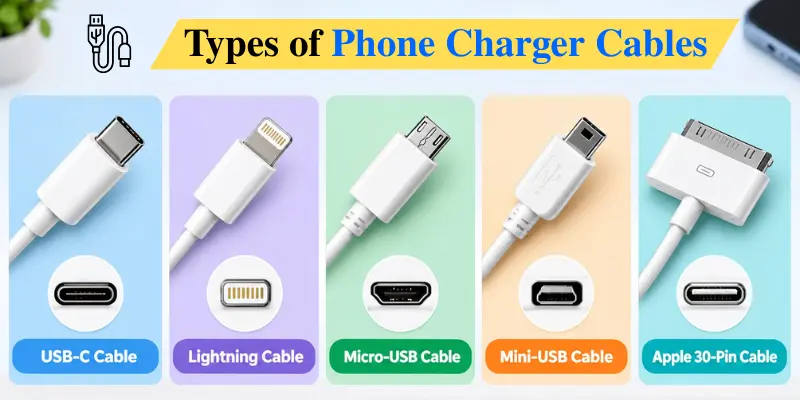
1. USB-C Cable
USB-C is the most common charging connector used in modern smartphones. This connector is oval-shaped with a small size and has rounded corners.
USB-C is reversible, so you can plug the connector into your smartphone from either side without worrying about which way it is facing.
USB-C is used by:
- Modern Android phones
- iPhone 15 and newer models
- Tablets
- Laptops
- Power banks
- Wireless earbuds
- Gaming devices
Advantages of USB-C Cables
- Reversible and easy to connect
- Supports modern fast-charging technologies
- Can transfer power and data
- Works with many different devices
- Can reduce the need for separate cables
- Available in USB-A to USB-C and USB-C to USB-C versions
Does Every USB-C Cable Support Fast Charging?
No. The USB-C connector only describes the shape of the connector. It does not automatically tell you the cable’s charging wattage or data speed.
USB-C cables can support different power levels, charging standards, and data speeds. Some certified USB-C cables are marked with their supported power rating, such as 60W or 240W.
To get the best charging speed, your phone, charger, and cable must support the required charging standard and power level.
2. Lightning Cable
Lightning is a charging connector developed by Apple. It has a thin and flat design with visible metal contacts.
Like USB-C, the Lightning connector is reversible. It can be connected to the device from either side.
Lightning cables are commonly used with:
- iPhone 14 and older iPhone models
- Some older iPads
- AirPods charging cases
- Older Apple keyboards and mice
- Some Apple accessories
Advantages of Lightning Cables
- Reversible design
- Small and easy to connect
- Supports charging and data transfer
- Works with many older Apple devices
- Available with USB-A or USB-C at the charger end
Limitations of Lightning Cables
- Mainly works with older Apple devices
- Does not fit devices with USB-C ports
- Becoming less common on newer iPhones
- Cheap, uncertified cables may not work reliably
3. Micro-USB Cable
There was extensive use of micro-USB before the popularity of USB-C took place. The device has a small connector with an irregular shape. It features a wide edge and a narrow edge and can thus fit in one particular direction only.
Micro-USB cables are commonly found with:
- Older Android phones
- Basic mobile phones
- Older tablets
- Bluetooth speakers
- Power banks
- Wireless headphones
- Portable electronic accessories
A Micro-USB charging cable usually has a Micro-USB connector on one end and a USB-A connector on the other.
Advantages of Micro-USB Cables
- Widely available
- Usually inexpensive
- Works with many older devices
- Supports both charging and data transfer
Limitations of Micro-USB Cables
- Not reversible
- Usually supports slower charging than modern USB-C setups
- The small connector can become loose with regular use
- Not used by most new smartphones
- Does not fit devices with USB-C or Lightning ports.
Micro-USB is still useful if you own older phones or accessories, but it is gradually being replaced by USB-C.
4. Mini-USB Cable
Mini-USB is an older connector that came before Micro-USB. It is larger and thicker than a Micro-USB connector.
Mini-USB was used with:
- Older mobile phones
- Digital cameras
- MP3 players
- GPS devices
- Older portable electronics
- Some gaming controllers
Mini-USB is not reversible. It must be inserted in the correct direction.
Is Mini-USB Still Used?
A Mini-USB port is hard to find on modern mobile devices. However, you might require one in case your electronic accessory is outdated, such as a camera, GPS, or game controller.
One thing you should never do is mistake Mini-USB for Micro-USB because they are not interchangeable and have different ports.
5. Apple 30-Pin Cable
The Apple 30-pin cable is a wide charging connector used by older Apple devices before the introduction of Lightning.
It was used with:
- Older iPhones
- Older iPads
- Older iPods
- Apple docking stations
- Older speaker systems
The connector is much wider than Lightning or USB-C. It is not reversible and must be inserted in the correct direction.
Apple 30-pin cables are now considered legacy accessories. They are mainly needed by people who still use older Apple devices.
Common Phone Charging Cable Combinations
Your phone connector is only one part of the cable. You also need to check the connector on the other end, which connects to the charger or power source.
Below are some of the most common phone charging cable combinations.
USB-C to USB-C Cable
A USB-C to USB-C cable has the same oval-shaped USB-C connector on both ends.
One end connects to the phone, while the other connects to a USB-C charging port on a charger, laptop, power bank, or another compatible device.
It is commonly used for:
- New Android phones
- iPhone 15 and newer models
- Tablets
- Laptops
- Modern power banks
USB-C to USB-C is usually the best option for modern fast charging. USB Power Delivery can provide high power levels through compatible USB-C cables, although the actual charging speed depends on the phone and adapter.
USB-A to USB-C Cable
One end of the cable has a rectangular USB-A plug, while the other end has a USB-C connector.
The USB-A plug can connect to an old charger, computer, car charger, or power bank. The USB-C connector can connect to the phone.
This cable comes in handy if you have a USB-C port on your phone but only a USB-A charging adapter.
However, the charging speeds of a USB-A to USB-C connection may be different from that of USB-C to USB-C fast charging.
USB-C to Lightning Cable
The USB-C to lightning cable features USB-C at one end while Lightning at another. It is commonly used for charging older iPhones with a USB-C charger.
This kind of cable can offer a higher rate of charging than the conventional USB-A to lightning cable if the iPhone, charger, and cable all support fast charging.
Apple has confirmed the compatibility of some iPhone models for fast charging through USB-C to lightning connection.
USB-A to Lightning Cable
This cable has a rectangular USB-A connector at one end and a Lightning connector at the other.
It is commonly used with:
- Older iPhone chargers
- Computers with USB-A ports
- Car chargers
- Older power banks
- Older iPhone models
It is still useful but may charge more slowly than a compatible USB-C to Lightning setup.
USB-A to Micro-USB Cable
USB-A to Micro-USB was one of the most common charging cable combinations before USB-C became popular.
It is used with older Android phones, Bluetooth speakers, power banks, headphones, and other accessories.
The USB-A end connects to the power source, while the Micro-USB end connects to the device.
Multi-Connector Charging Cable
A multi-connector cable includes two or more charging connectors on a single cable.
It may include:
- USB-C
- Lightning
- Micro-USB
These cables are useful for travelling or charging different devices without carrying several separate cables.
However, some multi-connector cables have limitations. They may charge more slowly, may not support data transfer, or may not allow all connected devices to use fast charging at the same time.
Check the cable specifications before buying one.
How to Identify Your Phone’s Charger Cable
You can identify the correct cable by looking at the charging port on your phone.
- USB-C Port: A USB-C port has a small oval shape with rounded edges and looks the same from the top and bottom. It is commonly found on modern Android phones and newer iPhones.
- Lightning Port: A Lightning port is thin and narrow and is mainly found on iPhone 14 and older iPhone models. The connector has visible flat metal contacts.
- Micro-USB Port: A Micro-USB port is small and has an uneven shape, with different top and bottom sides. The cable only fits in one direction.
- Mini-USB Port: A Mini-USB port is larger and thicker than Micro-USB. It is mostly found on older electronic devices rather than modern phones.
- Apple 30-Pin Port: An Apple 30-pin port is wide and flat. It is easy to recognize because it is much wider than modern phone charging ports.
Does the Charging Cable Affect Charging Speed?
Yes, the cable can affect how quickly your phone charges.
Fast charging depends on four main factors:
- The charging speed supported by your phone
- The power output of the adapter
- The power rating of the cable
- The charging technology supported by all three
For example, even if you use a high-wattage charger with a fast-charging phone, the phone may not charge at its maximum speed if the cable does not support the required power level.
Similarly, using a high-power USB-C cable with an older phone does not make the phone charge faster than the charging speed it supports.
How to Choose the Right Phone Charger Cable
Consider the following points before buying a charging cable.
1. Check Your Phone’s Charging Port
Find out which connector your smartphone has: USB-C, Lightning, Micro-USB, etc.
You should not buy a cable according to your phone’s brand as there might be various types of connectors for devices of the same company.
2. Check the Charging Adapter Port
Look at the port on your wall adapter. A rectangular port is normally USB-A, while a smaller oval port is USB-C. This tells you which connector you need at the other end of the cable.
3. Check Fast-Charging Support
Select the right cable that is capable of accommodating the charging power requirements of your phone.
For better performance, use either the original cable or a certified cable from a reputed manufacturer.
4. Check Data Transfer Support
Choose a cable with data transfer support if you want to connect your phone to a computer, car, or other compatible device.
Keep in mind that not all charging cables support data transfer.
5. Choose a Suitable Length
Shorter cables are easy to carry and may have less power loss. Longer cables provide more freedom when the power outlet is far away.
Choose a length that fits your normal use instead of buying an unnecessarily long cable.
6. Check Build Quality
Look for:
- Strong connector joints
- Flexible strain relief
- Durable outer material
- Clear power specifications
- Proper certification
- A warranty from the manufacturer
Common Mistakes to Avoid
Avoid these common mistakes when choosing and using phone charging cables.
- Buying a cable without checking both connector ends
- Assuming every USB-C cable supports fast charging
- Using a charge-only cable for file transfers
- Forcing a connector into the wrong port
- Using a damaged or exposed cable
- Buying an uncertified Lightning cable
- Ignoring the cable’s wattage rating
- Using a low-quality cable with a high-power adapter
- Continuing to use a connector that becomes unusually hot
Conclusion
So guys, in this article, we’ve covered the different types of phone charger cables in detail. You now know the main cable types, common connector combinations, and what to check before buying one. I recommend choosing a reliable cable that matches both your phone and charger instead of buying one based only on price.
Also, check its charging and data transfer capabilities when needed. If this guide helped you, share it with your friends and check out our other mobile phone guides.
Frequently Asked Questions (FAQs)
Here are answers to some common questions about the types of phone charger cables.
No. The cable must have a connector that matches your phone’s charging port. You should also check whether the cable supports your phone’s charging and data-transfer requirements.
Not necessarily. Price alone does not determine cable quality. Look for reliable construction, proper power ratings, certification where applicable, and compatibility with your phone and charger.
Some cables support both charging and data transfer, while others are designed for charging only. Check the cable specifications if you need to transfer files between your phone and another device.
Yes, if the cable has compatible connectors or is designed for multiple devices. However, charging speed and other features can vary between devices.

- Be Respectful
- Stay Relevant
- Stay Positive
- True Feedback
- Encourage Discussion
- Avoid Spamming
- No Fake News
- Don't Copy-Paste
- No Personal Attacks
- Be Respectful
- Stay Relevant
- Stay Positive
- True Feedback
- Encourage Discussion
- Avoid Spamming
- No Fake News
- Don't Copy-Paste
- No Personal Attacks
