How to Check a Refurbished Phone Before You Buy: A 10-Point Checklist
Published: 4 Sep 2026
A refurbished phone can save you a lot of money, but it can also become an expensive mistake if you skip a few important checks. A phone may look perfect on the outside while hiding a weak battery, damaged components, account locks, or network issues.
You can spot most common mobile phone problems within a few minutes of testing. Whether you are buying privately in Dubai or choosing tested refurbished phones from a retailer, this 10-point checklist will help you check the phone properly and avoid a bad deal.
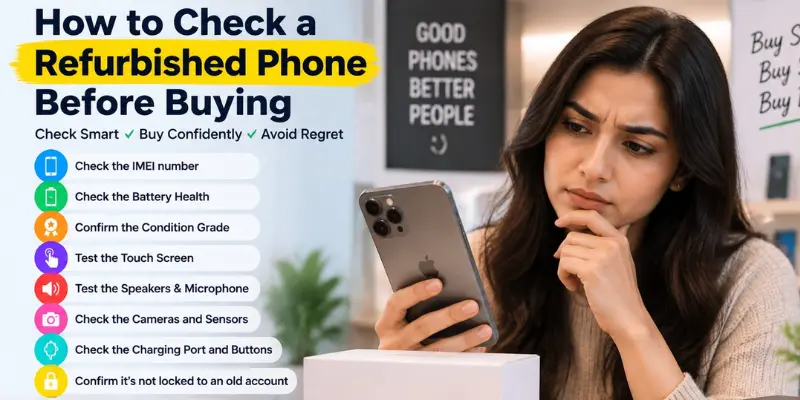
1. Check the IMEI number
The IMEI is a unique 15-digit number that identifies a mobile phone. It is different from your SIM number and stays associated with the device itself. To find it quickly, dial *#06# on the phone, or check it under the device settings.
Once you have the IMEI, compare it with the number shown in the phone’s Settings and, if available, the number printed on the original box. All numbers should match. If they do not, the phone may have been repaired, replaced, or tampered with, so ask the seller for an explanation before buying.
It is also worth checking whether the IMEI has been reported as lost or stolen. A phone can look and work normally while still having a network-related issue, so checking the IMEI before payment can help you avoid a costly problem.
2. Check the Battery Health
Battery health is one of the most important things to check when buying a refurbished phone. On an iPhone, go to Settings > Battery > Battery Health & Charging and check the maximum capacity. You can use these figures as a general guide:
- 90% or higher: Excellent battery condition
- 85–89%: Good for normal daily use
- 80–84%: The battery has some wear and may not last all day.
- Below 80%: The battery is quite weak and may need replacement soon.
Android phones do not always show battery health in the same way. If available, check the battery health report or cycle count, and ask the seller about the battery’s condition before buying.
3. Confirm the Condition Grade
Good sellers grade their refurbished phones and explain what each grade means. The grading may vary by seller, but a common scale looks like this:
- Open Box and Like New show no visible marks at all
- Grade A has light wear you notice only up close
- Grade B has visible scratches but works perfectly
If a listing only says “excellent condition” without explaining what that means, ask the seller for clear details about the phone’s actual condition before buying.
4. Test the Touch Screen
A faulty touchscreen can have dead zones that are difficult to notice during normal use. Swipe slowly across the entire display, including the corners and edges, and make sure every area responds correctly.
You can also use our touch screen test tool to check the display more thoroughly. It helps identify unresponsive areas that may be missed during manual testing.
5. Test the Speakers and Microphone
Speakers and microphones can develop problems that are not always obvious at first. Test each one before buying:
- Speakers: Play a video at high volume and listen for crackling or distorted sound.
- Microphone: Record a short voice note and play it back to check the audio quality.
- Earpiece: Make a short call and make sure you can hear the other person clearly.
You can also use our mobile speaker test tool to check the phone’s speaker and identify unusual sounds or volume issues more easily.
6. Check the Cameras and Sensors
Switch between the front, wide, ultra-wide, and zoom cameras and take a photo with each one. Check the photos for blurry areas, unusual colors, spots, or dust inside the lens.
Also test Face ID or the fingerprint reader to make sure they work properly. Sensor problems can be costly to fix, especially if the phone has already been repaired .
7. Check the Charging Port and Buttons
Confirm that the phone charges properly without needing to wiggle or adjust the cable. Test wireless charging as well if the model supports it.
Press the power button, both volume buttons, and the mute switch to make sure they respond correctly. If the phone only charges when the cable is held at a certain angle, the charging port may be damaged.
8. Confirm the phone is not locked to an old account
An iPhone still signed in to a previous owner’s iCloud account can be unusable. Check that no Apple Account is signed in and that Find My iPhone is off. If the previous owner’s account is still linked, you may not be able to activate the phone after a reset.
For Android phones, confirm that the device has been properly factory reset. The phone should start at the setup screen rather than showing the previous owner’s home screen. If an old account or activation lock appears during setup, do not proceed with the purchase.
9. Check Network Compatibility and Carrier Lock
Insert your own SIM and confirm you get a signal and mobile data, not just Wi-Fi. Phones imported through unofficial channels sometimes lack local registration, which can cause connection problems later.
Ask whether the handset is unlocked and approved for local networks before buying. Also make sure your SIM works properly for calls, texts, and mobile data.
10. Read the Warranty and Returns Policy
Warranty is the part many buyers overlook and later regret. Before you pay, get clear answers on:
- How many months the cover lasts
- What it excludes, especially the battery and screen
- Who carries out the repair and where
- How long you have to return a faulty device
Read the warranty terms carefully and make sure you understand what is covered and what is not. If the phone develops a problem after purchase, understanding the repair and return policy can help you avoid unexpected costs.
Where to Buy a Refurbished Phone Safely
Where you buy a refurbished phone can be just as important as the checks you perform. Choose a seller with clear product descriptions, transparent condition grades, and a written warranty or return policy.
Before paying, check the seller’s reviews and make sure they provide the phone’s condition, battery status, and any repairs that have been carried out. Avoid sellers who refuse to provide basic details or pressure you to make a quick payment.
Conclusion
So guys, in this article, we’ve covered in detail how to check a refurbished phone before buying. In my recommendation, never rush into a refurbished phone purchase just because the price looks attractive. Take a few minutes to check the battery, screen, cameras, charging port, account lock, and warranty. These simple checks can help you avoid hidden problems and unnecessary repair costs.
If you’re planning to buy a reconditioned phone, use this 10-point checklist and check the device carefully before you pay.
Frequently Asked Questions (FAQs)
Here are the answers to some common questions about how to check a refurbished phone before buying :
Yes, a refurbished phone can be worth buying if it has been properly tested, is in good condition, and comes with a reasonable warranty or return policy. You can often get a high-quality device for much less than a new one.
For an iPhone, 85% or higher is generally a good range for a refurbished device. Battery health below 80% may indicate significant wear and could mean the battery needs replacement sooner.
Check the phone’s repair or parts history if the device provides one. You can also look for signs such as gaps around the screen, mismatched parts, loose buttons, or unusual camera and display behavior.
A refurbished phone can be safe to use when it has been properly tested and reset before sale. Make sure the device is not linked to someone else’s account and that its important hardware and software features work correctly.
A refurbished phone is usually an original device that has been tested or repaired for resale. However, fake phones can also be sold as refurbished. Check the IMEI, model details, and build quality to verify the phone is genuine.




- Be Respectful
- Stay Relevant
- Stay Positive
- True Feedback
- Encourage Discussion
- Avoid Spamming
- No Fake News
- Don't Copy-Paste
- No Personal Attacks
- Be Respectful
- Stay Relevant
- Stay Positive
- True Feedback
- Encourage Discussion
- Avoid Spamming
- No Fake News
- Don't Copy-Paste
- No Personal Attacks
