What Is Mobile Printer? Discover How It Changes Printing
Published: 26 Nov 2025
In today’s fast-paced world, being able to print from anywhere and at any time has become essential. Whether you’re a business professional who needs to print invoices while traveling or someone who simply wants the comfort of printing documents from a mobile device, a mobile printer is a game-changer.
In this article, we’ll dive deep into what mobile printers are, how they work, and why they could be the solution to your portable printing needs. So, let’s get started.
What is a Mobile Printer?
A mobile printer is a compact, lightweight printer designed to work with mobile devices like smartphones, tablets, and laptops. Unlike traditional desktop printers, mobile printers are built to be portable, allowing users to print from anywhere. These printers connect to your mobile device wirelessly, often through Bluetooth, Wi-Fi, or even USB, allowing for printing on the go without the need for a fixed connection or a large printer setup.
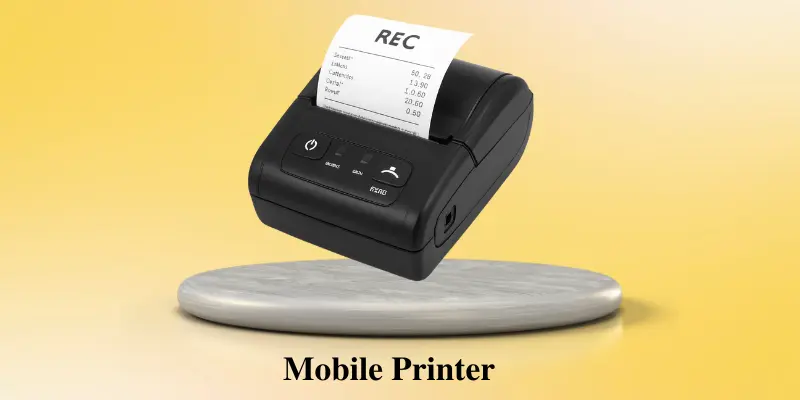
While they may not be as powerful as office printers but mobile printers provide the advantage of portability and flexibility, making them perfect for professionals who are always on the move, such as sales representatives, field technicians, and travelers.
How Does a Mobile Printer Work?
Mobile printers operate using a variety of connection methods, depending on the type of printer you’re using. Most modern mobile printers rely on wireless technology to connect to mobile devices. The most common methods include:
- Bluetooth: This is one of the most common and easiest ways to connect your mobile printer to a smartphone or tablet. Bluetooth allows you to send documents directly from your device to the printer without needing an internet connection.
- Wi-Fi: Some mobile printers can connect through Wi-Fi, either directly to your device or to a local network. This is particularly useful if you want to print from multiple devices in a larger space, like an office or home.
- USB: Though less common, some mobile printers still support USB connections, allowing you to plug your device directly into the printer.
Once connected, you can use various mobile printing apps provided by manufacturers (such as HP Smart, Epson iPrint, or Canon PRINT) to manage your printing tasks. These apps make it easier to print documents, photos, and even web pages directly from your phone or tablet.
Types of Mobile Printers
Mobile printers come in different types depending on their printing technology, purpose, and portability. Here are the most common types:
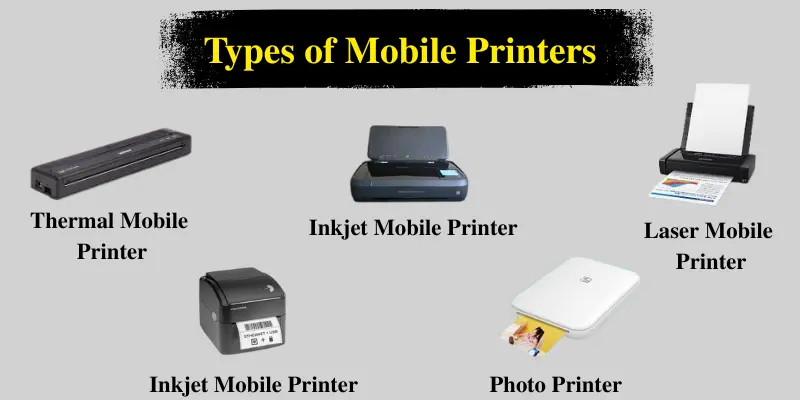
1. Thermal Mobile Printers
Thermal printers use heat to print on special thermal paper. They don’t require ink or toner, so they are lightweight and easy to maintain.
- Use case: Printing receipts, invoices, shipping labels, or tickets on the go.
2. Inkjet Mobile Printers
These printers work like traditional inkjet printers but in a smaller, portable form. They provide high-quality color printing, making them suitable for documents and photos.
- Use case: Printing photos, reports, or colorful documents while traveling.
3. Laser Mobile Printers
Laser printers use toner instead of ink and can print fast and efficiently. Portable laser printers are slightly bigger than inkjet or thermal printers, but they are perfect for regular document printing.
- Use case: Printing large numbers of professional documents or contracts quickly.
4. Label Printers
Label printers are compact devices specifically designed to print labels, barcodes, and tags. They are widely used in retail, logistics, and inventory management.
- Use case: Printing product labels, shipping labels, or ID tags instantly.
5. Photo Printers
Portable photo printers are designed for quick, high-quality photo printing. They are usually very compact and can easily fit in a bag or pocket.
- Use case: Printing personal photos or event pictures directly from a smartphone.
Uses of Mobile Printers
Mobile printers are handy and can be used in many places where traditional desktop printers can’t go. Here are some common ways they’re used:
- Field Service & Repairs: Workers like technicians can print bills, job sheets, or service reports right where they work, eliminating the need to go back to the office.
- Retail & Sales: Great for printing receipts, price tags, and invoices during deliveries, sales visits, or in small shops and pop-up stalls.
- Logistics & Delivery: Drivers can print labels, delivery notes, or route maps while on the road, making their work faster and more organized.
- Healthcare: Doctors and nurses can print patient details, prescriptions, or labels directly during visits or at clinics to save time and avoid mistakes.
- Event Management: At events or conferences, organizers can quickly print entry tickets, name tags, or wristbands as needed.
- Travel & Transport: Travellers and transport workers can print tickets, boarding passes, or travel plans from their phones while at stations or airports.
Advantages of Using a Mobile Printer
Mobile printers offer a wide range of benefits, especially for people who are always on the move or work in the field. Some of the key benefits include:
- Easy to Carry: Mobile printers are small and lightweight, making them easy to carry around, whether in a bag or a briefcase.
- Print Anytime: You can print directly from your mobile device, saving you time and effort. Whether it’s a report, a document, or even a boarding pass, mobile printers can handle it all.
- Work Faster: Mobile printers help businesses print on the go, making tasks like field service, sales, or logistics more efficient.
- Budget-Friendly: Mobile printers are affordable, giving convenience without spending too much.
Disadvantages of Using a Mobile Printer
While mobile printers are useful, they also have some drawbacks that are important to know before buying one.
- Limited Print Quality: Mobile printers often have lower print resolutions compared to traditional desktop printers, which can affect the quality of the printed documents, especially for detailed graphics or high-quality images.
- Small Paper Capacity: Most mobile printers have a limited paper tray capacity, which means frequent paper refills are necessary, making them less efficient for larger print jobs.
- Battery Life: Mobile printers rely on rechargeable batteries, and the battery life may be limited, especially if used extensively. Users may need to carry extra batteries or chargers for continuous use.
- Connectivity Issues: Mobile printers connect to devices through Bluetooth, Wi-Fi, or USB, but sometimes connectivity issues can cause delays or printing errors.
How to Choose the Best Mobile Printer
Choosing the right mobile printer depends on your specific needs. Here are some factors to consider:
- Print Quality: Decide what you will mostly print. For photos or color documents, choose an inkjet or photo printer. For simple black-and-white text or receipts, a thermal or laser printer is enough.
- Connectivity: Make sure the printer works with your device. Some printers only support certain systems like iOS, Android, or Windows.
- Battery Life: Look for printers with long-lasting or easily rechargeable batteries, especially if you print on the go.
- Size & Weight: Pick a compact, lightweight printer if you travel frequently. For heavy fieldwork, a slightly larger printer may offer better performance.
- Price: Mobile printers come in different prices. Set a budget and choose a printer that gives the best value for your needs.
Conclusion
So guys, in this article, we’ve covered what is a mobile printer in detail. These portable printers make printing easy, fast, and flexible, perfect for people who work or travel a lot. Whether you’re printing receipts, labels, or photos, they help you stay productive wherever you are.
They may not replace big office printers, but for light tasks, they’re super handy. If you need easy and portable printing, I highly recommend trying a mobile printer.
👉 Ready to get started? Explore and find the mobile printer that fits your needs today!
Frequently Asked Questions (FAQs)
Here are the answers to some frequently asked questions about the mobile printer:
Yes! Most mobile printers connect easily with smartphones using Bluetooth or Wi-Fi. Just install the printer’s app, and you’re ready to print directly from your phone.
You can print many types of documents with a mobile printer. This includes text files, reports, invoices, and receipts. Some mobile printers can also print photos, labels, and boarding passes directly from your phone or tablet.
It depends on the type. Inkjet printers need ink cartridges, while thermal printers use special thermal paper and don’t need ink. Always check what your printer uses before buying supplies.
Yes, especially if you have limited space or want to print from your phone. They’re perfect for light printing tasks like homework, documents, or photos. However, for large jobs, a desktop printer might work better.
A mobile printer app is a special app that allows you to connect your smartphone or tablet to a mobile printer. It helps you print documents, photos, or labels directly from your device. Brands like HP, Canon, and Epson have their own free apps to make printing easy and quick.




- Be Respectful
- Stay Relevant
- Stay Positive
- True Feedback
- Encourage Discussion
- Avoid Spamming
- No Fake News
- Don't Copy-Paste
- No Personal Attacks
- Be Respectful
- Stay Relevant
- Stay Positive
- True Feedback
- Encourage Discussion
- Avoid Spamming
- No Fake News
- Don't Copy-Paste
- No Personal Attacks
