Advantages and Disadvantages of VPN You Should Know
Published: 6 Jul 2026
A VPN (Virtual Private Network) is one of the most popular tools for improving online privacy and security. Millions of people use VPNs to protect their data on public Wi-Fi, hide their IP address, reduce online tracking, and access geo-restricted content.
However, a VPN also comes with a few drawbacks. It may slow down your internet connection, cause compatibility issues with some websites or apps, and cannot protect you from every online threat.
In this guide, we will clearly explain the pros and cons of VPN, how they work, when you should use one, and the situations where a VPN may not be necessary. So, let’s dive in
What Is a VPN?
A VPN stands for Virtual Private Network. It creates a secure connection between your device and the internet. When you connect to a VPN, your internet traffic passes through a VPN server before reaching websites, apps, or online services.
This process does two main things.
First, it encrypts your internet traffic. Encryption makes your data harder to read if someone tries to intercept it, especially on public Wi-Fi networks.
Second, it hides your real IP address. Websites and apps usually see the IP address of the VPN server instead of your actual IP address. This helps improve your online privacy and can make your location harder to track.
For example, if you are using Wi-Fi at an airport, hotel, or coffee shop, a VPN can help protect your browsing activity from hackers or other people on the same network.
Advantages of Using a VPN
A VPN offers several benefits for your online privacy, security, and browsing experience. Whether you’re using public Wi-Fi, working remotely, or simply browsing the web, it can help keep your online activity more secure.
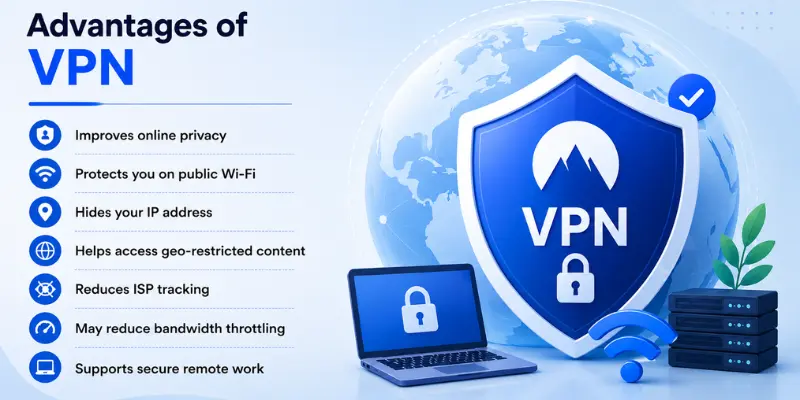
Here are the seven key advantages of using a VPN:
- Improves online privacy
- Protects you on public Wi-Fi
- Hides your IP address
- Helps access geo-restricted content
- Reduces ISP tracking
- May reduce bandwidth throttling
- Supports secure remote work
Now that you’ve seen the key benefits, let’s explore each one in more detail.
1. Improves Online Privacy
One of the best benefits of a virtual private network is enhanced privacy. If you do not use a VPN, your ISP, websites, advertisers, and data brokers will be able to track your online activities.
However, a virtual private network protects you by hiding your IP address and encrypting your internet traffic. It means that it becomes more difficult for websites to pinpoint your location and for your ISP to monitor what you are doing on the web.
In other words, your ISP may understand that you are using a VPN, yet it will be unable to see which sites you visit. Likewise, websites may see only the IP address of the server used for the connection, not yours.
It means that a VPN improves your privacy, but it does not make you completely anonymous online.
2. Protects You on Public Wi-Fi
Free public Wi-Fi is convenient, but it is not always secure. People often connect to free Wi-Fi networks in airports, hotels, cafes, restaurants, libraries, and shopping malls. Because these networks are usually public, cybercriminals may try to intercept the data you send and receive.
A VPN secures your connection by encrypting your internet traffic. This greatly reduces the risk of being hacked and of having your logins, emails, messages, or other data stolen.
Therefore, for tourists, freelancers, students, and remote workers, protecting your data on public Wi-Fi is one of the most valuable benefits of using a VPN.
3. Hides Your IP Address
The IP address can be used to identify your physical location as well as your internet connection. Various sites, applications, advertisements, and other forms of tracking software use the IP address to identify your region and create your online profile.
When using a Virtual Private Network (VPN), your true IP address is replaced with an IP address of the server that you are connected to.
For example, if you’re in the UK but connected to a VPN server in the US, websites may think you’re browsing from the United States instead of your actual location.
This helps protect your privacy and makes it more difficult for websites to identify your real location.
4. Help Access Geo-Restricted Content
Some websites, apps, and streaming services restrict content based on your location. This is known as geo-restriction. By connecting to a VPN server in another country, you may be able to access content that isn’t available in your region.
For example, if someone is traveling, he or she can use a virtual private network service to access the services of his or her own country. Others use it to access restricted websites.
However, this doesn’t always work. Some streaming services can detect and block VPN IP addresses, preventing access to certain content.
5. Reduce ISP Tracking
Your internet service provider can often see parts of your browsing activity, especially when you are not using privacy tools. A VPN reduces this visibility by encrypting your connection.
This means your ISP may not easily see the websites you visit or the type of content you access. For users who care about online privacy, this is a major benefit.
6. Reduce Bandwidth Throttling
Bandwidth throttling is when your internet service provider (ISP) intentionally slows down your internet speed based on your online activity, such as streaming, gaming, or large downloads.
Because a VPN encrypts your internet traffic, your ISP may have a harder time identifying the type of activity you’re performing. In some cases, this can help reduce bandwidth throttling, but it does not guarantee faster internet speeds.
7. Supports Secure Remote Work
Many companies use VPNs to give employees secure access to internal systems, business applications, and company files while working from home or traveling. This helps protect sensitive business data and creates a secure connection to the company’s network.
However, a corporate VPN is different from a personal VPN. If you use a company VPN, your employer may monitor network activity for security and compliance purposes, so it should not be used for private browsing.
Disadvantages of Using a VPN
While a VPN offers many advantages, it also has some drawbacks. Depending on the VPN you use, you may experience slower speeds, compatibility issues, or other limitations.
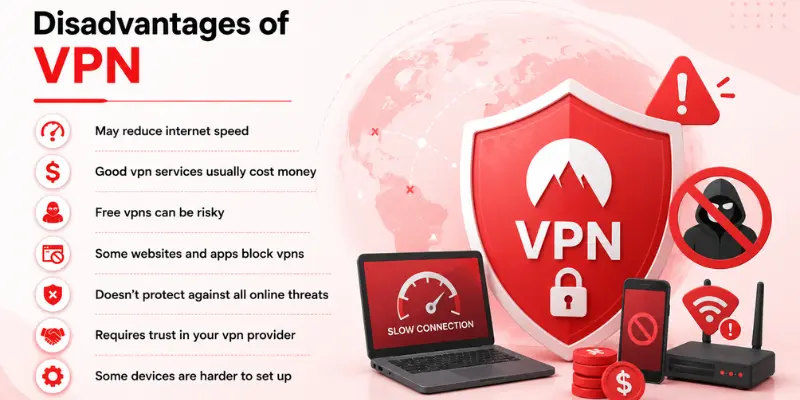
Here are the seven main disadvantages of using a VPN:
- May reduce internet speed
- Good vpn services usually cost money
- Free vpns can be risky
- Some websites and apps block vpns
- Doesn’t protect against all online threats
- Requires trust in your vpn provider
- Some devices are harder to set up
Now, let’s explore each one in more detail.
1. May Reduce Internet Speed
Reduced internet speed is another popular problem that can be associated with the use of a VPN. As all your traffic goes through a secure connection to a remote server, you might experience delays while browsing the Internet.
The speed will vary depending on many different factors, including server location, server load, chosen VPN protocol, the strength of encryption, and your initial internet speed.
If the server is far away from your current location, you might experience increased latency. If the server is overloaded, you may expect slower browsing and streaming.
2. Good VPN Services Usually Cost Money
Another disadvantage of using a VPN is cost. Many reliable VPN services require a monthly or yearly subscription.
Free VPNs are available, but they usually come with limitations. They may offer slower speeds, fewer server locations, data limits, ads, or weaker privacy protection.
A good paid VPN usually gives better speed, stronger security, more server options, and better customer support. But for users who only need basic browsing, paying for a VPN may feel unnecessary.
This is why cost is one of the biggest reasons some people avoid VPNs.
3. Free VPNs Can Be Risky
The first thing that attracts people to using free VPN services is that there are no costs involved. However, there are many risks that come with using a free VPN service.
The problem with free VPN services is that they could actually put one’s privacy at risk. This means that some free VPN companies could actually be logging your activities, showing you ads, or tracking your web activity.
Using a free VPN can be acceptable if done occasionally; however, it is dangerous to use it for private browsing, working on company files, or even doing online banking.
It would be better to opt for a paid solution that you can trust.
4. Some Websites and Apps Block VPNs
Some websites, apps, and streaming services can detect and block VPN connections. This is often done to enforce regional restrictions or prevent unauthorized access to certain content.
As a result, you may not be able to access some websites, watch certain streaming content, or use specific online services while your VPN is turned on. If this happens, you may need to switch to a different VPN server or temporarily disconnect your VPN.
5. Doesn’t Protect Against All Online Threats
A VPN protects your connection, but it does not protect you from every online danger.
For example, a VPN cannot stop you from entering your password on a fake website. It cannot scan downloaded files for malware. It cannot protect you from online scams, weak passwords, or social engineering attacks.
If you click on a phishing link and enter your banking details, a VPN will not save you. The connection may be encrypted, but you are still giving your information to a scammer.
To stay secure online, you still need strong passwords, two-factor authentication, updated software, antivirus protection, and safe browsing habits.
6. Requires Trust in Your VPN Provider
When you use a VPN, your internet traffic passes through the VPN provider’s servers. This means you need to trust the company to handle your data responsibly.
Not all VPN providers follow the same privacy standards. Some may collect activity logs or share user data with third parties. Before choosing a VPN, it’s important to check its privacy policy, logging practices, and reputation.
Using a trusted VPN provider helps reduce these risks and offers better protection for your online privacy.
7. Some Devices Are Harder to Set Up
VPNs are usually easy to install on phones, laptops, and desktop computers. Most VPN providers offer apps for Android, iPhone, Windows, and Mac.
However, some devices do not support VPN apps directly. Smart TVs, gaming consoles, and some IoT devices may require router-level VPN setup. This can be difficult for beginners.
If you only want to use a VPN on your phone or laptop, setup is usually simple. But if you want VPN protection across your entire home network, the setup may be more technical.
When Should You Use a VPN?
You should use a VPN whenever you want to improve your online privacy and protect your internet connection. It is especially useful when you’re using public networks or accessing sensitive information.
A VPN is best for:
- Using public Wi-Fi
- Working remotely
- Accessing banking or financial accounts
- Protecting personal data while traveling
- Reducing ISP tracking
- Hiding your IP address
- Accessing geo-restricted content
- Protecting sensitive data online
If you’re using public Wi-Fi, traveling, or accessing sensitive information online, a VPN can add an extra layer of privacy and security.
When Should You Not Use a VPN?
You may not need a VPN for every online activity. In some situations, using a VPN can reduce speed or create unnecessary complications.
You may not need a VPN when:
- Playing online games where low ping is important
- Accessing websites or apps that block VPN connections
- Using a trusted home network for everyday browsing
- You need the fastest possible internet speed
- Using an untrusted free VPN service
- Assuming a VPN alone will protect you from all online threats
If you don’t need extra privacy or security, a VPN may not be necessary. Always choose a trusted provider, and remember that a VPN is just one part of staying safe online.
Free VPN vs Paid VPN
This is one area where users should be careful. Free VPNs are not always bad, but they often come with limitations. Paid VPNs are usually better for speed, privacy, server choice, and security.
| Feature | Free VPN | Paid VPN |
|---|---|---|
| Speed | Usually slower | Usually faster |
| Privacy | Can be risky | Usually stronger |
| Data limits | Common | Usually unlimited |
| Server locations | Limited | More options |
| Ads | Often included | Usually no ads |
| Best for | Temporary basic use | Long-term privacy and security |
Conlusion
So guys, in this blog post we’ve covered the advantages and disadvantages of VPN in detail. A VPN is a helpful tool for improving online privacy and security, but it is not always required for everyone. If you mainly use the internet for normal browsing and do not handle sensitive data, you may not need it all the time. However, when using public Wi-Fi or accessing important accounts, a VPN can add an extra layer of protection.
In the end, the choice depends on your needs, but using safe browsing habits and a trusted VPN can help you stay more secure online.
Frequently Asked Questions (FAQs)
Here are the answers to some common questions about the benefits and drawbacks of using a VPN :
Yes, using a VPN is legal in most countries. However, some countries restrict or regulate VPN use. Always check your local laws before using a VPN.
A VPN helps protect your internet connection, especially on public Wi-Fi. However, it cannot stop phishing attacks, malware, or online scams. You should still follow good online security practices.
Some free VPNs are safe, but many have limitations or weaker privacy practices. They may show ads, collect user data, or offer fewer security features. Choosing a trusted VPN provider is always recommended.
Yes, a VPN hides your real IP address by replacing it with the IP address of a VPN server. This makes it more difficult for websites to identify your actual location. However, it does not make you completely anonymous online.
Yes. Most VPN providers offer easy-to-use apps for Android and iPhone. Once installed, you can connect with just a few taps.





- Be Respectful
- Stay Relevant
- Stay Positive
- True Feedback
- Encourage Discussion
- Avoid Spamming
- No Fake News
- Don't Copy-Paste
- No Personal Attacks
- Be Respectful
- Stay Relevant
- Stay Positive
- True Feedback
- Encourage Discussion
- Avoid Spamming
- No Fake News
- Don't Copy-Paste
- No Personal Attacks
