15 Types of Sensors in Mobile Phones and Their Functions
Published: 8 Feb 2026
When you use your mobile phone, you may have noticed that the screen brightness automatically increases in sunlight. In the same way, when you play games and rotate your phone, the screen tilts by itself. This is not magic. Behind all these features, there are different types of sensors inside a mobile phone that make everything work smoothly.
That is why, in this article, we will explain 15 common types of sensors in mobile phones, how they work, and why they are important in our daily lives. So, let’s get started.
Types of Sensors in Mobile Phones
Sensors play an important role in helping smartphones perform everyday tasks like detecting movement, light, and direction. Here’s a list of 15 smartphone sensor types, each serving a unique purpose to make your device smarter and more efficient.
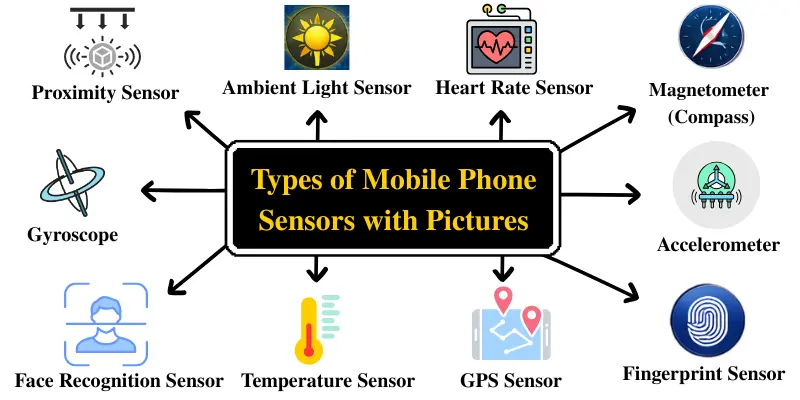
- Accelerometer
- Gyroscope
- Proximity Sensor
- Ambient Light Sensor
- Magnetometer (Compass)
- Fingerprint Sensor
- Face Recognition Sensor
- Barometer
- Temperature Sensor
- Gravity Sensor
- GPS / GNSS Sensor
- Hall Sensor
- Heart Rate Sensor
- RGB Color Sensor
- Blood Oxygen (SpO₂) Sensor
Now, let’s discuss each type of sensor in detail.
1. Accelerometer
The accelerometer is a sensor that detects your phone’s movement and speed along three axes — X, Y, and Z. It helps the phone understand orientation, tilt, and motion, so features like auto screen rotation, step tracking, and motion-based interactions work smoothly. It converts movement into digital signals so the phone can respond instantly.
Uses:
- It helps rotate the screen when you flip your phone from portrait to landscape.
- It counts steps and tracks movement for fitness apps.
- It enhances motion-based games by detecting tilt and shake.
- It lets you refresh apps or content by shaking the phone.
2. Gyroscope
The gyroscope is a sensor that measures the rotation or angular velocity of your phone. It detects changes in orientation, helping your device understand how it’s positioned in space. When you rotate your phone, the gyroscope tracks this movement and adjusts accordingly, providing a more accurate response compared to the accelerometer.
Uses:
- It enhances gaming by detecting tilt and rotation for a smoother experience.
- It stabilizes camera movements for clearer photos and videos.
- It supports AR (Augmented Reality) apps by tracking motion accurately.
3. Proximity Sensor
The proximity sensor detects objects that are close to your phone without physical contact. It works by using infrared light or capacitive sensing to measure the distance between the phone and nearby objects. When you bring the phone close to your face during a call, the sensor detects this change and automatically turns the screen off to prevent unwanted touches and reduce power usage.
Uses:
- It turns the screen off automatically during calls when the phone is near your ear.
- It prevents accidental touches while talking on the phone.
- It helps save battery by keeping the screen off when not needed.
- It improves call handling by controlling screen behavior automatically.
4. Ambient Light Sensor
The ambient light sensor measures the surrounding light level using a light-sensitive component inside the phone. It detects changes in brightness around the device and sends this data to the system. Based on this information, the phone automatically adjusts screen brightness to ensure clear visibility while reducing unnecessary power consumption.
Uses:
- It automatically adjusts screen brightness based on surrounding light.
- It improves screen visibility in bright and dark environments.
- It helps save battery by avoiding excessive screen brightness.
- It provides a more comfortable viewing experience for the eyes.
5. Magnetometer (Compass)
The magnetometer is a sensor that detects magnetic fields around your phone. It works by measuring the Earth’s magnetic field to determine the device’s direction. This helps the phone know which way it is facing, just like a digital compass.
Uses:
- It helps navigation apps determine accurate directions.
- It supports map orientation while walking or driving.
- It improves location accuracy when used with GPS.
- It assists AR apps by providing correct directional data.
6. Fingerprint Sensor
The fingerprint sensor is a biometric security sensor that scans and recognizes your fingerprint. It works by capturing unique fingerprint patterns and converting them into digital data using optical, capacitive, or ultrasonic methods. This allows the phone to verify your identity quickly and securely before granting access.
Uses:
- It unlocks the phone instantly using your fingerprint.
- It secures apps, files, and private data.
- It allows safe and fast authentication for payments and banking apps.
- It helps protect personal information from unauthorized access.
7. Face Recognition Sensor
The face recognition sensor is a biometric security sensor that scans your facial features to verify your identity. It uses infrared or 3D mapping technology to capture unique facial patterns and convert them into digital data. This allows the phone to unlock quickly and securely while protecting your personal information.
Uses:
- It unlocks the phone instantly by recognizing your face.
- It secures apps, files, and sensitive data.
- It allows safe and fast authentication for mobile payments.
- It increases privacy by preventing unauthorized access to your device.
8. Barometer
The barometer is a sensor that measures the air pressure around your phone. Using this data, the device can detect altitude changes and understand weather conditions. This information is also used to track elevation accurately and support fitness-related activities.
Uses:
- It predicts weather changes by measuring air pressure.
- It tracks altitude during hiking or climbing activities.
- It counts floors or stairs climbed in fitness apps.
9. Temperature Sensor
The temperature sensor is a sensor that measures the temperature of the phone’s internal components and the surrounding environment. It helps the device monitor heat levels and prevent overheating by adjusting performance as needed. This ensures the phone works safely and efficiently.
Uses:
- It monitors the phone’s temperature to prevent overheating.
- It helps protect internal components by controlling heat levels.
- It supports battery safety and improves device lifespan.
- It provides temperature data for system and diagnostic apps.
10. Gravity Sensor
The gravity sensor is a sensor that detects the force of gravity acting on your phone. It helps the device understand orientation and direction without being affected by sudden movements. By focusing only on gravity, the phone can provide stable and accurate motion data.
Uses:
- It helps identify the phone’s orientation more accurately.
- It improves screen rotation and overall motion control.
- It supports gaming by providing stable tilt-based controls.
- It enhances user experience in motion and navigation apps.
11. GPS / GNSS Sensor
The GPS / GNSS sensor is a navigation sensor that determines your phone’s exact location on Earth. It works by receiving signals from multiple satellites to calculate position, speed, and direction. This helps the phone provide accurate location-based services.
Uses:
- It helps navigation apps show real-time location and directions.
- It tracks routes, distance, and speed during travel or workouts.
- It supports location sharing and emergency services.
- It improves map accuracy for ride-hailing and delivery apps.
12. Hall Sensor
The Hall sensor is a magnetic sensor that detects the presence of a magnetic field near your phone. It works by sensing changes in magnetic flux, allowing the device to recognize when specific accessories, like flip covers or cases with magnets, are attached. This helps the phone respond automatically to the accessory’s position.
Uses:
- It automatically turns the screen on or off when a magnetic cover is opened or closed.
- It detects and interacts with magnetic accessories.
- It helps save battery by managing screen behavior based on accessory position.
- It enhances user experience by enabling smart cover features.
13. Heart Rate Sensor
The heart rate sensor is a biometric sensor that measures your pulse using light or electrical signals. It works by detecting changes in blood flow or electrical activity in your skin, converting these readings into digital data for the phone to monitor your heart rate accurately.
Uses:
- It tracks your heart rate during workouts and exercises.
- It monitors your heart rate while at rest to help track overall health.
- It provides data for fitness and wellness apps.
- It can alert you to unusual heart rate patterns for better health awareness.
14. RGB Color Sensor
The RGB color sensor is a sensor that detects the colors of light in the surrounding environment. It measures the intensity of red, green, and blue light to help the phone adjust display colors, screen brightness, and white balance for a better visual experience.
Uses:
- It automatically adjusts the screen’s color and brightness based on ambient lighting.
- It improves camera performance by helping with accurate color reproduction.
- It enhances visual quality for videos, games, and photos.
- It supports apps that require color detection or measurement.
15. Blood Oxygen (SpO₂) Sensor
The Blood Oxygen (SpO₂) sensor is a biometric sensor that measures the oxygen level in your blood. It works by shining light through your skin and analyzing how much oxygen is carried by your red blood cells, converting this into digital data for health monitoring.
Uses:
- It monitors blood oxygen levels during workouts and daily activities.
- It helps track respiratory health and detect potential issues.
- It provides data for fitness and wellness apps.
- It alerts you if oxygen levels fall below safe limits.
Why Are Mobile Sensors Important?
Mobile sensors are not just extra features—they make your smartphone smart, responsive, and truly useful in everyday life. Here’s why they matter:
- They make phones smarter and faster.
- They improve gaming and motion-based apps.
- They make navigation more accurate.
- They help control brightness and save battery.
- They improve security with fingerprint and face unlock.
- They support health tracking like heart rate and SpO₂.
Without sensors, your smartphone would feel basic and limited.
Conclusion
Now you clearly understand the types of sensors in a mobile phone and why they are important. Sensors work silently in the background but make your smartphone experience smooth, smart, and powerful.
Next time your screen rotates, brightness changes, or map points in the right direction, you will know which sensor is working behind the scenes.
If this guide helped you, feel free to bookmark it or share it with friends. What sensors does your phone have? Let us know in the comments.
Frequently Asked Questions (FAQs)
Here are the answers to some common questions about types of mobile phone sensors:
The number of sensors in a smartphone can vary, but modern smartphones typically contain 10 to 15 different sensors. These sensors include the accelerometer, gyroscope, ambient light sensor, fingerprint sensor, and more. As technology advances, smartphones may include even more sensors to enhance functionality.
There are three main types of fingerprint sensors in smartphones: optical, capacitive, and ultrasonic. Optical sensors use light to capture your fingerprint pattern, capacitive sensors use electrical currents, and ultrasonic sensors use sound waves to create a detailed scan of your fingerprint. Each type offers different levels of accuracy and security.
Yes, many smartphones have a heart rate sensor that measures your pulse by detecting changes in blood flow. It uses light or electrical signals to gather data, which is then used by fitness or health apps. This helps you track your heart rate during workouts and monitor your overall health.
The accelerometer detects movement and orientation along three axes, while the gyroscope measures the rotation or angular velocity of your phone. Together, they help improve motion control, gaming, and camera stability.
Not necessarily! While more sensors can add functionality, it doesn’t always mean better performance. The quality of the sensors and how well they are integrated into the phone’s software play a bigger role in enhancing the user experience.






- Be Respectful
- Stay Relevant
- Stay Positive
- True Feedback
- Encourage Discussion
- Avoid Spamming
- No Fake News
- Don't Copy-Paste
- No Personal Attacks
- Be Respectful
- Stay Relevant
- Stay Positive
- True Feedback
- Encourage Discussion
- Avoid Spamming
- No Fake News
- Don't Copy-Paste
- No Personal Attacks
