Types of Mobile Phone Locks: Best Security Options Explained
Published: 6 Jan 2026
In today’s digital world, securing your mobile phone is more important than ever. Smartphones store personal data, photos, work documents, and banking information, making them a common target for misuse.
That’s why choosing the right mobile phone lock is essential. In this guide, we’ll explain the different types of mobile phone locks, how they work, and their pros and cons to help you pick the best option for your device. So, let’s dive in.
Types of Locks in Mobile Phones
Mobile phones offer different types of locks to keep your data safe from unauthorized access. Each lock works in a unique way and provides a different level of security, convenience, and speed.
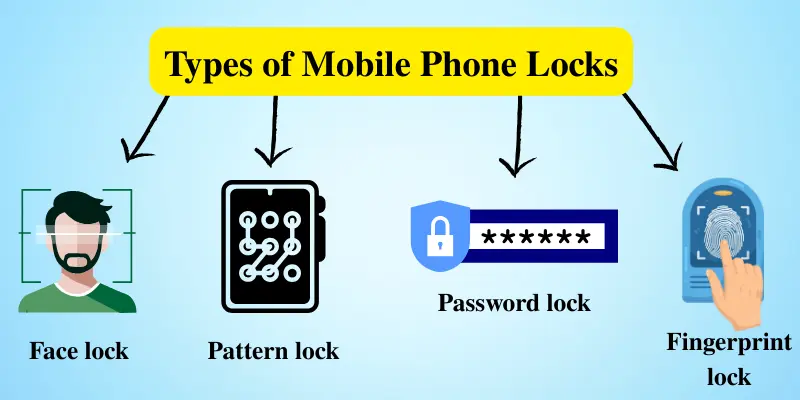
Here’s a quick overview of the most common mobile phone locks:
- PIN Code Locks
- Pattern Locks
- Password Locks
- Fingerprint Scanners
- Facial Recognition
- Iris Scanning
- Smart Locks (Trusted Devices)
Now, let’s discuss each mobile phone lock type in detail.
1. PIN Code Locks: Simple and Secure (But Not Always Reliable)
A PIN code lock is one of the oldest and most basic security features on smartphones. It involves entering a short numeric code (usually 4–6 digits) to unlock your phone.
| Why People Love It: |
|---|
|
| Things to Consider: |
|---|
|
When Should You Use It?
This lock is perfect if you’re looking for quick, basic security but don’t want high-level protection. It’s ideal for people who store non-sensitive information on their devices.
2. Pattern Locks: Visual and Intuitive
Instead of a numeric code, a pattern lock requires you to draw a specific pattern on a grid of dots. This unique pattern serves as your phone’s password.
| Why People Love It: |
|---|
|
| Things to Consider: |
|---|
|
When Should You Use It?
Pattern locks are perfect if you want a quick and easy way to unlock your phone. They’re great for everyday use, especially if you prefer a simple, visual method over typing numbers or passwords, but keep in mind they’re not the most secure option.
3. Password Locks: Stronger Security with More Complexity
A password lock requires you to enter a combination of letters, numbers, and symbols to unlock your device. This makes it much harder to guess than a PIN or pattern.
| Why People Love It: |
|---|
|
| Things to Consider: |
|---|
|
When Should You Use It?
Password locks are ideal for those who need higher security but don’t mind taking a bit more time to unlock their device. It’s perfect for people who store sensitive information, like work files or personal documents.
4. Fingerprint Scanners: The Fast and Secure Option
Fingerprint scanners are a biometric security feature where your phone uses a sensor to scan and recognize your fingerprint to unlock the device.
| Why People Love It: |
|---|
|
| Things to Consider: |
|---|
|
When Should You Use It?
Fingerprint scanning is the way to go if you’re looking for a fast and highly secure method to protect your phone. It’s ideal for those who want the convenience of quick unlocking without sacrificing security.
5. Facial Recognition: Unlocking with Your Face
Facial recognition uses your phone’s front camera to scan and recognize your face to unlock the device. It’s one of the easiest ways to secure your phone.
| Why People Love It: |
|---|
|
| Things to Consider: |
|---|
|
When Should You Use It?
Facial recognition is perfect for those who want speed and convenience. It’s a good option for everyday use, but may not be ideal for those who need the highest level of security.
6. Iris Scanning: The High-Security Lock Option
Iris scanning is a highly advanced biometric method that scans the unique patterns in your eyes to unlock your phone.
| Why People Love It: |
|---|
|
| Things to Consider: |
|---|
|
When Should You Use It?
Iris scanning is ideal for users who want advanced security and don’t mind a slightly slower unlock process. It’s best suited for people who store sensitive or private information on their devices.
7. Smart Locks (Trusted Devices): The Effortless Security
Smart locks use Bluetooth or other trusted devices (like a smartwatch or a connected Wi-Fi network) to unlock your phone automatically when they’re nearby.
| Why People Love It: |
|---|
|
| Things to Consider: |
|---|
|
When Should You Use It?
Smart locks are ideal for tech-savvy users who want a convenient, hassle-free security solution. They work best with smart home setups or Bluetooth devices like smartwatches. If you value ease of use and don’t mind relying on connected devices, smart locks are a great choice.
Which Lock is Best for You?
Now that you know about the different lock types, it’s time to choose the best one based on your needs. Here’s some advice to help you decide:
1. For Basic Users
For texting, browsing, or social media, simple security is enough. Use a PIN Lock or Pattern Lock for quick and easy protection.
2. For Security-Conscious Users
If your phone has sensitive data like work files or banking info, you need stronger protection. Use a Password Lock or Iris Scanning to keep your data safe.
3. For Convenience Lovers
If you unlock your phone often and want it fast, use a Fingerprint Lock or Face Lock for instant access without typing.
4. For Tech-Savvy or Smart Home Users
If you use smart devices or Bluetooth gadgets, use Smart Lock (Trusted Devices) for effortless unlocking near trusted devices. Pair it with another lock for better security.
| Pro Tip: |
|---|
For the best balance of security and convenience, you can combine locks. For example, use a fingerprint, or face lock, together with a PIN or password. This way, your phone stays secure without slowing you down. |
Conclusion
So guys, in this article, we’ve covered types of mobile phone locks in detail to help you understand how each option protects your device. Since our phones store personal data, photos, and important information, using strong security is very important. Personally, I recommend using a Fingerprint or Face Lock combined with a PIN or Password because it gives you fast access while also adding an extra layer of protection.
Take a moment to check your phone’s settings today and choose the right lock to keep your device safe and your data secure.
Frequently Asked Questions (FAQs)
Here are the answers to some common questions about mobile phone lock types:
Password locks and biometric locks like fingerprint or iris scanning offer strong security. They are hard to guess or copy. For best protection, use a biometric lock with a PIN or password.
Pattern locks are easy and quick to use, but not very secure. Smudge marks on the screen can reveal the pattern. They are best for users who don’t store sensitive data.
No, iris scanning is a high-tech feature found only on specific high-end smartphones. If your phone doesn’t have this option, you can still use other secure methods like fingerprint or facial recognition.
Both are convenient and secure, but fingerprint scanning is usually more accurate. Face recognition is faster but can be fooled in some cases. For best security, you can use either a PIN or a password as a backup.
If you forget your PIN or password, you can reset it using your Google or Apple account. If that doesn’t work, a factory reset may be required, but it will erase all the data on your phone. Therefore, it’s important to back up your information regularly.




- Be Respectful
- Stay Relevant
- Stay Positive
- True Feedback
- Encourage Discussion
- Avoid Spamming
- No Fake News
- Don't Copy-Paste
- No Personal Attacks
- Be Respectful
- Stay Relevant
- Stay Positive
- True Feedback
- Encourage Discussion
- Avoid Spamming
- No Fake News
- Don't Copy-Paste
- No Personal Attacks
