Compare Smartphones & Computers: Choose the Right Device
Published: 20 Dec 2025
Smartphones and computers are essential in today’s world, but choosing between them can be tough. Both have unique strengths, but which one is right for you? It depends on your lifestyle, work, and personal needs.
In this article, we’ll compare smartphones vs computers based on performance, price, ease of use, and specific use cases, helping you decide which device suits you best. So, let’s dive in
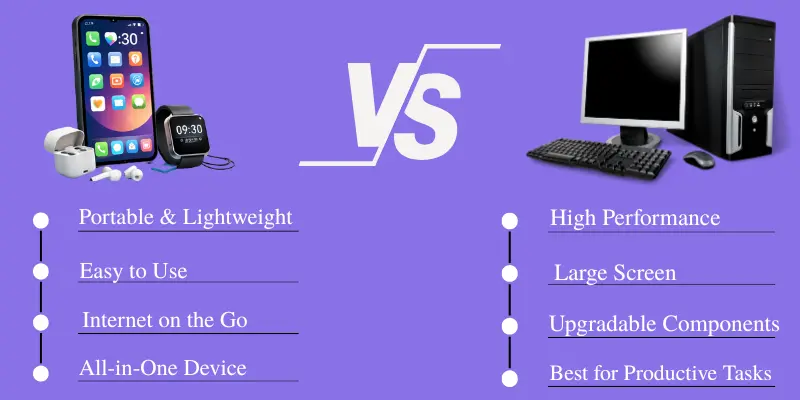
Smartphone vs Computer – What’s the Difference?
When it comes to smartphones and computers, each serves a distinct purpose. Whether you’re using them for work, gaming, or staying connected, here’s a quick comparison to show how they differ.
| Feature | Smartphone | Computer (Laptop/Desktop) |
|---|---|---|
| Portability | Highly portable, fits in a pocket | Less portable, requires more space |
| Performance | Limited processing power | High processing power, multitasking |
| Screen Size | Small (4.5–6.5 inches) | Larger (13–32 inches) |
| Storage | Up to 1TB | Typically 1TB and beyond, expandable |
| Battery Life | 6–12 hours | 4–8 hours (laptops), desktops need constant power |
| Software | Mobile apps only | Full software suites like Microsoft Office, Adobe Photoshop |
| Internet Connectivity | Cellular data & Wi-Fi | Wi-Fi & Ethernet for stable, high-speed connections |
| Data Entry/User Input | Touchscreen & virtual keyboard | Physical keyboard & mouse |
| Price | $100–$1000 | $400–$3000+ |
This table gives a quick overview of how each device performs. Now, let’s explore each feature in detail.
1. Portability
If you’re always on the go, a smartphone will likely be your best friend. It’s small, lightweight, and fits in your pocket, making it perfect for quick tasks like checking emails, social media, or getting directions. On the other hand, computers (whether laptops or desktops) are bulkier and require more space, but they offer superior power for long-term tasks like working from home, gaming, or video editing.
2. Performance
In terms of performance, computers win by a long shot. They offer faster processors, more storage, and the ability to handle resource-heavy tasks such as programming, graphic design, or playing AAA games. Smartphones, while great for everyday tasks, can lag when running heavy apps or multiple applications at the same time.
3. Screen Size
A larger screen on a computer makes it much easier to multitask, especially for tasks like writing reports, video conferencing, or editing photos. Smartphones, with their smaller screens, are excellent for quick tasks but can be straining on the eyes when it comes to lengthy work sessions.
4. Storage
If you’re someone who stores tons of files, music, videos, or large applications, a computer has a significant advantage. Smartphones are generally limited in storage, but newer models are offering more options, with cloud storage helping to compensate for space limitations.
5. Battery Life
For those who need a device that can last throughout the day without charging, smartphones are the clear winner. They offer better battery life for everyday use. However, computers, particularly laptops, tend to require more frequent charging, especially when running demanding software, while desktops rely on a constant power supply.
6. Software
Smartphones use operating systems like Android and iOS, which means they can only run mobile apps. These apps are great for everyday tasks, but they don’t offer the full range of tools you get on a computer.
On computers, whether Windows, macOS, or Linux, you can use complete software suites like Microsoft Office, Adobe Photoshop, and advanced programs for coding, engineering, video editing, and design.
7. Internet Connectivity
Both devices offer internet connectivity, but in different ways. Smartphones connect through cellular data (3G/4G/5G) and Wi–Fi, making them perfect for on-the-go internet access. Computers, on the other hand, primarily use Wi-Fi and Ethernet for more stable, high-speed connections, especially in work or gaming environments where fast internet is important.
8. Data Entry/User Input
Smartphones rely on a touchscreen and virtual keyboards for data entry. This works well for casual use, but can be frustrating for longer typing sessions or more complex tasks. Computers, however, come with a physical keyboard and a mouse, providing a more efficient and comfortable input method for typing, design work, or programming.
9. Price
When it comes to affordability, smartphones offer more options at lower price points. If you’re looking for something budget-friendly, you can get a reliable smartphone for under $200. Computers, especially those with higher specifications, usually range from $400 to $3000, offering more power and features in return.
Which Device is Best for Your Needs?
After comparing smartphones and computers, let’s see which device is best suited for your specific needs. Whether you’re a student, professional, parent, or gamer, the right device can boost productivity, learning, and entertainment.
For Students
If you’re managing classes, studying, and social media, a smartphone is great for staying connected on the go. However, for heavy note-taking, research, or group projects, a computer, especially a laptop, offers the power and portability needed for academic tasks.
For Young Professionals
A computer is essential for professionals who work with complex documents, presentations, or spreadsheets. Smartphones make work easier by allowing you to check emails, schedule meetings, and join virtual calls while on the move. For best results, use both: a computer for deep work and a smartphone for communication and quick tasks.
For Parents
Smartphones are useful for quick communication, managing schedules, and connecting with family. But for tasks like managing finances, handling home projects, or helping kids with online learning, a computer provides a more stable and efficient setup. Laptops offer flexibility, while desktops deliver a consistent workspace.
For Gamers and Content Creators
If you enjoy gaming or creating content, a computer gives the power, graphics, and screen size needed for demanding apps. Mobile gaming is fun, but computers deliver superior performance, customization, and a better overall experience for gaming and video editing.
Conclusion
Choosing between a smartphone and a computer depends on your needs. Smartphones are great for portability and quick tasks, while computers excel in performance, multitasking, and professional work.
For most people, using both devices works best—computers for heavy work and smartphones for communication and on-the-go tasks. So, take a moment to assess your priorities and choose the device that will make your life easier and more productive.
Frequently Asked Questions (FAQs)
Here are the answers to some common questions about the difference between a smartphone and computer :
While smartphones are getting more powerful, they’re still limited when it comes to tasks like graphic design, video editing, or programming. However, for basic tasks, smartphones can handle most of your needs.
It depends on the type of work. Smartphones are great for communication, emails, and light tasks. But for more complex work like word processing, data analysis, or designing, a computer is the better choice.
A smartphone can handle simple tasks like browsing, checking emails, and taking notes. However, for heavy assignments, research, or group projects, a computer, especially a laptop, is more efficient. Using both devices together gives the best flexibility for schoolwork.
Yes, laptops are designed to be portable and can be used anywhere. Desktops are stationary and need a dedicated space. However, desktops generally offer more power and larger screens.
You can play games on both, but computers offer better performance, graphics, and controls. Mobile games are fun for quick entertainment, but PCs handle demanding games better.



- Be Respectful
- Stay Relevant
- Stay Positive
- True Feedback
- Encourage Discussion
- Avoid Spamming
- No Fake News
- Don't Copy-Paste
- No Personal Attacks
- Be Respectful
- Stay Relevant
- Stay Positive
- True Feedback
- Encourage Discussion
- Avoid Spamming
- No Fake News
- Don't Copy-Paste
- No Personal Attacks
