How to Set Up a Satellite Phone: Quick and Easy Instructions
Published: 3 Dec 2025
You have a satellite phone in your hands, but you don’t know how to turn it on, get a signal, or make a call. Don’t worry—you’re not alone. Many first-time users find this device confusing.
In this guide, we’ll show you step by step how to use your satellite phone, fix common problems, and give you tips to make it work better. So, let’s dive in!
How to Use a Satellite Phone
Follow these easy steps to turn on your satellite phone, get a signal, and make calls.
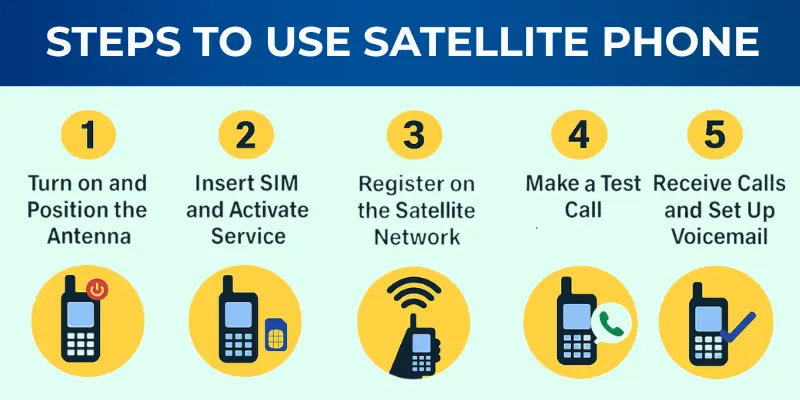
Step 1: Turn On and Position the Antenna
The first step is to turn on the phone and position the antenna properly. To do this
- Press and hold the power button to turn on the satellite phone.
- Fully extend the antenna until it locks in place.
- Move to an open area with a clear view of the sky.
- Avoid tall buildings, dense trees, or caves that can block the signal.
| Pro Tip: |
|---|
Slowly rotate the phone until the signal strength shows at least three bars. |
Step 2: Insert SIM and Activate Service
Just like a regular mobile phone, satellite phones need a SIM card to connect to the network. Once inserted, you must activate it to begin using the service.
- Open the SIM slot cover and carefully insert the SIM card provided by your satellite service (Iridium, Inmarsat, Thuraya, etc.).
- Restart the phone after inserting the SIM card.
- Follow the activation instructions shown on the screen.
- In some cases, you may need to call a specific number or complete online registration before the SIM works.
Step 3: Register on the Satellite Network
Once powered on with a SIM card, your phone must connect to a satellite network. This step ensures the phone is ready to make or receive calls.
- Hold the phone upright with the antenna facing directly toward the sky.
- Wait until the phone screen displays “Registered” or “Network Available.“
- The process usually takes between 30–60 seconds if you are in a clear area.
Step 4: Make a Test Call (Dialling Format Explained)
Before depending on your satellite phone in the field, you should always test it. Satellite phones use international dialling formats, which may be new if you’ve only used regular mobiles.
- Press the call button and dial: + → country code →phone number.
- Example: To call a U.S. number, dial +1 [number].
- Most providers offer a free test number (Iridium: +1-480-752-5105).
| Pro Tip: |
|---|
Make a test call before your trip. It confirms the device works and that you know how to dial correctly. |
Step 5: Receive Calls and Set Up Voicemail
A satellite phone has a unique number, different from regular mobile numbers, that allows people to reach you. Because service can drop when moving, voicemail setup is very useful.
- Share your satellite phone number (usually starting with +870 or +881) with people who may need to contact you.
- Stay in open areas so the phone can maintain its connection to satellites.
- Set up voicemail to handle missed calls when you’re out of coverage or moving.
| Pro Tip: |
|---|
Since satellite calls are costly for the caller, ask family or colleagues to use text or email whenever possible. |
Step 6: Connect to the Internet (APN/Data Setup)
Connecting your satellite phone to the internet is possible, but the connection is often slow and limited. Follow these steps to get online:
- Contact your satellite service provider and select a data plan that fits your needs.
- Open the settings menu on your satellite phone.
- Go to Network → APN Setup.
- Enter the APN details provided by your service provider.
- If supported, you can connect the phone to the internet using a USB cable or a Wi-Fi hotspot.
- Satellite internet speeds are typically slow(2.4–20 kbps), so it’s best for light tasks like checking emails or updating GPS.
| Pro Tip: |
|---|
Use data compression apps and plain-text emails to save bandwidth and reduce costs. |
Troubleshooting Common Issues
Even after following the steps, you might face some problems with your satellite phone. Here are the most common ones and their solutions:
1. No Signal or Weak Signal
The phone shows “No Network” or has very weak bars.
Solution:
- Move to an open area with a clear view of the sky.
- Avoid being under trees, near tall buildings, or inside cars.
- Make sure the antenna is fully extended and pointing upward.
- Wait at least 1–2 minutes for the phone to register on the network.
2. SIM Card Not Detected
The phone says “Insert SIM” even though it’s already inside.
Solution:
- Power off the phone and remove the SIM card.
- Check if the SIM is properly seated and clean.
- Reinsert it carefully and restart the phone.
- If the issue continues, contact your provider to check if the SIM is activated.
3. Cannot Make Calls
The phone shows a network, but when you try to call, it doesn’t connect.
Solution:
- Double-check the international dialling format: + → country code → number.
- Make sure you have enough prepaid balance or an active plan.
- Try making a test call to the provider’s free number.
- If it is still not working, restart the phone and re-register on the network.
4. Battery Drains Too Fast
The battery runs out quickly, even without much use.
Solution:
- Keep the antenna folded when not in use.
- Turn off Bluetooth, Wi-Fi, or data features if not needed.
- Avoid leaving the phone searching for a signal indoors.
- Carry a spare battery or solar charger if you’re travelling outdoors.
Considerations for Using a Satellite Phone
Using a satellite phone can be very effective in remote areas, but there are several important factors to consider for optimal performance:
- Credit and Billing: Ensure you have enough credit or check your subscription plan for emergencies.
- Signal Quality: Stay in open areas with a clear view of the sky, as weather conditions like rain or clouds can weaken your signal.
- Power and Battery Life: Satellite phones have limited battery life, so carry spare batteries, a power bank, or a solar charger to keep them running
- Privacy and Security: Be aware that satellite phone calls can be accessed, so be cautious with sensitive information.
- Laws and Regulations: Some countries restrict satellite phone use (e.g., India, China, parts of the Middle East), so check the rules before travelling.
- Save Emergency Contacts: Make sure to save local rescue numbers and your satellite provider’s helpline for easy access in case of an emergency.
- Use an External Antenna: For stronger signals, use an external antenna when inside cars or boats.
Conclusion
Satellite phones might seem complicated at first, but once you understand the basics, turning it on, registering it, dialing correctly, and keeping the antenna clear, they become an essential tool for staying connected.
Whether you’re an adventurer, a remote worker, or preparing for an emergency, a satellite phone keeps you within reach no matter where you are.
Explore more satellite phone options today and stay connected anytime, anywhere!
Frequently Asked Questions (FAQs)
Here are the answers to some common questions about the advantages and disadvantages of mobile phones:
To use a satellite phone, first power it on by holding the power button. Extend the antenna fully to get a strong signal. Then insert the SIM card, register on the network, and dial the number using the international format with “+” and the country code.
Satellite phones work by connecting directly to satellites in space rather than relying on cell towers. These satellites send your signal to ground stations, connecting your call or data to Earth’s networks. This allows communication in remote areas with no traditional cellular coverage.
Satellite phones are not illegal in the U.S. They are, however, restricted in some countries like India and China, where their use is controlled for security reasons. Always check local regulations before travelling with a satellite phone.
To call a satellite phone from a mobile phone, dial the international code (+) followed by the satellite phone number (e.g., +870, +881). Be aware that calls to satellite phones are typically more expensive than regular mobile calls. It’s important to check rates with your service provider before making calls.
The first operational satellite phone services were launched in the early 1990s. Iridium, a major satellite phone network, began its service in 1998. Satellite phones have evolved since then, offering more reliable service and global coverage.

- Be Respectful
- Stay Relevant
- Stay Positive
- True Feedback
- Encourage Discussion
- Avoid Spamming
- No Fake News
- Don't Copy-Paste
- No Personal Attacks
- Be Respectful
- Stay Relevant
- Stay Positive
- True Feedback
- Encourage Discussion
- Avoid Spamming
- No Fake News
- Don't Copy-Paste
- No Personal Attacks
