How to Improve Mobile Phone Signal at Home
Published: 18 Dec 2025
Having a poor mobile phone signal at home can be incredibly frustrating. Whether it’s dropped calls, slow data speeds, or having to stand in one spot just to get a decent connection, a weak signal can disrupt your day-to-day activities.
But don’t worry, there are several ways to improve mobile phone signal strength at home without having to leave your house or spend a lot of money. In this guide, we’ll cover both simple and advanced solutions to help you recover a strong, reliable connection. So, let’s dive in
Why Is Your Signal Weak? Common Causes
Understanding why your signal is weak is the first step in finding a solution. Here are some common reasons:
- Building Materials: Concrete, metal, and thick walls can block signals, especially in multi-story homes or apartments.
- Distance from Cell Towers: If you’re far from a cell tower, such as in rural areas, your phone will struggle to maintain a strong connection.
- Interference: Wi-Fi routers, microwaves, and other devices can interfere with your phone’s connection to nearby cell towers.
- Network Congestion: During peak hours, urban areas with high traffic face network delays, which slow data speeds and cause dropped calls.
- Phone Issues: Older phones or those with damaged antennas may not connect to networks properly, leading to a poor signal.
Simple and Free Ways to Improve Mobile Signals at Home
Here are some simple and free solutions you can try to get better service on your phone.
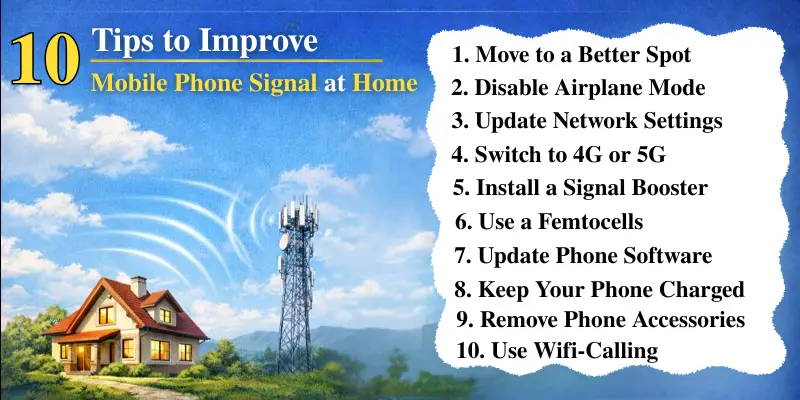
1. Move to a Better Spot
A weak signal can often be due to poor positioning. To improve the network:
- Try moving closer to a window or an open area in your home.
- Go upstairs if you live in a multi-story house. Signals tend to be better on higher floors because they’re less obstructed by walls and floors.
- Avoid areas with a lot of metal (like the kitchen) or thick concrete walls.
2. Disable Airplane Mode
This simple step can help reconnect your phone to a stronger network:
- Turn on Airplane Mode: Open your phone’s Settings or swipe down the notification bar and tap the Airplane Mode icon.
- Wait 10 Seconds: This temporarily disconnects your phone from the network.
- Turn Off Airplane Mode: After 10 seconds, turn off Airplane Mode. This forces your phone to search for a better signal and reconnect to the nearest tower with a stronger connection.
3. Update Network Settings
Network settings updates can improve your phone’s reception:
- For iPhones: Go to Settings > General > About, and if there’s an update available, you’ll be prompted to install it.
- For Android phones: Go to Settings > System > Software Updates, and check for updates. Additionally, you can reset network settings by going to Settings > General Management > Reset > Reset Network Settings. This resets your Wi-Fi, mobile data, and Bluetooth settings, which can help your phone reconnect to stronger signals.
4. Switch to 4G or 5G
If your phone is still using 2G or 3G, you’re likely missing out on faster, more reliable connections. Switching to 4G or 5G, if available in your area, can provide a much stronger signal and faster data speeds.
- For iPhones: Go to Settings > Cellular > Cellular Data Options > Voice & Data, then select 4G or 5G (depending on availability in your area).
- For Android phones: Go to Settings > Network & Internet > Mobile Network > Preferred Network Type, then select 4G or 5G.
Advanced Solutions to Boost Signal
If the free solutions don’t work, it may be time to consider advanced options that require a bit more investment.
1. Invest in a Mobile Signal Booster
A mobile signal booster is a powerful tool to amplify weak signals and extend coverage inside your home:
- Choose the Right Booster: Make sure to select a booster that is compatible with your phone’s provider (Verizon, AT&T, etc.) and supports the frequencies used in your area. You can check compatibility through the product’s description or reviews.
- Installation: Signal boosters typically come with two parts: an outdoor antenna (which needs to be mounted on your roof or balcony) and an indoor amplifier. Install the outdoor antenna in an area where it can catch the strongest available signal (usually on the roof or near a window facing the direction of the cell tower), then connect it to the indoor amplifier. Follow the product instructions for the best results.
2. Femtocells and Microcells
Femtocells and microcells act like small personal cell towers inside your home. They connect to your internet and help boost your mobile signal.
- Ask Your Mobile Network Provider: These devices are typically offered by mobile network providers. Contact your provider to ask if they offer femtocells or microcells and how you can get one.
How to Set It Up:
- Connect the device to your internet router using an Ethernet cable.
- Follow the setup instructions provided with the device to complete the installation.
- Once set up, it will use your internet to improve your cell phone signal inside your home.
Why It’s Worth It: These devices can completely transform your mobile signal indoors, providing consistent coverage even in dead zones.
3. External Antennas for Your Phone
Some phones support external antennas to improve signals, especially when you’re in areas with a weak signal.
- Find the Right Antenna: Search for an antenna that is compatible with your phone model and network (4G or 5G). You can often find them online or at your mobile carrier’s store.
- Attach the Antenna: Usually, these antennas plug into your phone’s charging port or antenna jack (if available). Follow the manufacturer’s instructions for installation, and adjust the antenna for the best signal.
4. Switch Carriers
If your current carrier doesn’t provide good coverage in your area, it may be time to switch:
- Research Coverage: Look up coverage maps for your area from different carriers and see which one has the strongest signal in your location. Some carriers may offer a better connection for your home.
- Compare Plans and Coverage: Many carriers offer trial periods or coverage checkers so you can test the signal strength in your area before committing to a new plan.
Easy Do-It-Yourself Methods to Boost Your Signal
If you’re a fan of DIY solutions, here are a couple of quick fixes that can help improve your signal temporarily.
1. Aluminum Foil Antenna
A classic Do-It-Yourself hack to improve signal:
- Wrap a piece of aluminium foil around the back of your phone, particularly around the antenna area. Experiment with the size and placement of the foil to see if it boosts your signals.
- Test the Signal: Move around your house or area to check if the signal improves. This method works by reflecting the signal towards your phone and can give a temporary boost.
2. Create Your Own Signal Booster
A simple homemade booster could help if you’re in a difficult situation :
- Using a Cardboard Box: Cut a small hole on the side of a box and place your phone inside, positioning the antenna area near the hole. Line the inside with aluminium foil to help reflect the signal and improve the network.
- Coat Hanger Antenna: You can straighten a wire coat hanger, attach it to the back of your phone, and adjust its length for a better signal. Plenty of online tutorials offer detailed step-by-step guides on making these DIY boosters.
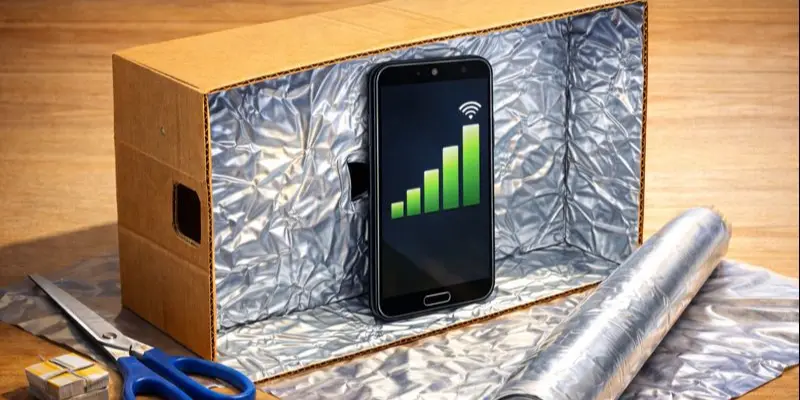
Although these DIY methods may not offer a permanent fix, they can improve your signal enough for temporary relief when you’re in a tight spot.
Maintain a Strong Signal: Long-Term Tips
Once you’ve improved your mobile signal, there are a few things you can do to keep it strong.
- Keep Your Phone Charged: A low battery can reduce your phone’s ability to pick up a strong signal. Keep your device charged to ensure it performs well.
- Remove Phone Accessories: Thick cases and other accessories can sometimes interfere with signal strength. If possible, remove these when using your phone in areas with poor signal.
- Clear Your SIM Card Slot: Over time, dirt can accumulate in your phone’s SIM card slot, which can prevent connection. Make sure it’s clean for the best performance.
Conclusion
Improving your mobile phone signal at home doesn’t have to be a difficult or expensive process. Start with simple solutions like switching to Airplane mode, updating your phone, and enabling Wi-Fi calling. If those don’t work, consider investing in a signal booster or switching to a better network.
The key is to experiment with different solutions and find the combination that works best for your home and your specific needs.
Say goodbye to dropped calls and slow data—hello to strong, reliable mobile service!
Frequently Asked Questions (FAQs)
Here are the answers to some common questions about how to improve the mobile signal at home :
Try standing near a window or moving to a higher floor. Thick walls and metal can block mobile signals, so avoid those areas. Turning Airplane mode on and off can also refresh your connection.
Bars show how strong your signal is. You can get more bars by staying in open areas, restarting your phone, or updating your settings. Using a signal booster can also help in weak signal zones.
dBm and ASU are numbers that indicate the strength of your signal. A lower dBm (closer to -50) means a stronger signal. You can improve it by using Wi-Fi calling, resetting network settings, or moving to a better location.
A good signal is around –50 dBm to –80 dBm. If the number is more than -100 dBm, the signal is weak. You can check this in your phone using signal apps or in developer settings.
Turn off your phone and remove the SIM card. Use a soft cloth or cotton swab to gently clean the golden side (the metal contacts). Make sure it’s dry and dust-free before putting it back.



- Be Respectful
- Stay Relevant
- Stay Positive
- True Feedback
- Encourage Discussion
- Avoid Spamming
- No Fake News
- Don't Copy-Paste
- No Personal Attacks
- Be Respectful
- Stay Relevant
- Stay Positive
- True Feedback
- Encourage Discussion
- Avoid Spamming
- No Fake News
- Don't Copy-Paste
- No Personal Attacks
