AMOLED vs IPS LCD: How to Pick the Right Screen
Published: 24 Dec 2025
When you’re choosing a new phone, tablet, or even a TV, one of the key decisions you’ll face is which type of display to go for. You’ve probably seen the terms AMOLED and IPS LCD thrown around, but what do they really mean, and how do they affect your device’s performance and your user experience?
In this article, we’re going to discuss everything about AMOLED vs IPS LCD Display, so you can make an informed decision based on your preferences. Whether you’re gaming, watching movies, or just browsing through your phone, choosing the right screen can make a big difference. So, let’s dive in!
1. What is an AMOLED Display?
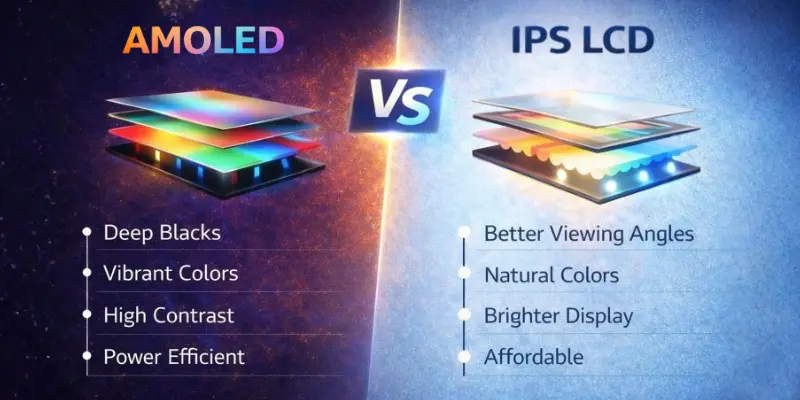
AMOLED stands for Active Matrix Organic Light Emitting Diode. Sounds fancy, right? But in simple terms, it’s a display technology where each pixel emits its own light, meaning there’s no need for a backlight like in traditional screens. This leads to deeper blacks and more vibrant colors, giving your display that rich, contrasty look.
| Key benefits of AMOLED displays: |
|---|
|
So, if you’re someone who enjoys watching high-definition videos, playing immersive games, or using your device in low-light conditions, AMOLED might just be your best friend.
2. What is an IPS LCD Display?
IPS LCD stands for In-Plane Switching Liquid Crystal Display. Unlike AMOLED, IPS LCD displays use a backlight to illuminate the pixels, with the liquid crystals controlling the light that passes through to create the image.
| Key benefits of IPS LCD displays: |
|---|
|
If you’re looking for a display that works well outdoors and don’t need the high contrast of AMOLED, IPS LCD might be the better option for you.
3. AMOLED vs IPS LCD: What is the Difference?
Alright, now that we’ve covered the basics of each display type, let’s take a closer look at the differences between AMOLED and IPS LCD. Here’s a quick comparison table to help you understand the key differences.
| Feature | AMOLED | IPS LCD |
|---|---|---|
| Color Quality | Vibrant colors, deep blacks, high contrast | Natural colors, good color accuracy |
| Brightness | Lower brightness in direct sunlight | Higher brightness in bright conditions |
| Battery Efficiency | More power-efficient with dark content | Uses more power, especially with dark content |
| Viewing Angles | Limited in certain angles | Consistent from all angles |
| Durability | Prone to burn-in issues | More durable, no burn-in risk |
| Flexibility | Thinner and flexible for curved or foldable designs | Rigid, limited flexibility due to the backlight |
| Pixel Response Time | Faster response, less blur | Slower response time |
| Eye Comfort | Can cause eye strain at high brightness | Easier on the eyes with balanced brightness |
| Cost | More expensive | More affordable |
Now that you’ve had a quick overview, let’s go deeper into each one to help you make a more informed choice.
1. Color and Contrast
One of the biggest differences between AMOLED and IPS LCD is how they display colors. AMOLED shines with vibrant colors and deep blacks, as each pixel emits its own light. This results in sharper contrast, making it perfect for dark scenes in movies or games, where the deep blacks really stand out.
On the other hand, IPS LCD displays offer more natural, balanced colors, which makes them ideal for tasks like photo editing that require accurate color reproduction. However, since IPS LCD uses a backlight, the blacks aren’t as deep, and they may appear more like dark gray rather than pure black.
2. Brightness
If you use your device outdoors frequently, an IPS LCD is the better option. IPS LCD displays generally have higher brightness, making them much easier to read in direct sunlight. AMOLED screens, while bright, can struggle in bright environments and may be harder to view outdoors, especially when trying to read content in the sun.
3. Battery Efficiency
AMOLED displays are more battery-efficient, particularly when using dark mode or viewing dark content. Since black pixels are completely turned off, they don’t use any power, which helps extend battery life. In contrast, IPS LCD displays rely on a constant backlight that stays on, which means they consume more power, even when displaying dark content.
4. Viewing Angles
IPS LCD displays offer wider viewing angles, meaning the colors and brightness remain consistent even when viewed from the side or at different angles. In contrast, AMOLED displays can experience color shifts and reduced brightness when viewed at extreme angles, making the screen less clear from the sides.
5. Durability
AMOLED displays are prone to burn-in, where static images can leave permanent marks on the screen. However, IPS LCDs are more durable and don’t suffer from burn-in, making them a better option for long-term use.
6. Flexibility
AMOLED displays are thinner and flexible because they don’t require a backlight. This allows them to be used in curved or foldable designs, like those found in premium smartphones. IPS LCD, on the other hand, requires a backlight, making it rigid and thicker, which limits its use in curved or foldable designs.
7. Pixel Response Time
AMOLED displays have faster pixel response times, meaning less blur during fast-moving content, making them ideal for gaming and action scenes. IPS LCD displays are slower in comparison, which can lead to motion blur during rapid movements.
8. Eye Comfort
When it comes to eye comfort, IPS LCD displays are generally considered easier on the eyes for extended use. They offer more balanced brightness and less blue light, making them ideal for long reading or browsing sessions.
On the other hand, AMOLED displays, while providing vibrant colors and deep blacks, can cause eye strain due to higher brightness, especially at full brightness. However, using dark mode on AMOLED can help reduce blue light and make it more comfortable for the eyes.
9. Cost
AMOLED displays are typically more expensive to produce due to their advanced technology, which is why they’re often found in premium devices. On the other hand, IPS LCD displays are more affordable to manufacture, making them commonly used in mid-range and budget-friendly devices.
Which One Should You Choose for Your Mobile Device?
After comparing AMOLED and IPS LCD displays across key features like color quality, brightness, battery efficiency, pixel response time, and cost, it’s easier to decide which one fits your needs.
Choose an AMOLED Display if:
- You prefer vibrant colors and deep blacks for immersive content.
- You enjoy dark mode and want better battery efficiency.
- You like sleek, curved, or foldable devices.
- You want fast response times for gaming or action content.
Choose an IPS LCD Display if:
- You need accurate color reproduction for tasks like photo editing.
- You often use your device outside and need better brightness.
- You’re looking for a budget-friendly option with no burn-in risk.
- You prefer wider viewing angles for sharing content.
Ultimately, the choice comes down to your personal needs and how you use your device.
Conclusion
AMOLED and IPS LCD both offer unique advantages, and the best choice depends on your needs. AMOLED delivers vibrant colors, deep blacks, and fast performance, making it ideal for gaming and media. IPS LCD focuses on natural colors, better outdoor visibility, eye comfort, and long-term durability.
If you want rich visuals and a premium feel, go with AMOLED. If you prefer balanced performance, brightness, and affordability, IPS LCD is the better option.
Still unsure? Think about how you use your device on a daily basis—then choose the display that best matches your lifestyle for a more enjoyable experience.
Frequently Asked Questions (FAQs)
Here are the answers to some common questions about the difference between an AMOLED and an IPS LCD Display:
Yes, AMOLED is often preferred for gaming due to its faster response time and higher contrast. The vibrant colors and deep blacks create an immersive experience in fast-paced games. However, IPS LCD can still offer great performance for gaming, especially for those on a budget.
AMOLED is more battery-efficient, especially when using dark mode, because black pixels are turned off and use no power. IPS LCD requires a constant backlight, which consumes more energy even when displaying dark content. So, AMOLED helps extend the battery life.
IPS LCD is typically easier on the eyes for extended use due to its more balanced brightness and lower blue light exposure. AMOLED, while vibrant, can cause eye strain at high brightness levels. However, using dark mode on AMOLED can help reduce eye strain.
No, you cannot change the screen type on your device because it is built into the phone. If you’re looking for a device with a different display technology, you’d need to choose a new phone that features the display type you prefer. Each display is designed for a specific model.
Yes, AMOLED displays are prone to burn-in if static images are left on the screen for extended periods. This can leave permanent ghost-like images. IPS LCD displays, however, do not suffer from this issue, making them more durable for long-term use.




- Be Respectful
- Stay Relevant
- Stay Positive
- True Feedback
- Encourage Discussion
- Avoid Spamming
- No Fake News
- Don't Copy-Paste
- No Personal Attacks
- Be Respectful
- Stay Relevant
- Stay Positive
- True Feedback
- Encourage Discussion
- Avoid Spamming
- No Fake News
- Don't Copy-Paste
- No Personal Attacks
