Types of Internet Connections: 10 Best Options Explained
Published: 20 May 2026
Choosing the right internet connection can feel confusing, especially when every provider uses different words like fiber, broadband, Wi-Fi, DSL, cable, cellular, hotspot, and satellite.
The truth is simple: every internet connection helps your device connect to the online world, but each type works in a different way. Some connections are very fast and stable. Some are better for rural areas. Some are cheaper but slower. Others are useful when you travel or need temporary internet.
In this guide, you will learn the main types of internet connections, how each one works, their pros and cons, and which option is best for your home, work, gaming, streaming, or rural area. So, let’s dive in.
What Is the Internet?
The internet is a global network that connects computers, smartphones, and smart devices worldwide. It allows people to browse websites, watch videos, send emails, use social media, play games, and communicate online.
To access the internet, you need an internet connection such as fiber, cable, DSL, satellite, broadband, or cellular networks. Different connection types offer different speeds, coverage, and performance.
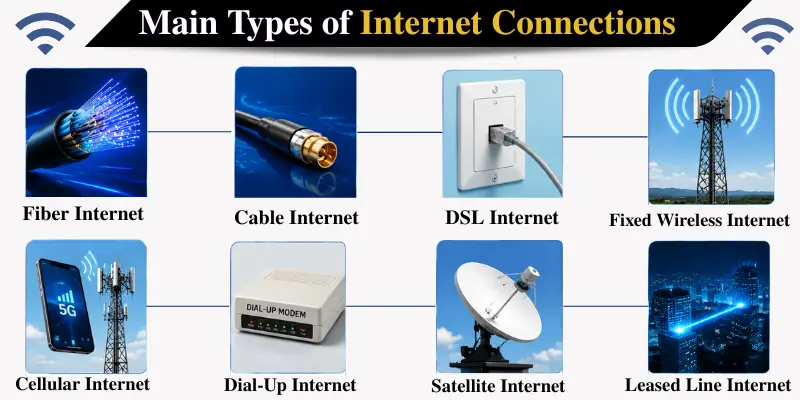
Main Types of Internet Connections
Different internet connections are designed for different needs, speeds, and coverage areas. Below are the most common types of internet connections used today.
Fiber Internet
One of the fastest and best types of Internet connections is fiber Internet. It uses fiber-optic cables to send data in the form of light signals, which makes it much faster than traditional internet types.
Because of this technology, fiber internet provides very high download and upload speeds, often ranging from hundreds of Mbps to even gigabit speeds.
Fiber is especially useful for modern households where multiple users stream videos, play games, attend online classes, work from home, and use smart devices at the same time.
Speed: Download 100 Mbps – 5 Gbps, Upload 100 Mbps – 5 Gbps
| Pros: |
|---|
|
| Cons: |
|---|
|
Best For: Gaming, streaming, remote work, online classes, video calls, large families, and heavy internet use.
Cable Internet
Cable internet uses the same type of coaxial cable network that is often used for cable TV. It makes up one of the most prevalent home internet connections in many cities and towns.
Cable internet is usually faster than DSL and more widely available than fiber in many areas. It supports multiple devices at the same time and is suitable for gaming, video calls, streaming, and general browsing.
But during peak time, cable internet may slow down because many users are on the same network, which can reduce bandwidth and affect speed and performance.
Speed: Download 25 Mbps – 1.2 Gbps, Upload 5 Mbps – 50 Mbps
| Pros: |
|---|
|
| Cons: |
|---|
|
Best for: Homes, families, streaming, online classes, remote working, and general usage.
DSL Internet
DSL stands for Digital Subscriber Line. It uses existing telephone lines to deliver internet service.
DSL is older than fiber and cable, but it is still available in many areas, especially where fiber or cable has not reached. It can be enough for basic browsing, emails, online reading, social media, and light video streaming.
The main weakness of DSL is speed. Its performance often depends on how far your location is from the provider’s network equipment. The farther you are, the slower the connection may become.
Speed: Download 10 Mbps – 100 Mbps, Upload 1 Mbps – 10 Mbps
| Pros: |
|---|
|
| Cons: |
|---|
|
Best for: Basic browsing, email, light streaming, small households, and areas with limited options.
Satellite Internet
Satellite internet uses a satellite dish to connect your home or building to the internet. The dish sends and receives signals from satellites in space. In rural and remote locations where fiber, cable, or DSL internet is not available, satellite internet can be a useful option.
However, satellite internet usually has higher latency because signals travel long distances between your dish and the satellite. As a result, online gaming and live video calls may not work as smoothly as other internet connections. Weather conditions can also affect speed and connection quality.
Speed: Download 25 Mbps – 250 Mbps, Upload 3 Mbps – 30 Mbps
| Pros: |
|---|
|
| Cons: |
|---|
|
Best for: Rural properties, off-the-grid locations, farms, cabins, and areas where cable or fiber is not available.
Fixed Wireless Internet
Fixed wireless internet delivers internet through radio signals from a nearby tower to a receiver installed at your home or building. It is called “fixed” because the receiver is usually installed in one place, unlike mobile internet, which moves with your phone.
Fixed wireless is common in rural, semi-rural, and suburban areas. It can be a good alternative where cable or fiber is not available.
However, performance depends on signal strength, tower distance, weather, and line of sight. If buildings, trees, or hills block the signal, the connection may become weaker.
Speed: Download 50 Mbps – 500 Mbps, Upload 10 Mbps – 50 Mbps
| Pros: |
|---|
|
| Cons: |
|---|
|
Best for: Rural and semi-rural homes, small towns, and areas without wired broadband.
Cellular Internet
Cellular internet uses mobile networks to provide internet access through wireless signals. It works on technologies like 2G, 3G, 4G LTE, and 5G. People commonly use it on smartphones, tablets, mobile hotspots, and portable Wi-Fi devices. Some providers also offer home internet using 4G or 5G networks.
Older networks like 2G and 3G are slower and mainly used for calls, texting, and basic browsing. Modern 4G LTE and 5G provide much faster speeds for streaming, video calls, gaming, and remote work.
Speed: 4G LTE 10 Mbps – 200 Mbps, 5G 50 Mbps – 1 Gbps+
| Pros: |
|---|
|
| Cons: |
|---|
|
Best for: Mobile users, travellers, backup internet, and areas without wired internet.
Mobile Hotspot Internet
Mobile hotspot internet allows you to share your phone’s mobile data connection with other devices, such as a laptop, tablet, or another phone. It uses your 4G LTE or 5G mobile network and creates a Wi-Fi connection for nearby devices.
Mobile hotspot internet is useful during travel, emergencies, or when your home internet is not working. However, it is usually not the best long-term replacement for home internet because it can use a lot of mobile data and drain your phone battery quickly.
Speed: Same as cellular (depends on 4G/5G signal)
| Pros: |
|---|
|
| Cons: |
|---|
|
Best for: Traveling, emergency internet, short task use, backup internet connection, and light use.
Dial-Up Internet
Dial-up is one of the oldest types of internet connections. It uses a telephone line and modem to connect to the internet.
Today, dial-up is mostly outdated. It is very slow compared to modern broadband options. It may still exist in some areas, but it is not suitable for modern internet needs like video streaming, online meetings, gaming, or large downloads.
Speed: Download 0.05 Mbps – 0.1 Mbps, Upload 0.03 Mbps – 0.05 Mbps
| Pros: |
|---|
|
| Cons: |
|---|
|
Best for: Very basic access where no other option exists.
ISDN Internet
ISDN (Integrated Services Digital Network) is an older type of internet connection that uses telephone lines to transmit digital data. It was once considered faster and more reliable than dial-up internet.
Today, ISDN is mostly outdated because modern internet technologies like fiber, cable, and cellular internet offer much better speed and performance. It may still exist in limited areas or special business systems.
Speed: 64 Kbps – 128 Kbps
| Pros: |
|---|
|
| Cons: |
|---|
|
Best for: Very old office or telecom systems that still rely on ISDN technology.
Leased Line Internet
A leased line is a dedicated internet connection mainly used by businesses and organizations. Unlike regular home internet, the connection is not shared with nearby users, which helps provide stable and consistent performance.
Leased line internet usually offers the same upload and download speeds, making it useful for offices, video conferencing, cloud services, and heavy business use. However, it is much more expensive than regular home internet connections.
Speed: Flexible, 10 Mbps – multiple Gbps
| Pros: |
|---|
|
| Cons: |
|---|
|
Best for: Businesses, offices, and organizations that need reliable high-speed internet.
Comparison Table of Internet Connection Types
| Internet Connection Type | How It Works | Typical Speed | Latency | Best For |
|---|---|---|---|---|
| Fiber Internet | Uses fiber-optic cables and light signals | 100 Mbps – 5 Gbps | Very low | Gaming, streaming, work from home, large families |
| Cable Internet | Uses coaxial cable lines | 25 Mbps – 1.2 Gbps | Low to medium | Homes, families, streaming, online classes |
| DSL Internet | Uses telephone lines | 10 Mbps – 100 Mbps | Medium | Basic browsing, emails, light streaming, small households |
| Satellite Internet | Uses a satellite dish and satellites | 25 Mbps – 250 Mbps | High | Rural/remote areas, farms, cabins |
| Fixed Wireless Internet | Uses a radio signal from the tower to the receiver | 50 Mbps – 500 Mbps | Medium | Rural/semi-rural homes, small towns |
| Cellular Internet | Uses 4G LTE and 5G mobile networks | 10 Mbps – 200 Mbps (4G), 50 Mbps – 1 Gbps+ (5G) | Medium | Mobile users, travel, backup internet, small homes, flexible setup |
| Mobile Hotspot Internet | Shares phone/mobile data via Wi-Fi | Same as cellular (depends on 4G/5G) | Medium | Travel, emergencies, backup internet |
| Dial-Up Internet | Uses telephone line and modem | 0.05 Mbps – 0.1 Mbps | High | Very basic access where no other option exists |
| ISDN Internet | Uses telephone lines to transmit digital data | 64 Kbps – 128 Kbps | High | Old office or telecom systems |
| Leased Line Internet | Dedicated business connection | 10 Mbps – multiple Gbps | Low | Businesses, offices, organizations |
Which Type of Internet Connection Is Best?
The best internet connection depends on your location, budget, and how you use the internet.
For most people, fiber internet is the best overall choice because it offers fast speed, low latency, and strong upload performance. It is excellent for gaming, streaming, video calls, remote work, and large households.
If fiber is not available, cable internet is usually the next best option. It is widely available and fast enough for most homes.
For rural areas, the best choice may be satellite internet, fixed wireless, DSL, or cellular internet (4G/5G), depending on coverage.
If you travel often or need backup internet, a mobile hotspot can be very helpful.
Conclusion
So guys, in this article, we’ve discussed the main types of internet connections in detail. If I were to recommend, fiber internet is the best option for most users because it is fast, stable, and ideal for everyday needs like streaming, gaming, and remote work. However, if fiber is not available, cable or cellular internet can also be a good choice, depending on your area.
Before choosing any internet plan, always check your local availability and compare different options carefully.
If this guide helped you, don’t forget to share it with others who are looking for the right internet connection
Frequently Asked Questions (FAQs)
Here are the answers to some common questions about internet connection types :
Fiber internet is usually the fastest and most reliable option for homes, especially when it offers gigabit speeds and strong upload performance.
Wi-Fi is not usually the actual internet connection type. It is the wireless network that connects your devices to your router. The real internet source may be fiber, cable, DSL, satellite, or mobile internet.
Fiber is the best option if available. If fiber is not available, cable internet is usually a strong choice for most homes.
In most cases, cable internet is faster than DSL. However, DSL may still be useful in areas where cable or fiber is not available.
Broadband internet is a high-speed connection that allows multiple devices to use the internet simultaneously. It is faster and more reliable than older dial-up connections. Broadband is a general term that includes different technologies such as fiber, cable, DSL, satellite, and cellular networks.
Satellite, fixed wireless, DSL, and 4G/5G internet are common options for rural areas. The best choice depends on local coverage and signal strength.






- Be Respectful
- Stay Relevant
- Stay Positive
- True Feedback
- Encourage Discussion
- Avoid Spamming
- No Fake News
- Don't Copy-Paste
- No Personal Attacks
- Be Respectful
- Stay Relevant
- Stay Positive
- True Feedback
- Encourage Discussion
- Avoid Spamming
- No Fake News
- Don't Copy-Paste
- No Personal Attacks
