Explore Different Parts of Mobile Phone and Their Functions
Published: 26 Oct 2025
Understanding the parts of your mobile phone helps you better analyze how it works. Each component, from the screen to internal circuits, plays a key role in your phone’s performance.
So, in this article, we’ll explain both the internal and external components of mobile phones, showing how they work together. Whether you’re a tech lover, need a repair, or are just curious, you’ll find useful information here.
1. External Components of a Mobile Phone
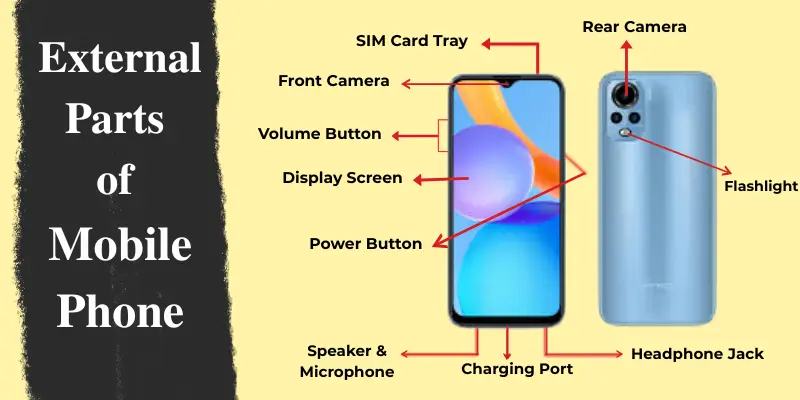
The external components of a mobile phone are the parts that users interact with daily. These parts include the screen, camera, buttons, and ports. Let’s go over each one:
1. Display Screen
The display screen is the main interface between you and your mobile phone. It shows everything from apps and messages to photos and videos. Modern smartphones use different screen technologies like LCD, LED, and AMOLED. Each type affects how bright, colorful, and power-efficient your phone’s display is. A high-quality screen improves your viewing and touch experience.
2. Camera
The camera on your mobile phone lets you capture photos and videos instantly. Most phones today feature multiple lenses, including wide, ultra-wide, and telephoto, but they mainly have two types of cameras:
- Rear Camera: Located on the back side of the phone, it’s used for regular photography and video recording. It often includes features like zoom, portrait mode, and high resolution for detailed shots.
- Front Camera (Selfie Camera): Found on the front screen area, usually at the top. It’s perfect for taking selfies and making video calls.
3. Microphone
The microphone in your mobile phone captures your voice during calls, recordings, or videos. It converts sound waves into digital signals so your voice can be heard clearly on the other end. Most modern smartphones come with multiple microphones to enhance sound quality.
- Primary Microphone: Located at the bottom of the phone, it’s mainly used for calls and voice recordings.
- Secondary Microphone: Usually found at the top or near the camera, it helps reduce background noise and improves audio clarity during calls or video recording.
These microphones work together to deliver clear, crisp, and noise-free audio in different environments.
4. Speakers
Speakers let you hear ringtones, alerts, music, videos, and call audio. They are usually located at the bottom, back, or top front of the phone, depending on the model. Many modern phones include stereo speakers for a richer and more immersive sound experience. The quality and placement of the speakers affect how clear and loud the audio sounds during calls or media playback.
5. Buttons
Buttons help you control different functions of your phone quickly. Most phones have two main types of buttons:
- Power Button: Usually found on the right side or top edge of the phone. It’s used to turn the device on or off or wake the screen.
- Volume Buttons: Located on the left or right side of the phone. They control audio levels and sometimes camera zoom.
Some phones also have an assistant button to activate voice assistants like Google Assistant or Siri.
6. Charging Port
The charging port is used to power up your phone and transfer data. It’s usually located at the bottom of the device. Most modern phones use a USB Type-C port, while some older models may have a Micro-USB port. iPhones use a Lightning port. This port allows you to charge your battery, connect to a computer, or attach accessories like USB drives and headphones (in some models).
7. Headphone Jack
The headphone jack allows you to connect wired earphones or external audio devices. Although many modern phones have removed the traditional 3.5mm jack, you can still connect headphones using Bluetooth or USB-C adapters.
8. SIM Card Tray
The SIM card tray holds your SIM card, which connects your phone to your mobile network for calls, texts, and data. It’s usually located on the side of the phone and can be opened using a SIM ejector tool or a small pin. Some phones also support dual SIM trays, allowing you to use two SIM cards at the same time.
9. Flashlight
The flashlight is located near the rear camera and helps in low-light conditions. It works as a camera flash for photos or a torchlight for everyday use. Many phones allow you to control the brightness of the flashlight directly from the quick settings menu.
Together, these external components make your mobile phone functional, interactive, and easy to use every day.
2. Internal Components of a Mobile Phone
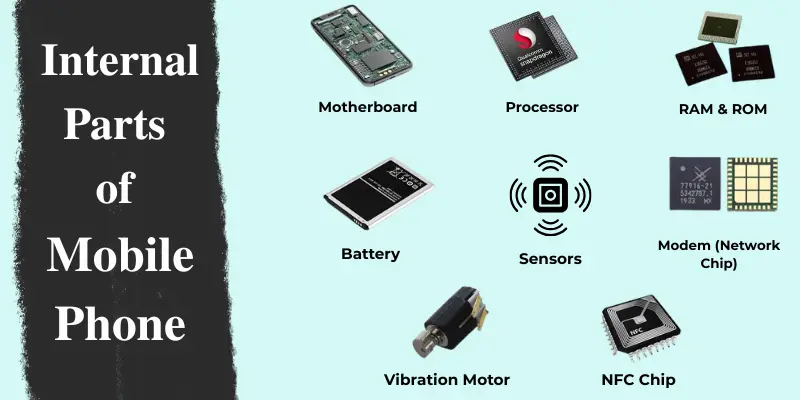
The internal components are the hidden parts inside your mobile phone that make everything work. These parts handle power, storage, processing, and communication. Let’s explore the main internal components and their functions.
1. Motherboard
The motherboard is the main circuit board and the heart of your phone. It connects all internal components, allowing them to communicate with each other. It contains key parts like the processor (CPU), memory, and power circuits, controlling the phone’s overall performance.
2. Processor (CPU)
The processor, also called the Central Processing Unit (CPU), is the brain of your mobile phone. It handles all the instructions and tasks, from opening apps to running games. A faster processor means smoother performance and better multitasking. Common processors include Qualcomm Snapdragon, Apple Bionic, and MediaTek.
3. Memory (RAM and ROM)
Memory refers to the components that store data and help your phone run smoothly. It plays a vital role in both performance and storage.
- RAM (Random Access Memory): Helps in multitasking and running apps smoothly. More RAM allows your phone to run more apps at the same time without slowing down.
- ROM (Read-Only Memory): This is the storage that holds your apps, photos, videos, and other files. Phones come with varying storage capacities, and many modern devices offer expandable storage through microSD cards.
4. Battery
The battery powers your phone’s internal and external components. Most smartphones use Lithium-ion (Li-ion) or Lithium Polymer (Li-Po) batteries. Internal battery performance affects how long your phone lasts on a single charge. Over time, battery capacity naturally decreases with frequent charging.
5. Sensors
Modern mobile phones are equipped with various sensors that make them smarter and more responsive:
- Accelerometer: Detects movement and orientation, allowing features like auto screen rotation.
- Gyroscope: Works with the accelerometer to provide precise motion sensing for gaming and AR applications.
- Proximity Sensor: Turns off the display when the phone is close to your face during calls to save power and prevent accidental touches.
- Fingerprint Sensor: Improves security and allows quick unlocking using your fingerprint.
- Face ID Sensor: Uses facial recognition technology to unlock the phone securely and verify your identity.
6. Modem (Network Chip)
The modem connects your phone to mobile networks like 4G, 5G, or Wi-Fi. It handles calls, messages, and internet data. A faster modem means better connectivity and faster download or upload speeds.
7. Antenna
The antenna is responsible for receiving and sending wireless signals. It helps your phone stay connected to the cellular network, Wi-Fi, Bluetooth, and GPS. Internal antennas are built into the phone frame and work quietly in the background.
8. Cooling System
High-performance phones often include a cooling system or thermal management setup. It helps prevent overheating during heavy tasks like gaming or video editing. Some phones use graphite sheets or liquid cooling technology to keep the device cool.
9. Vibration Motor
The vibration motor provides haptic feedback, such as gentle vibrations when typing or receiving notifications. It’s a small but essential part that enhances user experience and alerts you without sound.
10. NFC Chip (Near Field Communication)
The NFC chip allows you to make contactless payments and share data easily between devices.
Mobile Phone Parts Maintenance Tips
Taking good care of your mobile phone’s parts helps your device last longer and perform better. Here are some easy maintenance tips for both internal and external parts:
- Clean Regularly: Wipe your phone with a soft microfiber cloth. Avoid harsh chemicals and clean ports gently using a soft brush or air blower.
- Protect the Screen: Use a good screen protector to prevent scratches and cracks.
- Use a Quality Phone Case: A strong phone case protects both internal and external parts from damage during drops.
- Avoid Overheating: Keep your phone away from direct sunlight. Don’t use it while charging for long periods.
- Care for the Battery: Charge before it drops below 20%, unplug at 100%, and always use original chargers.
- Update Software: Regular software updates improve performance and protect phone components.
- Handle Ports and Buttons Gently: Insert cables carefully, press buttons lightly, and keep them clean and dust-free.
- Avoid Moisture: Keep your phone dry. If it gets wet, turn it off immediately and dry it properly before use.
- Manage Storage: Delete unused apps, photos, and files regularly. Use SD cards or cloud storage for extra space.
- Seek Professional Help: If you face issues like overheating, slow performance, or screen flickering, visit a certified technician.
Conclusion
Mobile phones are made up of various internal and external parts that work together for a smooth user experience. Understanding these parts of a mobile phone helps you make better decisions about maintenance, repairs, or upgrades. Whether you’re fixing a screen, upgrading the battery, or simply learning about your phone, knowing its parts is the first step.
Want to learn more? Check out our guides and expert tips on mobile repairs and upgrades!
Frequently Asked Questions (FAQs)
Here are the answers to some common questions about the different parts of a mobile phone :
A smartphone has several key parts that help it function. These include the display, where you see everything; the battery, which powers the phone; and the camera, for taking photos and videos. The processor handles all the tasks, while sensors help with features like screen rotation and touch response.
The battery in a mobile phone provides power to run all the phone’s features. Without it, your phone wouldn’t work unless plugged into a charger. It stores energy to keep the phone working when it is not connected to a power source.
A cell phone screen has three main parts: the display (LCD or OLED) that shows the image, a touch sensor that responds to your finger, and a protective glass (like Gorilla Glass) to prevent scratches and damage.
The internal parts of a mobile phone include the motherboard, processor (CPU), memory (RAM and ROM), battery, and sensors. These parts work together to ensure the phone runs smoothly and efficiently.


- Be Respectful
- Stay Relevant
- Stay Positive
- True Feedback
- Encourage Discussion
- Avoid Spamming
- No Fake News
- Don't Copy-Paste
- No Personal Attacks
- Be Respectful
- Stay Relevant
- Stay Positive
- True Feedback
- Encourage Discussion
- Avoid Spamming
- No Fake News
- Don't Copy-Paste
- No Personal Attacks
